SaeboStim Pro
Select and Start a Program
Step 2
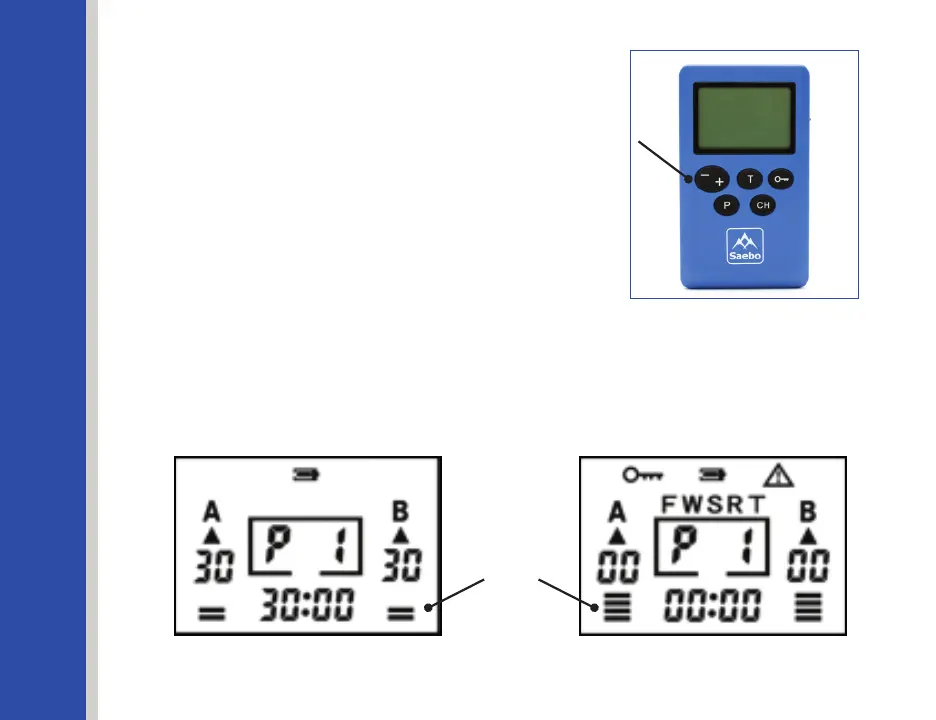
Once the program is selected, and while
ChannelAiconisstillashing,pressIntensity
Keys (-/+) to adjust the intensity to the
desired level in Channel A. Pressing (+) button
during treatment increases the intensity level
by a factor of one for that channel. Pressing
(-) button during treatment decreases the
intensity level by a factor of one. See Figure
Figure 18: Intensity Bar Increasing
Figure 17: Intensity Bar Decreasing
Figure 16
Intensity Key
The user can feel the stimulation when he or she increases or decreases the
intensity level. The Intensity Bar will increase and decrease corresponding to the
contraction and relaxation cycle on each Channel.
See Figures 17 & 18.
Intensity Bars
30


 To Next Page