21
English
To set this option follow the procedure described in chapter “7.5
Changing and saving parameters”.
If “YES” is selected, two start up and shutdown time bands (ON1/
OFF1, ON2/OFF2) are required.
To program days and times follow the procedure as per the “FREE
VEND –TIME RANGE” item.
Once the parameters have been set and confirmed, it’s necessary
to exit the programming function.
This function allows the exit from the programming function at any
time.
It’s on the same level of the five main menu items, and its visualiza-
tion requires to:
- Press the D key, the fourth from top on model D.A. 5P (ref. 3,
fig. 6) until the items from the first level are displayed.
One of the five main menu items appears.
In model D.A. 3P scroll the settings first and than the functions
with the “UP” and “DOWN” keys, until one of the five main
programming menu items appears.
- Use the “UP” and “DOWN” keys to scroll them and display
the function to exit programming.
- Press “ENTER”.
A cursor flashes under the letter “…/N”.
- If it is not desired to exit programming it’s necessary to press
the “ENTER” key. The same item will be displayed but without
the flashing cursor, and it will be possible to scroll 1
st
level
functions.
If instead the intention is to exit, it’s necessary to use the “UP”
and “DOWN” keys to get the cursor to appear under the letter
“…Y…”, then press “ENTER”.
The display will show the text set in function “TEXT STAND-BY”.
Important
The vending machine keeps the programmed parameters in
memory even during power failure.
- The application of a discount automatically causes the open-
ing of a following level.
From this level it’s possible to set two time bands (ON1/ OFF1,
ON2/OFF2), which determine the times in which the discount should
be applied.
To program days and times follow the procedure as per the “FREE
VEND – TIME RANGE” item.
This function allows the setting of a rise on the drink price, to be
applied within one week in two different time bands.
The lower line shows the increase to be applied.
To set this option follow the procedure described in chapter “7.5
Changing and saving parameters”.
Important
Discounts are settable with values varying from 10 to the low-
est drink price, with 10-by-10 steps
Applying a price rise automatically causes the opening of a fol-
lowing level.
From this level it’s possible to set two time bands (ON1/ OFF1,
ON2/OFF2), which determine the times in which the price rises
should be applied.
To program days and times follow the procedure as per the “FREE
VEND – TIME RANGE” item.
This function allows the setting of two time bands within a week,
during which the machine performs automatic mixer cleaning in
sequence.
Press “ENTER” to set this option.
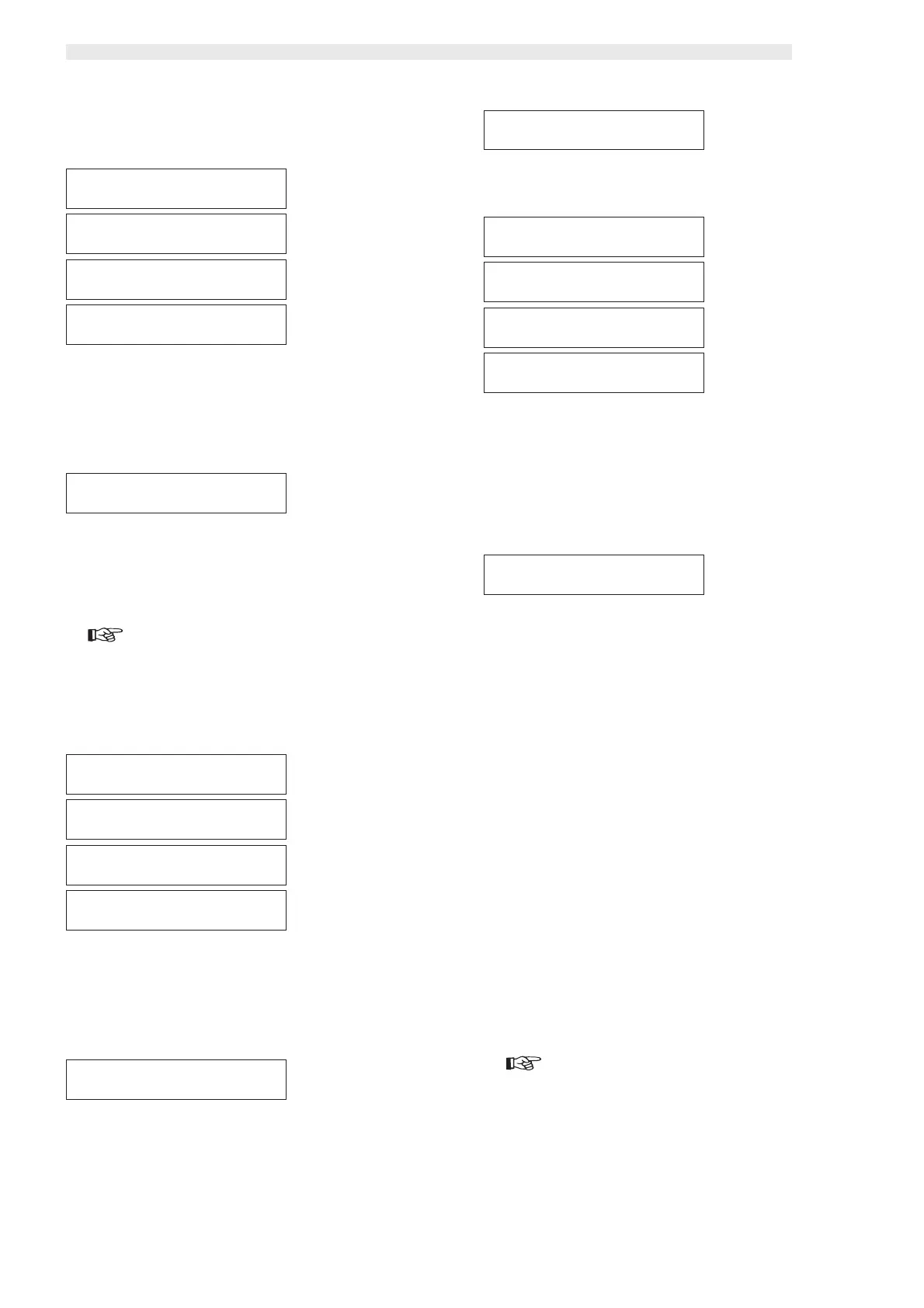
INCREASEINCREASE
INCREASEINCREASE
INCREASE
00000000
00000000
0000
INCREASE OFF1INCREASE OFF1
INCREASE OFF1INCREASE OFF1
INCREASE OFF1
mtwtfssmtwtfss
mtwtfssmtwtfss
mtwtfss
00:00 00:00
00:00 00:00
00:00
INCREASE ON1INCREASE ON1
INCREASE ON1INCREASE ON1
INCREASE ON1
mtwtfssmtwtfss
mtwtfssmtwtfss
mtwtfss
00:00 00:00
00:00 00:00
00:00
INCREASE OFF2INCREASE OFF2
INCREASE OFF2INCREASE OFF2
INCREASE OFF2
mtwtfssmtwtfss
mtwtfssmtwtfss
mtwtfss
00:00 00:00
00:00 00:00
00:00
INCREASE ON2INCREASE ON2
INCREASE ON2INCREASE ON2
INCREASE ON2
mtwtfssmtwtfss
mtwtfssmtwtfss
mtwtfss
00:00 00:00
00:00 00:00
00:00
RINSING TIMERINSING TIME
RINSING TIMERINSING TIME
RINSING TIME
YESYES
YESYES
YES
DISCOUNT OFF1DISCOUNT OFF1
DISCOUNT OFF1DISCOUNT OFF1
DISCOUNT OFF1
mtwtfssmtwtfss
mtwtfssmtwtfss
mtwtfss
00:00 00:00
00:00 00:00
00:00
DISCOUNT ON1DISCOUNT ON1
DISCOUNT ON1DISCOUNT ON1
DISCOUNT ON1
mtwtfssmtwtfss
mtwtfssmtwtfss
mtwtfss
00:00 00:00
00:00 00:00
00:00
DISCOUNT OFF2DISCOUNT OFF2
DISCOUNT OFF2DISCOUNT OFF2
DISCOUNT OFF2
mtwtfssmtwtfss
mtwtfssmtwtfss
mtwtfss
00:00 00:00
00:00 00:00
00:00
DISCOUNT ON2DISCOUNT ON2
DISCOUNT ON2DISCOUNT ON2
DISCOUNT ON2
mtwtfssmtwtfss
mtwtfssmtwtfss
mtwtfss
00:00 00:00
00:00 00:00
00:00
EXITEXIT
EXITEXIT
EXIT
PROGRAM Y/NPROGRAM Y/N
PROGRAM Y/NPROGRAM Y/N
PROGRAM Y/N
RINSING OFF1RINSING OFF1
RINSING OFF1RINSING OFF1
RINSING OFF1
mtwtfssmtwtfss
mtwtfssmtwtfss
mtwtfss
00:00 00:00
00:00 00:00
00:00
RINSING ON1RINSING ON1
RINSING ON1RINSING ON1
RINSING ON1
mtwtfssmtwtfss
mtwtfssmtwtfss
mtwtfss
00:00 00:00
00:00 00:00
00:00
RINSING OFF2RINSING OFF2
RINSING OFF2RINSING OFF2
RINSING OFF2
mtwtfssmtwtfss
mtwtfssmtwtfss
mtwtfss
00:00 00:00
00:00 00:00
00:00
RINSING ON2RINSING ON2
RINSING ON2RINSING ON2
RINSING ON2
mtwtfssmtwtfss
mtwtfssmtwtfss
mtwtfss
00:00 00:00
00:00 00:00
00:00
RINSING TIMERINSING TIME
RINSING TIMERINSING TIME
RINSING TIME
->Y<- N->Y<- N
->Y<- N->Y<- N
->Y<- N







 To Next Page