English
26
8
8PROGRAMMING AND MAINTENANCE MENU
8
Thissectionillustrateshow
tosetupormodifythe
vendingmachine
programmingand
maintenance settings.
8
Thereforeitisnecessaryto
carefullyreaditandto
understandtheexact
sequenceofoperations
before performing them.
8
8.1Key description of
programming and
maintenance phases
8
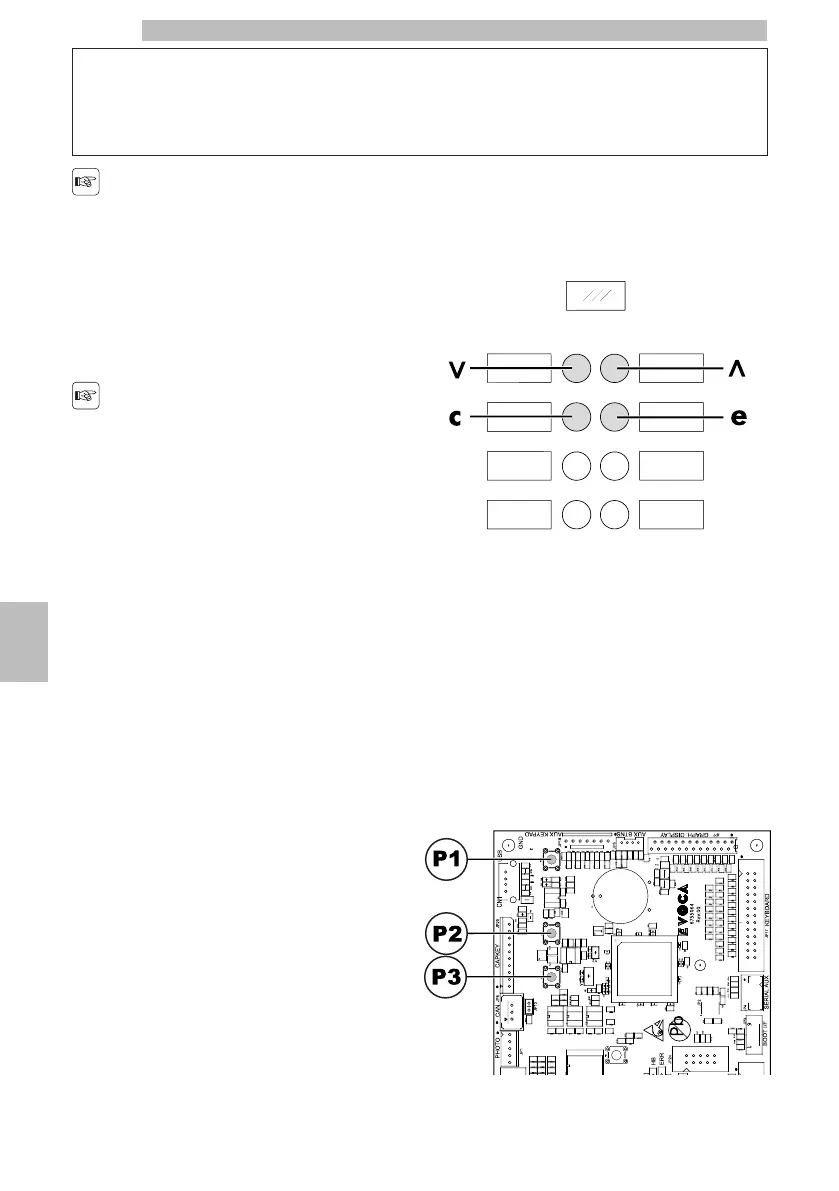
Toscrollthroughthevendingmachinemenu,thekeys
described below are used.
8
"e" Key: ENTER
8
By pressingthiskeyit ispossibleto enterthefollowing
programmingormaintenancelevel.Itisalsopossible
tomodifyorconfirmthevaluessetintheentriesof
the programming or maintenance menus.
8
"c" Key: CANCEL
8
Bypressingthiskeyitispossibletogobacktothe
previousleveloftheprogrammingormaintenance
menu.Itisalsopossibletoavoidstoringthepreviously
modified values.
8
"v" Key: DOWN
8
Pressingthiskeyitispossibletoaccesstheprevious
entryinsidethesamelevel.Ifusedafterasetting
modificationrequest,thevalueofthissetting
decreases.
88
"^" Key: UP
8
Bypressingthiskeyitispossibletoaccessthenext
entryinsidethesamelevel.Ifusedafterrequestingthe
change of a setting, the value of this setting increases.
888
8.2Programming Menu
8
Thestructureoftheprogrammingmenuisindicatedin
section "Structure of the Programming Menu".
88
Thesection"DescriptionofMessagesinthe
ProgrammingMenu"describesalltheitemsinthe
programming menu.
8
8.2.1Access to the Programming
Menu
8
Openthedoor,disablethesafetydevice(seesection
"SafetyDevices")andpresstheP1keytoenterthe
programming menu.
88888







 To Next Page