English
61
10
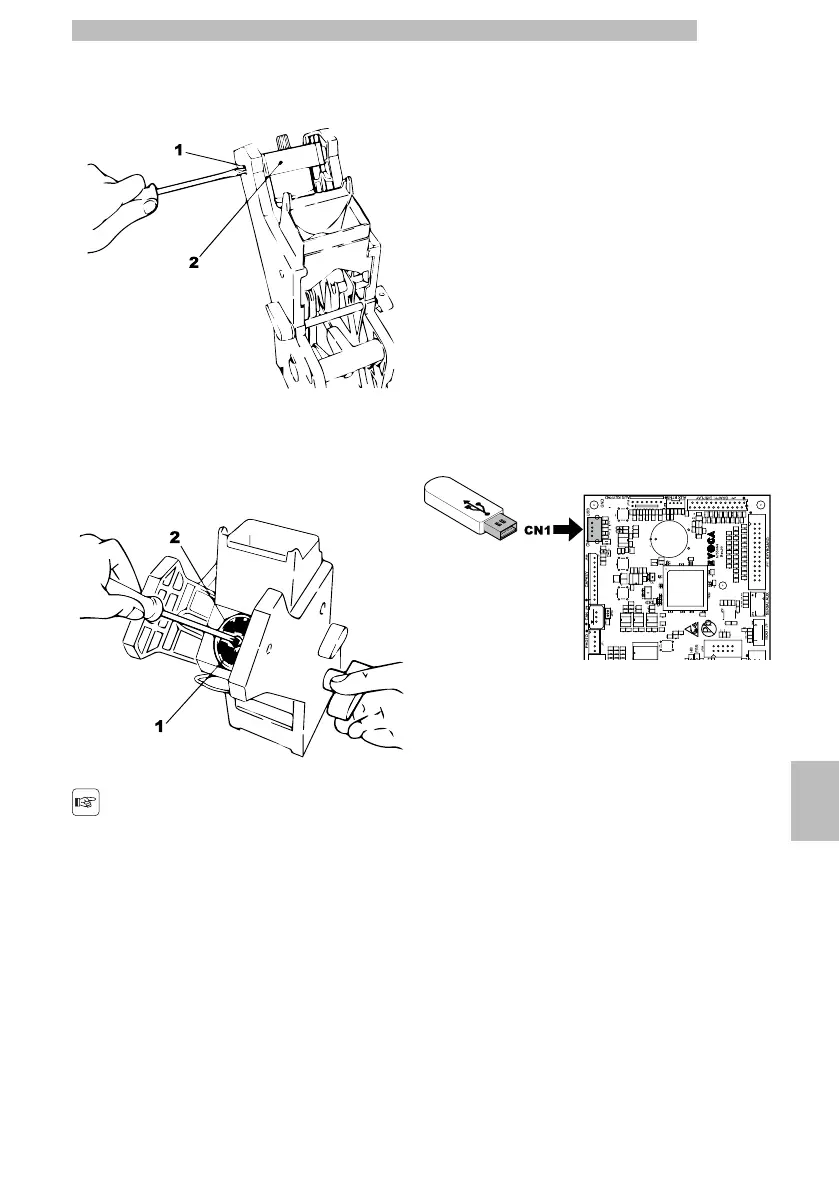
Lower filter:
10
•
unscrewthetwosidescrews(1)andremovethe
upper piston stop (2)
10101010
•
manuallyrotateusingthekey(notsupplied)untilthe
lower filter is flush with the cup
10
•
unscrew screw (1) and replace filter (2)
10
•
reassemble all the parts following the reverse order.
10101010
Carefullyblottheupper
andlowerfilterandblow
with compressed air.
10
10.4Software update
10
The vending machinemanagement programis storedin
the flash memory inside the CPU board.
1010
The software update can be performed by using:
1010
•
a USB key (Pen Drive);
10
•
a file containing the new software to be loaded.
1010
Update procedure:
1010
•
copythefilereceivedforupdate"XXXXX.prg"
(whereXXXXXistheversionnumber)ontoaUSB
key* (the file should be stored on the device root);
1010
•
switch off the vending machine;
1010
•
insert the USB key into the CN1 connector;
101010101010
•
Switch on the vending machine;
1010
•
TheCPUrecognisestheUSBstickandsearchesfor
the filewiththesoftwaretobeloaded.Thesoftware
loadingbarwiththecompletionpercentageis
shown on the display;
1010
•
Intheeventofanerror,anerrormessageappears
on the display.
1010
•
TheUSBstickshouldberemovedwhenloadingis
complete, as indicated on the display.
1010
*All common USBkeys used onPCs are suitable.Some
restrictions are:
1010
•
thedevicehastobeFAT12,FAT16orFAT32
formatted
1010







 To Next Page