13
ENGLISH
13
Yellow
2
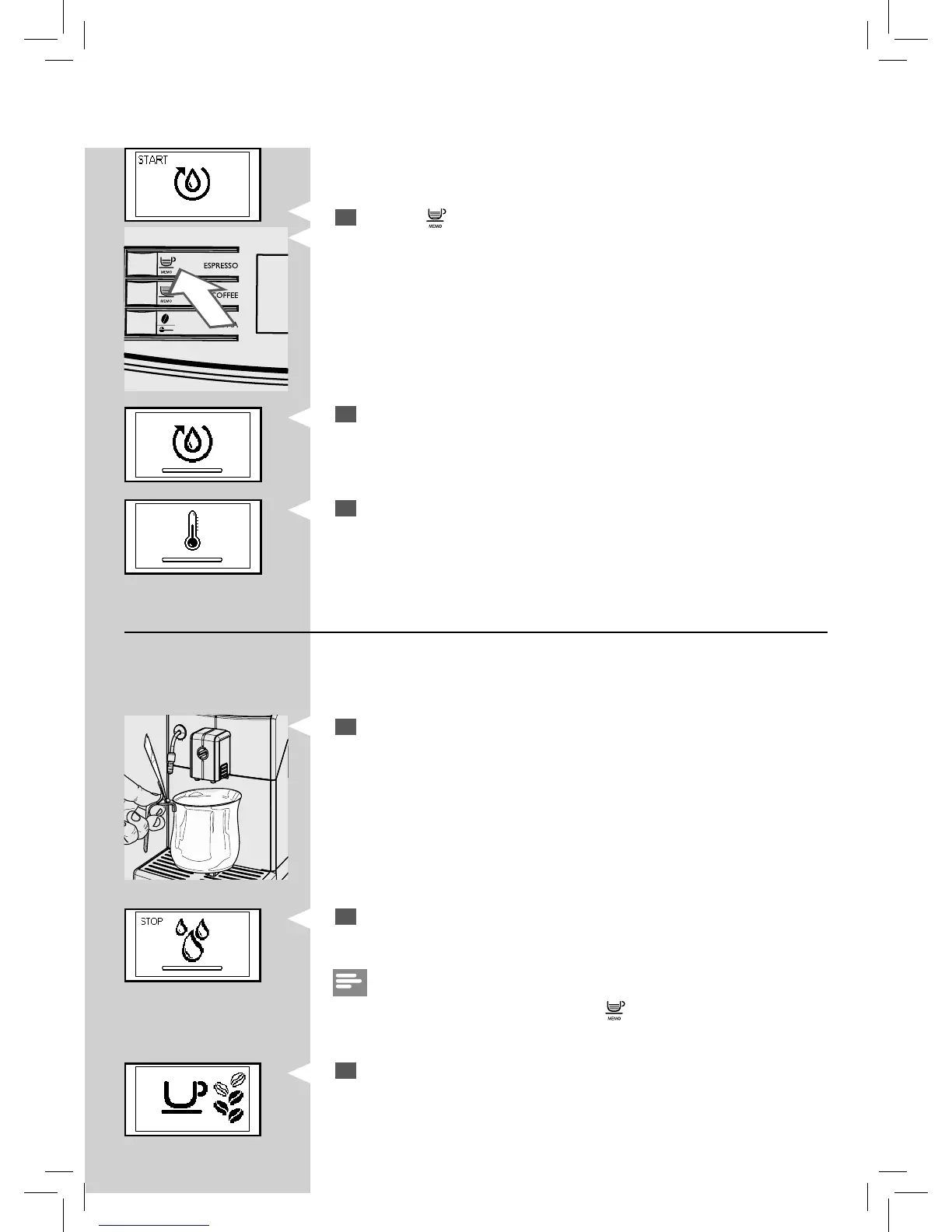
Press the “ ” button to start the cycle. The machine starts the automa-
tic priming of the circuit by dispensing some water through the steam
wand.
Yellow
3
The bar under the icon shows the operation progress. When the pro-
cess is complete, the machine stops dispensing automatically.
Yellow
4
Then the control panel shows the machine warm-up icon.
Automatic rinse/self- cleaning cycle
When warm-up is complete, the machine automatically performs a rinse/
self-cleaning cycle of the internal circuit with fresh water. This takes less
than a minute.
5
Place a container under the dispensing spout to catch the small
amount of water which will be dispensed.
6
The machine shows this display. Wait for the cycle to nish automati-
cally.
Note:
You can stop dispensing by pressing the “
” button.
YellowGreen
7
When the above steps have been completed, the machine shows this
display.
You can now proceed with the manual rinse cycle.






 To Next Page