21
ENGLISH
21
1
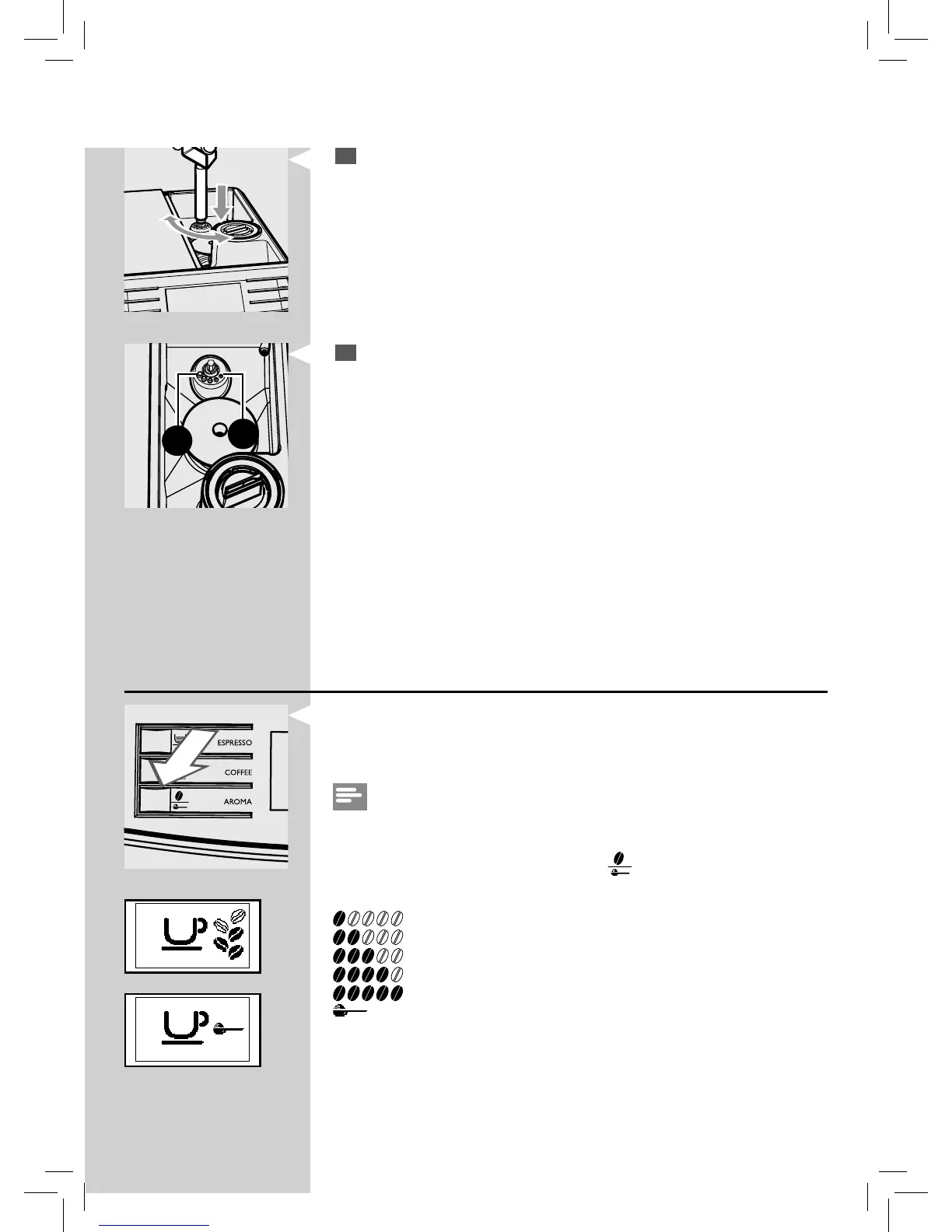
Press and turn the grinder adjustment knob one notch at a time. You
will taste the di erence after brewing 2-3 cups of co ee.
1
2
2
The reference marks inside the co ee bean hopper indicate the grind
setting. There are 5 di erent grind settings to choose from position
1 for coarse grind - lighther taste to position 2 for ne grind - bolder
taste
When you adjust the ceramic co ee grinder to a ner setting, your co ee
will taste stronger. For a milder co ee taste, adjust the ceramic co ee
grinder to a coarser setting.
Adjusting the aroma (co ee strength)
Choose your favorite co ee blend and adjust the amount of co ee to be
grounded until they meet your personal taste. You can also select the pre-
ground co ee function.
Note:
Selection must be made prior to selecting co ee.
Five choices are possible by pressing the “
” button. Each time the
button is pressed, the aroma changes by one degree, according to the
selected amount:
= Extra Mild aroma
= Mild aroma
= Medium aroma
= Strong aroma
= Extra Strong aroma
= pre-ground co ee
GreenGreen






 To Next Page