23
ENGLISH
23
Adjusting the co ee lenght
The machine allows you to adjust the amount of brewed co ee according
to your taste and the size of your cups.
Each time the “
” or “ ” button is pressed, the machine brews a pre-set
amount of co ee. Each button may be individually programmed for a
speci c brew setting.
The following procedure describes the programming of the “
” button.
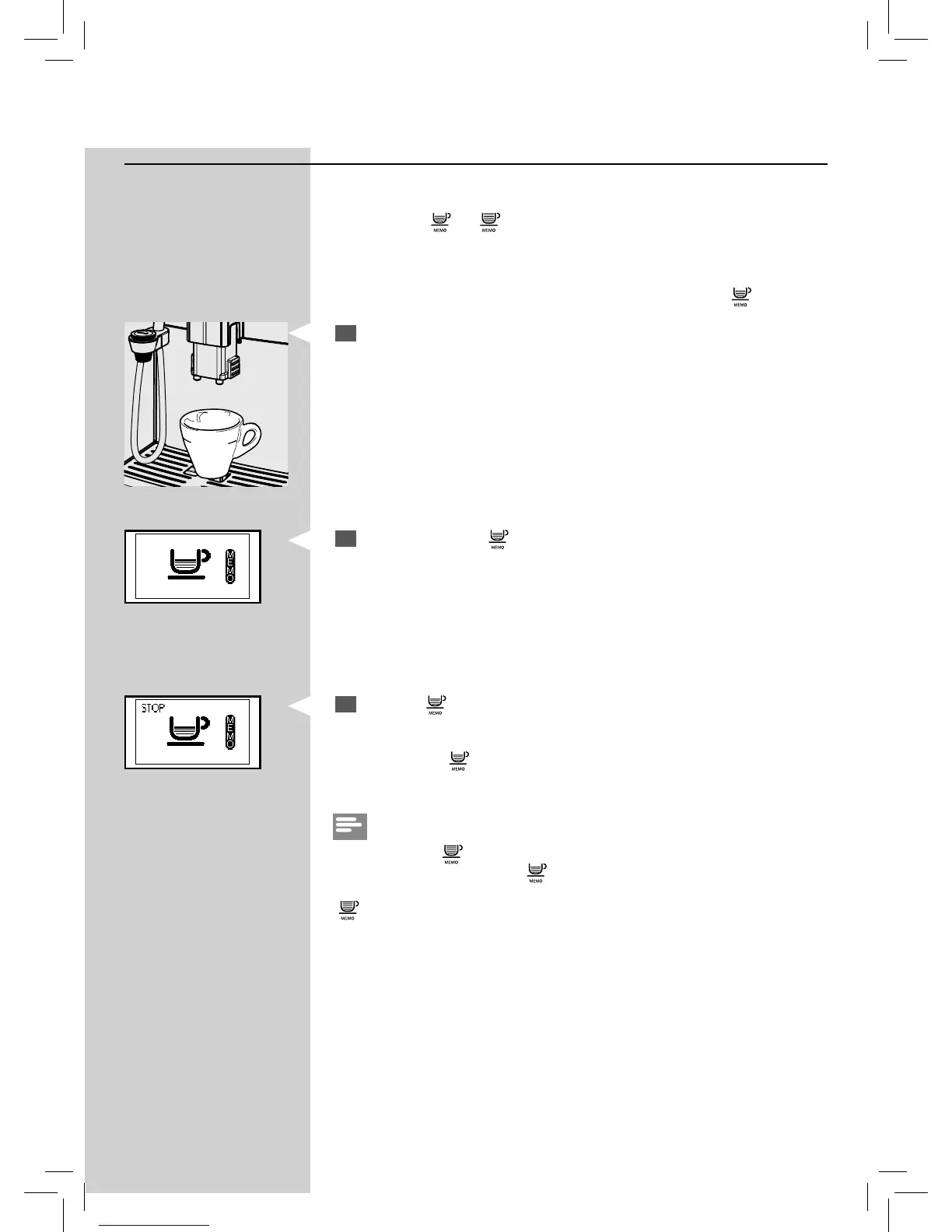
1
Place a cup under the dispensing spout.
Green
2
Press and hold the “ ” button until the “MEMO” icon is displayed.
Then release the button. The machine is now programming.
The machine starts brewing co ee.
3
Press the “ ” button as soon as the desired amount of co ee is rea-
ched.
Now the button “
” is programmed; each time it is pressed, the machine
will brew the same amount of espresso that was just programmed.
Note:
To program the “
” button, the same steps should be followed.
You should always using the “
” button to stop brewing co ee when the
desired amount of co ee is reached, even when you are programming the
“
” button.
Green






 To Next Page