13
CONTROL PANEL - TABLEAU DE COMMANDE
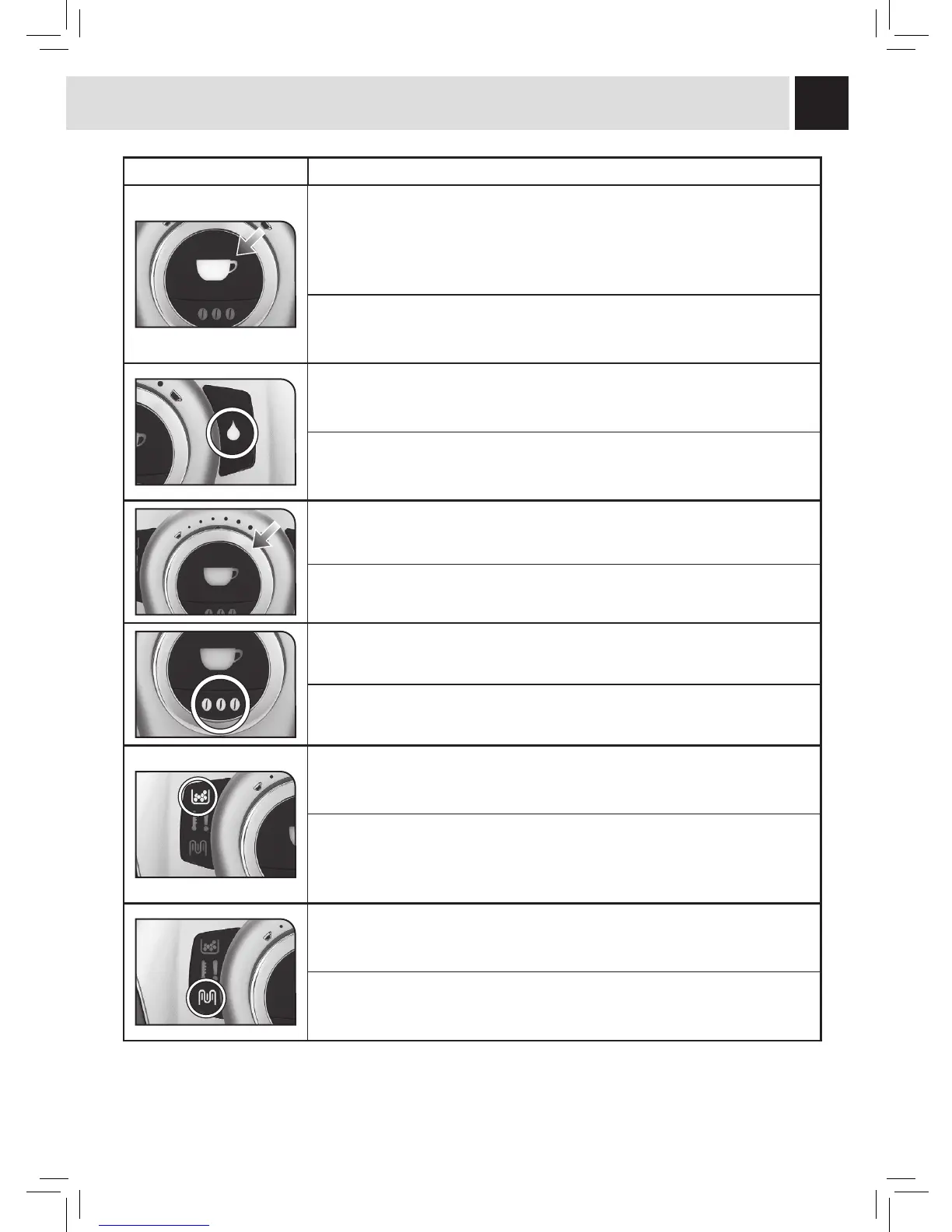
LED Light - Touche / DEL Description - Description
Coffee button:
• slowly fl ashing: 1 coffee has been selected (the button has been pushed
once).
• quickly fl ashing: 2 coffees have been selected (the button has been pushed
twice).
Bouton de distribution du café :
• clignotement lent : 1 café sélectionné (touche appuyée une fois).
• clignotement rapide : 2 cafés sélectionnés (touche appuyée deux fois).
Hot water button:
• off: steam function is selected
• on: hot water function is selected
Bouton de distribution d’eau chaude:
• éteint : la machine distribue de la vapeur
• allumé : la machine distribue de l’eau chaude.
Coffee volume knob (see page 17).
Bouton pour régler la quantité du café en tasse (voir page 17).
Aroma Opti-Dose Button: adjusts the coffee dose per cup (see page 15).
Bouton de la quantité de café moulu (Opti-dose) (voir page 15).
Dregdrawer indicator light:
• permanently on: signals the need to empty the dregdrawer; this operation
must be performed when the machine is turned on (steps 1 and 2, page 30).
DEL (diode lumineuse) alarme vider le marc :
• allumée de manière fi xe : signale le besoin de vider les marcs ; cette
opération doit être effectuée quand la machine est allumée (Points 1 et 2
page 30).
Descaling light:
• on and fl ashing: signals the need to perform a descaling cycle
(see page 22).
DEL (diode lumineuse) détartrage :
• allumée clignotante : signale la nécessité d’exécuter le cycle de détartrage
(voir page 22).






 To Next Page