English
23
6
6DESCRIPTION OF CONTROLS
6
6.1Power button
6
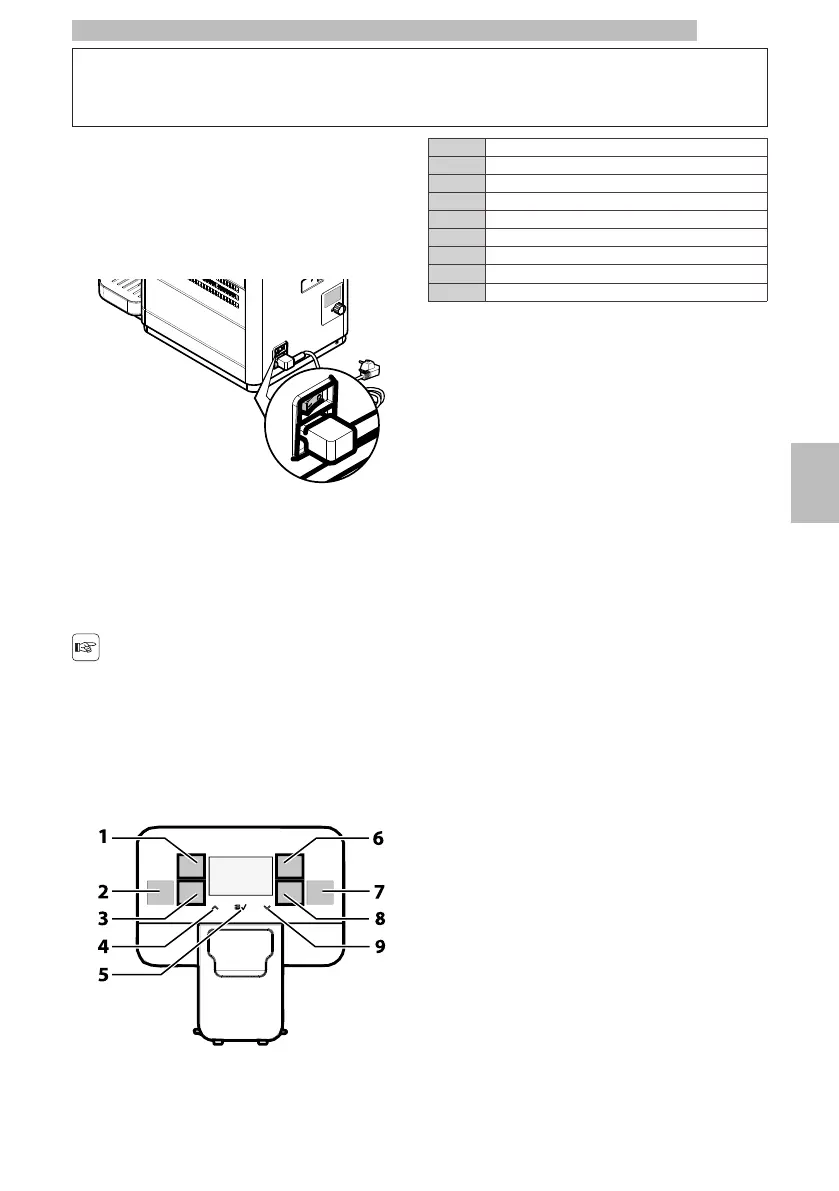
Itislocatedinthelowerleftpartintherearofthe
machine.If settothe"I"positionthemachineturnson
(electricalfunctionsenabled).Ifsettothe"O"position
the machine turns off (electrical functions disabled).
6666
6.2Display
6
Thedisplayshowsthemessagesduringnormal
operationandduringtheprogrammingand
maintenance phase.
6
6.3Keypad
6
Thefunctionofeachkey
changesaccordingtothe
changeoftheappliance
phase(ordinarydispensing
or programming phase).
6666
1"Ristretto" button / "Espresso x2" button
2"Hot Water" button
3"Manual Milk" Button
4"Up" button
5"MENU/OK" button
6"Espresso" button
7"Americano" button
8"Coffee" button
9"Down" button
666
6.4Button Description during
Normal Operation
6
"Ristretto"
Button
(only
if
"STANDARD"
model
is
selected)
6
Pressthisbuttontostartbrewingastrongcoffee.
Pressthisbuttontwiceandconsecutivelytostart
brewing a "ristretto x2"
66
"Espresso
x2"
button
(only
if
"CHINA
ESPR
X2"
model
is
selected)
6
Pressthisbuttontostartbrewingan"espressox2"
coffee.
66
"Hot
Water"
button
6
Press this button to dispense hot water.
66
"Manual
Milk"
Button
6
Pressthisbuttontostartdispensingsteamfor
automatic or manual milk frothing.
66
"Up"
button
6
Press this button to scroll up the user menu options.
66
"MENU/OK"
button
6
Pressthisbuttontoaccesstheusermenu,which
allowsyoutoperformafewmachinewashingcycles
(brewgroup)andaccessthetech.menu.Once
enteredthemenu,thisbuttonallowsyoutoconfirm
the selected menu option.
6
Ifyouholddownabuttonforapprox.3secondsina
menu,youexitfromallscreensandreturntothe
"machine-ready" screen.
66
"Espresso"
button
6
Press thisbuttonto startbrewingan"espresso" coffee.
Startthebrewingofan"espressox2"bypressing
twice consecutively.
66







 To Next Page