English
36
8
8PROGRAMMING MENU
8
Thischaptercontains
instructionsonhowtoset
andchangethe
programmingparameters
of the appliance.
88
Thereforeitisnecessaryto
carefullyreaditandto
understandtheexact
sequenceofoperations
before performing them.
88
Alltheoperations
describedinthischapter
mustbeperformed
exclusivelybytheservice
provideroraspecialised
technician,whoshall
organisealltheoperating
stepsanduseonlysuitable
meanstoensurestrict
compliancewiththesafety
regulations in force.
88
Thespecialisedtechnicianortheserviceprovidercan
changesomeofthemachineoperatingparametersto
suit the needs of the users.
8
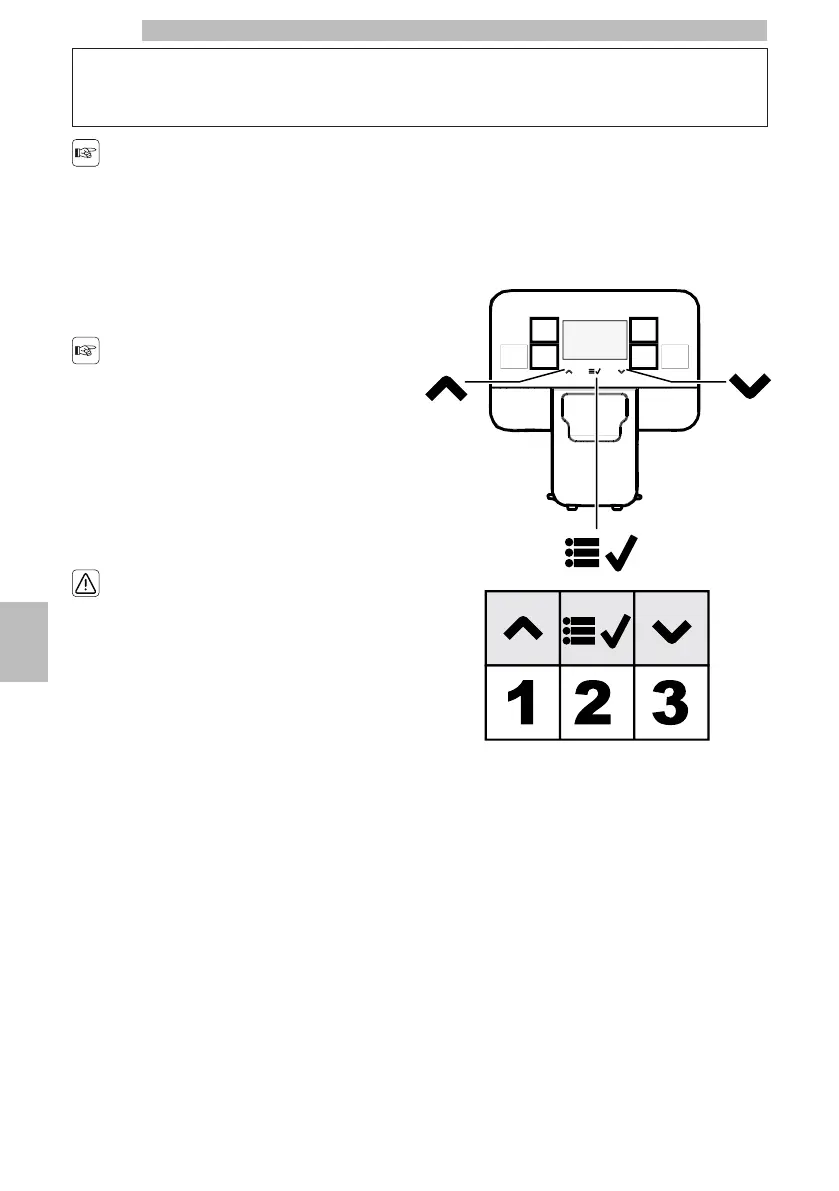
8.1Button Description in
Programming Mode
88
Usethebuttonsdescribedbelowtoscrollthe
appliance menus.
88888888
Button
1:
Up
8
This button allows the parameters to be changed when they are displayed.
8
(+) increases the value
88
Button
2:
OK
8
Itallowstoconfirmtheparameter/valueafterchanging
it.
88
Button
3:
Down
8
This button allows the parameters to be changed when they are displayed.
8
(-) decreases the value
88







 To Next Page