English
29
7
ASoft water
BHard water (standard)
CVery hard water.
777
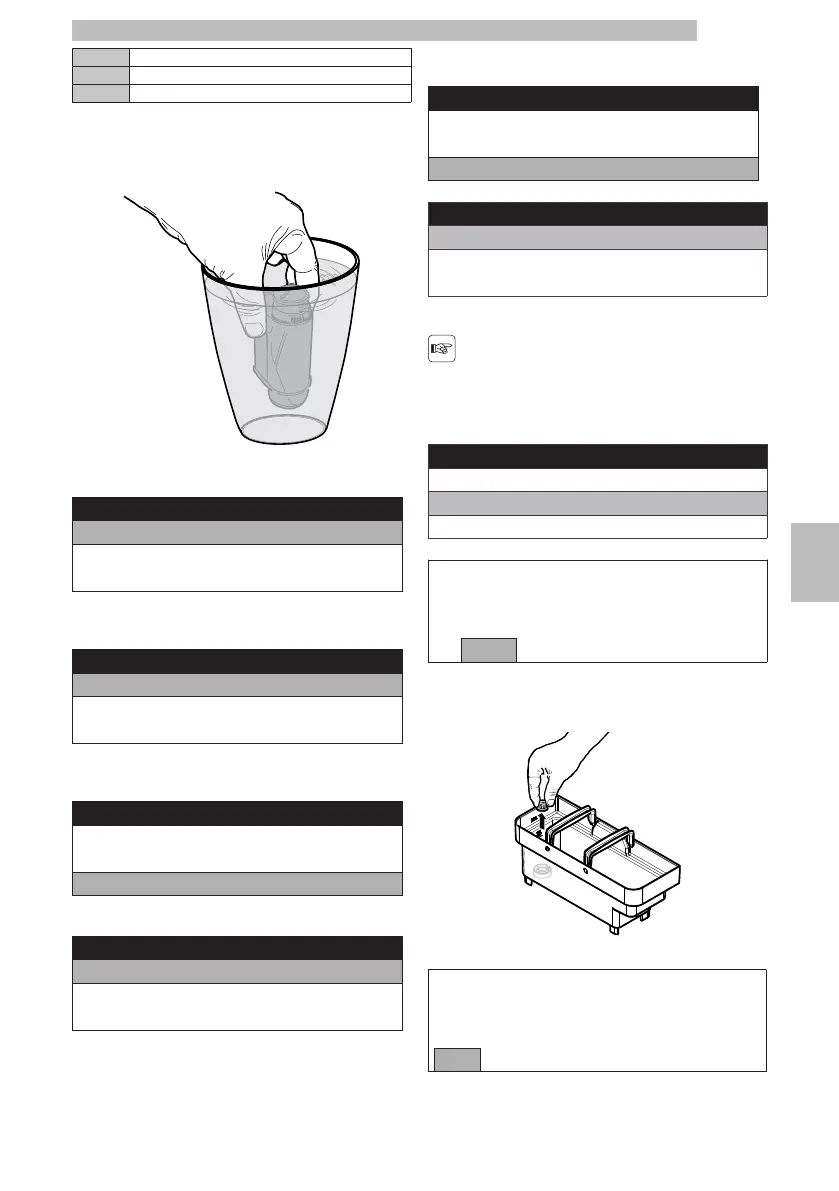
Immersethewaterfilterverticallyincoldwater(with
theopeningpositionedupwards)andgentlypressits
sides to let the air bubbles out.
7777
Switchtomachineprogrammingmodeasdescribedin
section "Access to the Technical Menu".
77
Tech Menu
Settings
Statistics
Exit
777
Selectthe"SETTINGS"optionandpressthe"OK"
button.
77
Settings
Credits Menu
BEVERAGE SETTINGS
Machine Menu
777
Toselectthe"MACHINEMENU"option,pressthe
"DOWN" button.
77
Settings
Credits Menu
BEVERAGE SETTINGS
Machine Menu
777
Press the "OK" button to enter.
77
Machine Menu
General Menu
Display Menu
Water Menu
777
Pressthe"DOWN"buttonuntilthe"WATERMENU"
option is selected.
77
Machine Menu
General Menu
Display Menu
Water Menu
77
Press the "OK" button to enter.
77
Water Menu
Hardness
FILTER (0/8)
Water Net
77
Pressthe"DOWN"buttonuntilyouselectthe
"FILTER (0/8)" option.
7
Thismodecannotbe
activatedifthewater
mains mode is enabled.
77
Water Menu
Hardness
FILTER (0/8)
Water Net
77
Press the "OK" button.
77
ACTIVATE
FILTER?
yesno
77
Remove the tank from the machine and empty it.
7
Removethesmallwhitefilterfromthetankandstore
it in a dry place sheltered from dust.
7777
Select "YES" and press the "OK" button.
77
INSERT FILTER
FILL WATER TANK
OKExit
777







 To Next Page