English
68
10
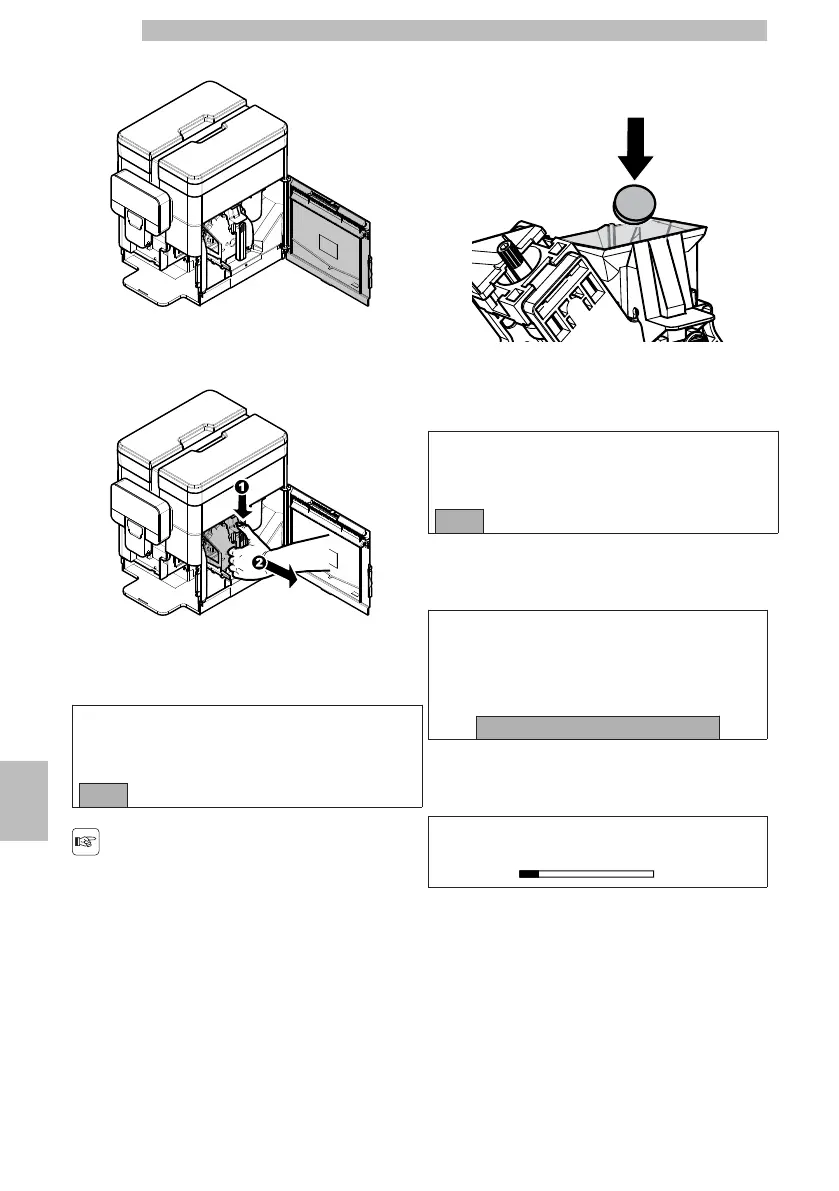
Open the service door.
1010101010
Remove thebrewgroupbypullingitbythehandleand
pressing the «PRESS» button.
1010101010
Pressthe"OK"buttontoconfirmtheremovalofthe
brew group.
101010
INSERT TABLET
Brew Group Clean
OKExit
101010
Ifthisoptionisconfirmed,
thecyclemustbe
completed.Select"EXIT"
to exit.
1010
Placethecleaningtabletinthebrewgroupandrefitthe
group inthemachine,makingsurethatallthecomponents
have been inserted and that the door is closed.
1010101010
Afterplacingthetabletinthebrewgroup,pressthe
"OK" button to confirm.
101010
PUT BACK THE GROUP
IN THE MACHINE
OKExit
101010
Putthebrewgroupbackintothemachineandpress
the "OK" button to confirm.
101010
PLACE A CONTAINER
UNDER ALL THE
SPOUTS
OK
101010
Placeacontainerunderthespouts(hotwaterand
coffee) and press the "OK" button to confirm.
101010
Brew Group Clean
101010
The machine completes the cycle automatically.
1010







 To Next Page