14
TROUBLESHOOTING
PROBLEM POSSIBLE CAUSES WHAT TO DO
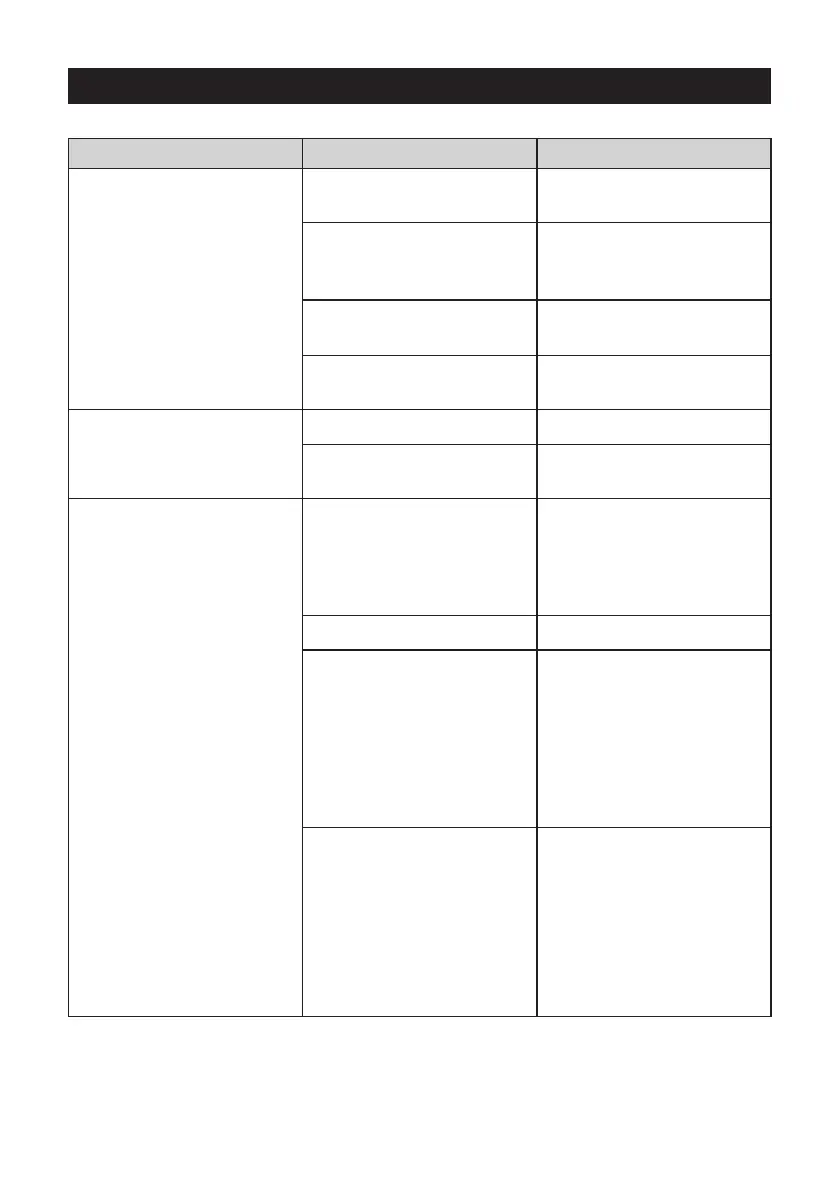
Coee drips from the
portalter spouts
The water tank is empty
or low
Fill the water tank.
Coee grind is too ne Ensure you use a suitable
espresso grind. Refer to
‘Extraction Guide’ on page 8.
Too much coee in basket Refer to ‘Coee Dose &
Tamping’ on page 7.
Machine is blocked by
mineral deposits
Decalcify the machine. Refer
to ‘Descaling’ on page 10.
Machine is making a loud
and continuous pumping
noise
Water tank is empty Fill the water tank.
Water tank is not securely
in place
Push water tank down
completely to lock into place.
No steam is generated
Machine is not turned on Ensure the machine is
plugged in, switched On
at the power outlet and
the POWER button
is pressed.
Water tank is empty Fill the water tank.
Control Dial not in ‘Steam’
position
Turn the Control Dial to the
‘Steam’ position. Use the
‘SELECT’ button to toggle
to ‘Steam’.
Ensure the ‘Steam’ LED is
illuminated for steam and the
‘Hot Water’ LED is illuminated
for hot water.
Steam Wand is blocked Use the pin on the cleaning
tool to clear the opening. If
the steam wand continues
to be blocked remove the
tip of the steam wand using
the spanner in the middle of
the cleaning tool. Refer to
‘Cleaning the Steam Wand’
on page 11.




 To Next Page