71
ITALIANO
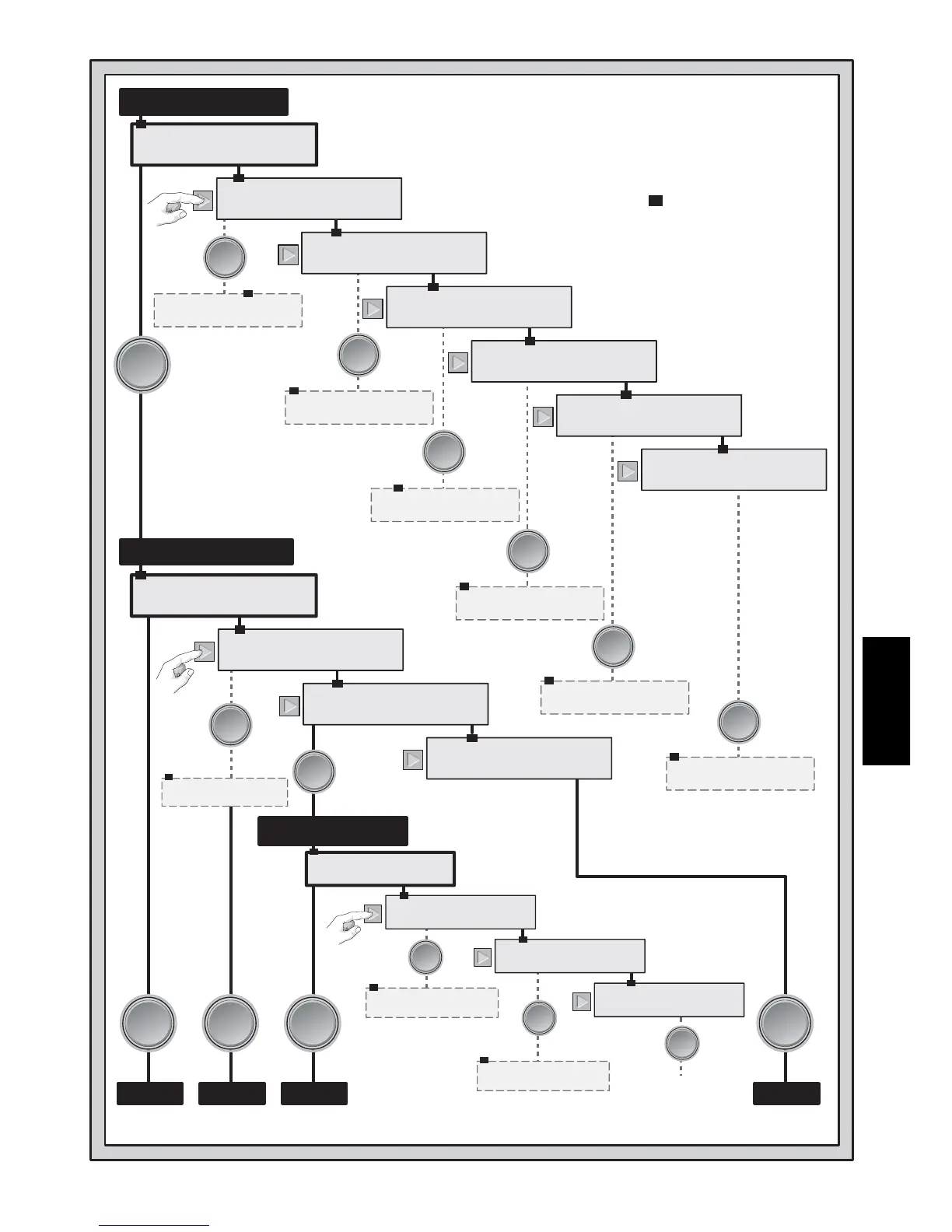
PGSIBLR
Play
PGSIBLR
Reset`score
PGSIBLR
Language
PGSIBLR
Bidding`systems
PGSIBLR
BL`Intensity
PGSIBLR
Sound`on/off
PGSIBLR
Game`level
RNES```Play
Random`deal
RNES```Play
By`deal`no.
RNES```Play
After`edit
RNES```Play
Same`deal
PEDR```deal
Edit`a`deal
PEDR```deal
Change`D/V
PEDR```deal
Rotate`hands
123456789TP
Team`of`four
yn`Sound
Sound`on
[[[
BL`Intensity
5AfF
NS:`5th major
EF`Language
English
yn`Scores
yes`Resets
0123456789
deal`No:
PEDR```deal
Play`this`deal
AKQJº987654
S£
WNES```-NEB
D:E````V:NS
Enter
Enter
Enter
Enter
Enter
Enter
Enter
Enter
Enter
Enter
Enter
Enter
Enter
Enter
Enter
Enter
Enter
Enter
Enter
Enter
Enter
Enter
Enter
Enter
Enter
Enter
Enter
Enter
Enter
Enter
Enter
Enter
GIOCOGIOCOGIOCO GIOCO
STESSA
MANO
MANO
CASUALE
MANO
NUMERATA
MANO
MODIFICATA
IL SISTEMA DEL MENU IN
UN COLPO D’OCCHIO!
(le mani sono ruotate)
Note:
• = l’opzione corrente
(lampeggiante) al primo avvio.
Se si cambiano le opzioni, la
selezione corrente lampeggia.
• Display a trattini = ulteriori
opzioni. Usare i tasti cursore
e/o ENTER per selezionare
e continuare a giocare.
Consultare il manuale per
maggiori dettagli.
MENU PRINCIPALE
MENU DELLA MANO
MENU MODIFICA




 To Next Page