EasyManua.ls Logo

Saitek Pro Bridge 310 - User Manual

Saitek Pro Bridge 310
18 pages
Print Icon
To Next Page IconTo Next Page
Loading...
ENGLISH
1
TABLE OF CONTENTS
Screen, keys and features
1. Introduction
2. Getting Started
Playing your first game
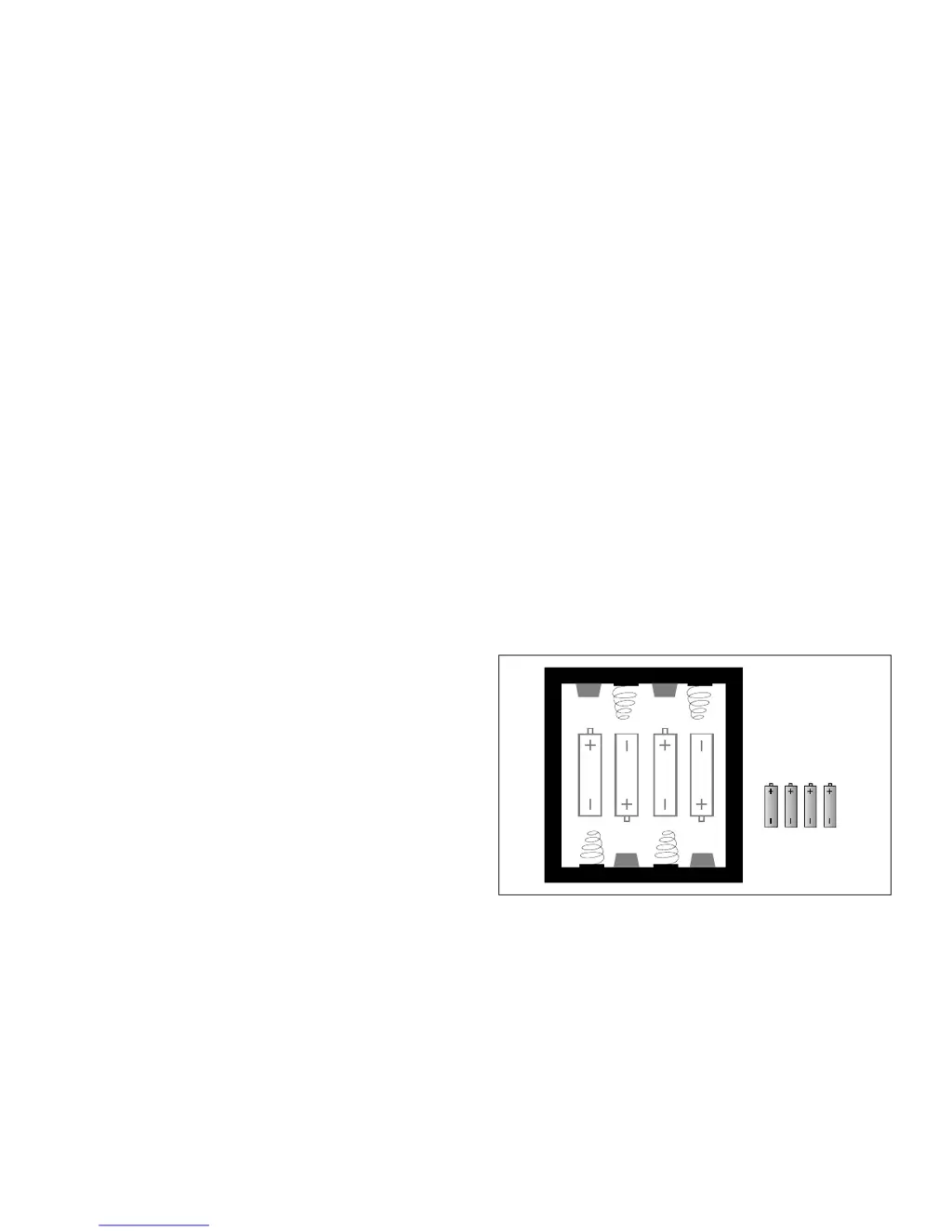
2.1 Installing the batteries
2.2 Dealing
2.3 Bidding
2.4 Playing the hand
2.5 The result
3. Other features
3.1 Changing the bidding system
3.2 Hint
3.3 View Information
3.4 Claim
3.5 Replay hand
3.6 Redeal
3.7 View Hands
3.8 Numbered deals
3.9 Score
4. The Link to Pro Bridge 510
4.1 What it does
4.2 Connecting
4.3 Disconnecting the Link
5. Technical Details
6. Troubleshooting Guide
APPENDIX
– Bidding System
– Scoring
AAA/AM4/RO3
Mini penlite

Questions and Answers

Summary

Introduction

Getting Started

2.1 Installing the batteries

Instructions for inserting the 4 mini-penlite alkaline batteries required to power the device.

2.2 Dealing

Details on how the Pro Bridge 310 deals hands and displays them on the LCD screen.

2.3 Bidding

Explains the bidding process, including when it's South's turn and how to input bids.

2.4 Playing the hand

Guidance on playing the hand after bidding, including card play and computer player actions.

2.5 The result

How the game's result is displayed, including scores and overtricks.

Other features

3.1 Changing the bidding system

Steps to switch between 5-card majors and ACOL bidding systems on the device.

3.2 Hint

How to request and use the computer's advice for bidding or play.

3.3 View Information

Accessing game information like tricks made, contract, and bidding systems.

3.4 Claim

Procedure for claiming remaining tricks during a game for NS or EW.

3.5 Replay hand

Instructions on how to replay the current hand or deal.

3.6 Redeal

How to request a new random deal if the current hand is disliked.

3.7 View Hands

How to view the hands of North/South or East/West players.

3.8 Numbered deals

Using preprogrammed deals by entering a specific number for recall.

3.9 Score

How to view the current rubber score, above and below the line.

The Link to Pro Bridge 510

4.1 Introduction

Overview of the cable connection between Pro Bridge 310 and Pro Bridge 510 units.

4.2 Connecting Pro Bridge 310 to Pro Bridge 510

Step-by-step instructions for physically connecting the Pro Bridge 310 and 510 with a cable.

4.3 Disconnecting the Link

Procedure for safely disconnecting the Pro Bridge 310 and 510 units.

Technical Details

5.1 Weak batteries

Information on how weak batteries affect performance and recommendations for replacement.

5.2 ACL key

Explanation of the ACL key's function for resetting the computer after battery issues.

5.3 Care and maintenance

Guidelines for cleaning and maintaining the Pro Bridge 310 device.

5.4 Technical specifications

Details on processor speed, screen type, power, dimensions, and weight.

Troubleshooting Guide

1. The unit will not turn on

Steps to resolve issues where the Pro Bridge 310 fails to power on.

2. Wrong display on LCD

Guidance for fixing incorrect or distorted information displayed on the LCD screen.

3. Illegal bidding

How to address issues related to invalid or incorrect bids entered by the user.

4. No response or improper response

Solutions for when the device does not respond or provides unexpected responses.

5. Display is dim

Troubleshooting steps for a dim or unreadable LCD display.

6. Computer rejects the card you selected

Resolving issues where the computer does not accept the card chosen by the player.

APPENDIX - Bidding System

1. Hand evaluation

Explains how to evaluate poker hands using high card points and distribution points.

2. Major differences between 5-Card Major and ACOL systems

Compares key differences in opening bids between 5-Card Major and ACOL systems.

3. Opening bids

Rules and strategies for making opening bids based on hand strength and suit length.

4. Responder bids

Guidelines for making responses to an opening bid or an opening 1NT bid.

5. Rebids by the Opener

Strategies for the opener's second bid based on hand strength and suit fits.

6. Blackwood

Details on using the Blackwood convention to inquire about Aces before a slam.

7. Doubles

Explanation of negative, take-out, and penalty doubles in bridge bidding.

8. Pro Bridge 310 has an aggressive bidding style

Describes the Pro Bridge 310's aggressive bidding tendencies, particularly when a favorable card fit is identified.

APPENDIX - Scoring

Rubber Bridge Scoring

Details the scoring method for tricks bid and successfully made within rubber bridge games.

Slams

Scoring values for achieving Small Slam and Grand Slam contracts.

Penalties

Scoring for undertricks when a contract is not made, with variations for doubled/redoubled.

Undertricks

Scoring for overtricks achieved by the contract makers.

Rubber bonus

Bonus points awarded for winning the rubber in two or three games.

Score above the line

Explains how overtrick scores and bonuses for doubled/redoubled contracts are recorded.

Saitek Pro Bridge 310 Specifications

General IconGeneral
BrandSaitek
ModelPro Bridge 310
CategoryGame Console
LanguageEnglish

Related product manuals