2
♦
♣
♥
♠
NS VULNER EW
WEST NORTH EAST SOUTH
DUMMY
A
K
8
3
A 8
J
J
A
Q
J
I
0
9
3
♦
♣
♥
♠
I
0
PASS
DOUBLE
ENTER
ESCAPE
AK
Q
J
10
9
8765
4
3
2
1
♦
♣
♥
♠
♦
♣
♥
♠
PRO BRIDGE 310
SCORE
VIEW
HANDS
VIEW
INFO
SCROLL
S
O
U
N
D
S
Y
S
T
E
M
R
E
B
I
D
C
L
A
I
M
G
O
/
S
T
O
P
H
I
N
T
I
0
2
9
4
♣♣♣♣
PRESS
ENTER
LINK
¤
⁄
‹
›
fi
fl
‡
°
·
‚
Â
Ê
Á
Ë
Ø
È
∏
NO TRUMP
34
4
Q
8
„
Œ
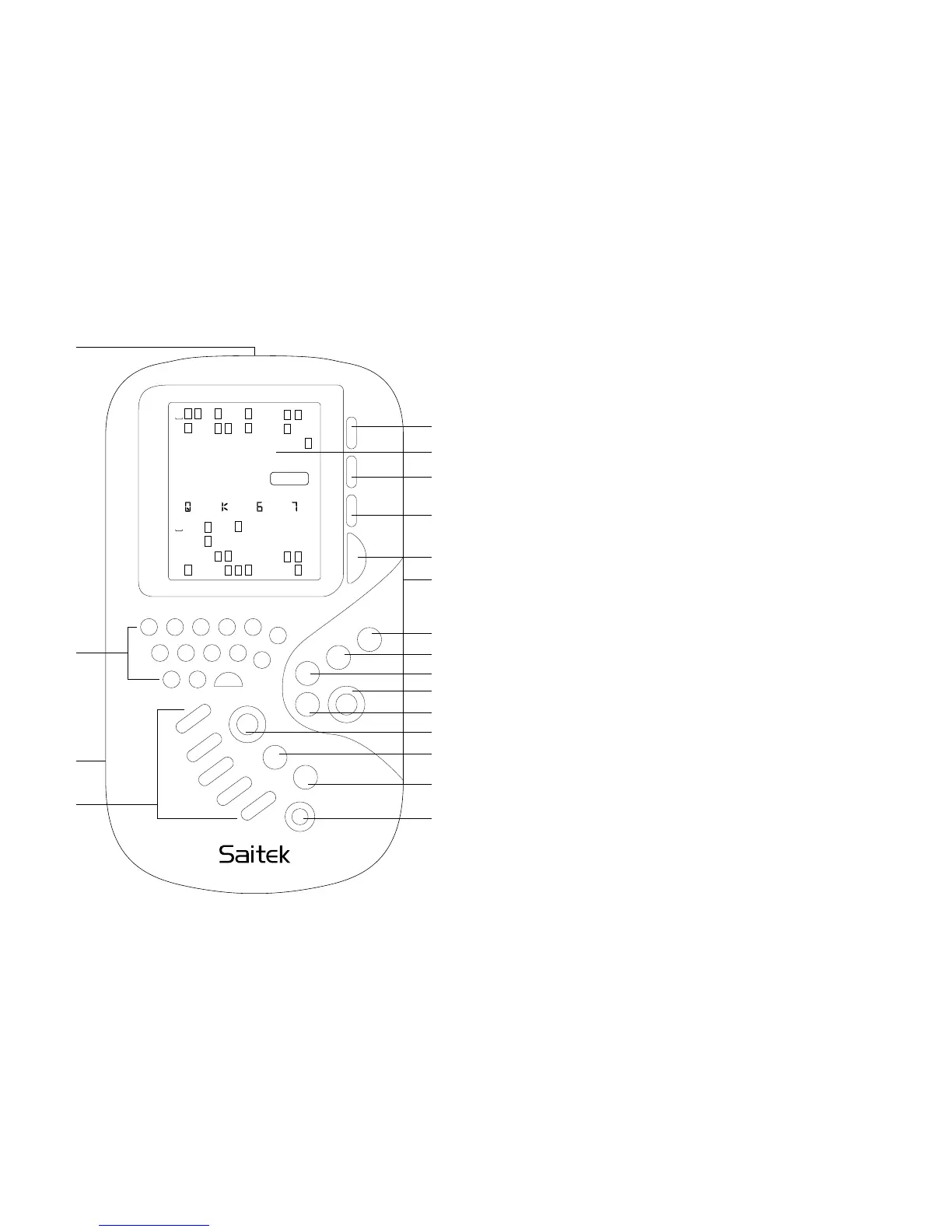
⁄LCD screen
Displays all the information needed to play.
¤SCORE
Press to see score of rubber.
‹VIEW HANDS
Press and hold to see NS or EW hands.
›VIEW INFO
Shows number of tricks made so far, current
contract and current bidding systems.
fiSCROLL
Press to select number of remaining tricks to be
claimed by NS and EW, or to view further
information in VIEW INFO.
flSOUND
Press to turn sound on/off.
‡HINT/SYSTEM
Press before dealing to change bidding systems.
During playing/bidding, press to ask computer for
suggestions.
° REBID
Press to replay the same deal.
·CLAIM
Lets you claim some or all of the remaining tricks.
‚GO/STOP
Press to turn computer on/off. Bidding systems,
dealer and vulnerability remain the same when
you switch on again.
Screen, keys and features





 To Next Page