6 | EN MCB_miniMCB v2019.1
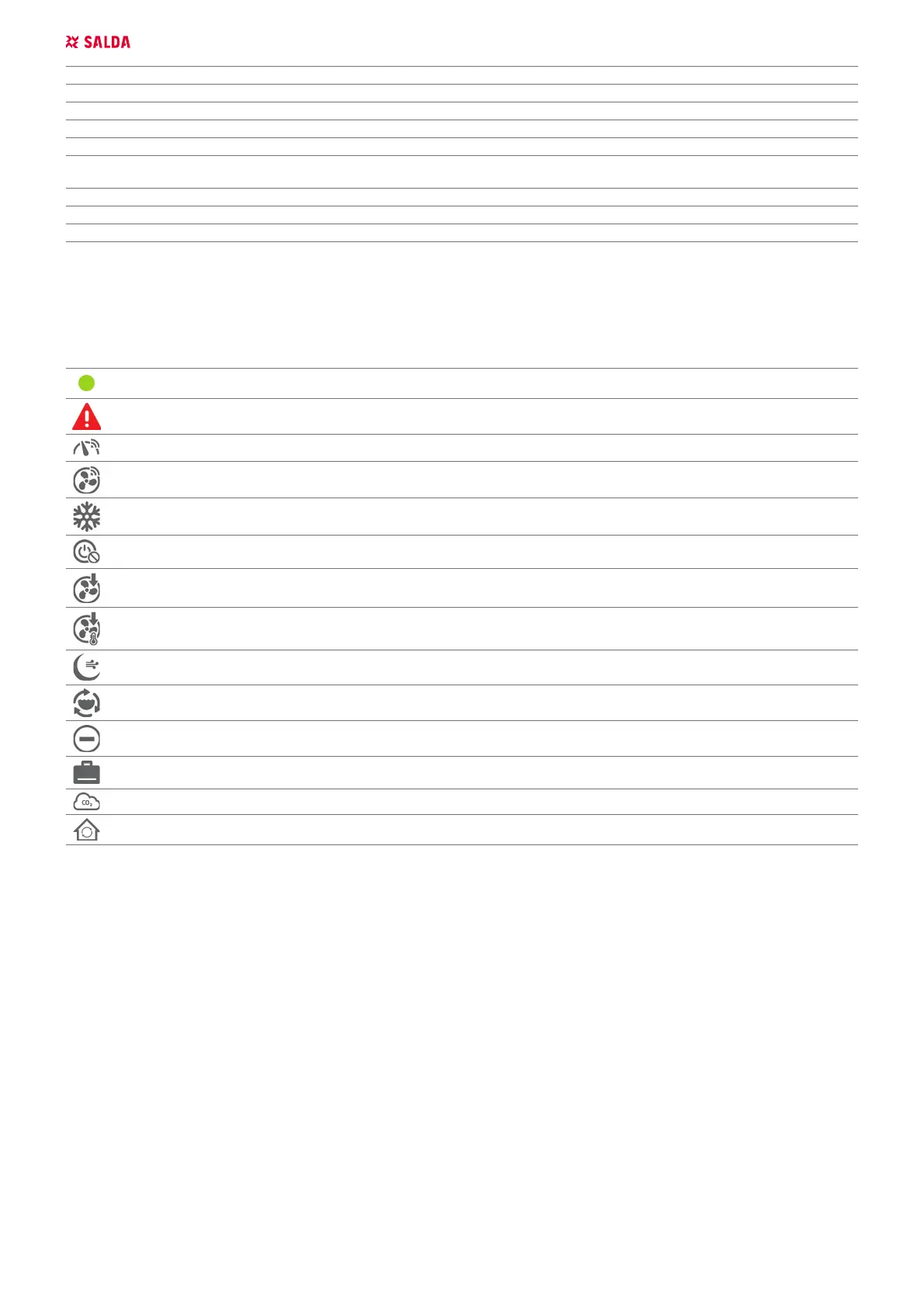
Closing dampers Dampers are closed
Night cooling Active night cooling
Critical alarm Critical failure, system is shut down (for details refer to alarms section)
Fire alarm Fire protection from an external contactor is activated
Heat exchanger frost protection activated Heat exchanger frost protection is activated
Change lters
Warning about clogged lters (pressure switches are activated or lter timer
is activated)
Room RH 3 days average is lower than 30%. Limiting speed. Reduced airow because of too low exhaust air moisture
DX cooler defrosting Dissolving the DX cooler / heater
Fire damper testing Checking re dampers
5.4. INDICATIONS OF FUNCTIONS, ALARMS AND WARNINGS
User about active functions, warnings or alarms is notied in the window ADJUSTER › ALARMS or USER › ALERT. Functions are displayed in the main
window ADJUSTER › VENTILATION CONTROL or in the user environment window. The table below provides indications and their descriptions.
FUNCTIONS DESCRIPTION
Working indication output Working indication output is activated
Alarm indication output Failure indication output is activated
System mode switch Switching on from an external contactor is activated
Custom fans speed switch Selected fans speed from an external contactor is activated
Winter Winter mode is active
Stand-by mode blocking
activated
Stand-by mode blocking is activated
Slowing down fans Fans are slowed down
Slowing down fans by tem-
perature
Fans are slowed down depending on supply air temperature
Night cooling function acti-
vated
Night cooling function is activated
Hydronic pump exercise
activated
Preventive maintenance of circulation pumps is activated
Service stop function Blocking of air handling unit operating algorithm; Service activities are carried out
Holidays
Holiday Schedule interval is active. System mode can be changed only upon changing the Holiday
Schedule interval
Reducing CO
2
level CO
2
reduction function is activated
Full recirculation Full recirculation function is activated
5.5. SETTING DATE AND TIME
For smooth execution of schedules, event log and winter/summer function, it is necessary to set proper date and time in section ADJUSTER › USER
SETTINGS › DATE AND TIME SET and click a button DATE AND TIME SET. It can also be indicated in user environment USER › MENU › SETTINGS › DATE AND
TIME. Fast synchronization with the computer time is possible in user and adjuster environment.
5.6. WEEKLY SCHEDULE
A weekly schedule consists of 10 weekly events. They can be added, deleted, activated and deactivated. One event indicates time, mode/BOOST
function, days of the week. Also it is possible to indicate the change of settable mode temperature.
The system changes modes according to the Weekly Schedule only when the indicated time comes, therefore a user can always change the
existing mode manually. This schedule noties of the upcoming mode change by indicating the time remaining till the next event.
The schedule is edited in user environment USER › MENU › SCHEDULE.
5.7. HOLIDAY SCHEDULE
This schedule is used when the unit has to operate in uniform mode during holidays. The user interface shows when the schedule period is active
as nobody can change the mode activated by this function (except for protection). In order to control the system in a normal manner, the Holiday
Schedule period must be deactivated, i. e. zero values must be indicated or dates must be changed. Up to ve holiday periods can be set.
The schedule is edited in the user environment USER › MENU › HOLIDAY.



 To Next Page