8 | EN STOUCH v2019.1
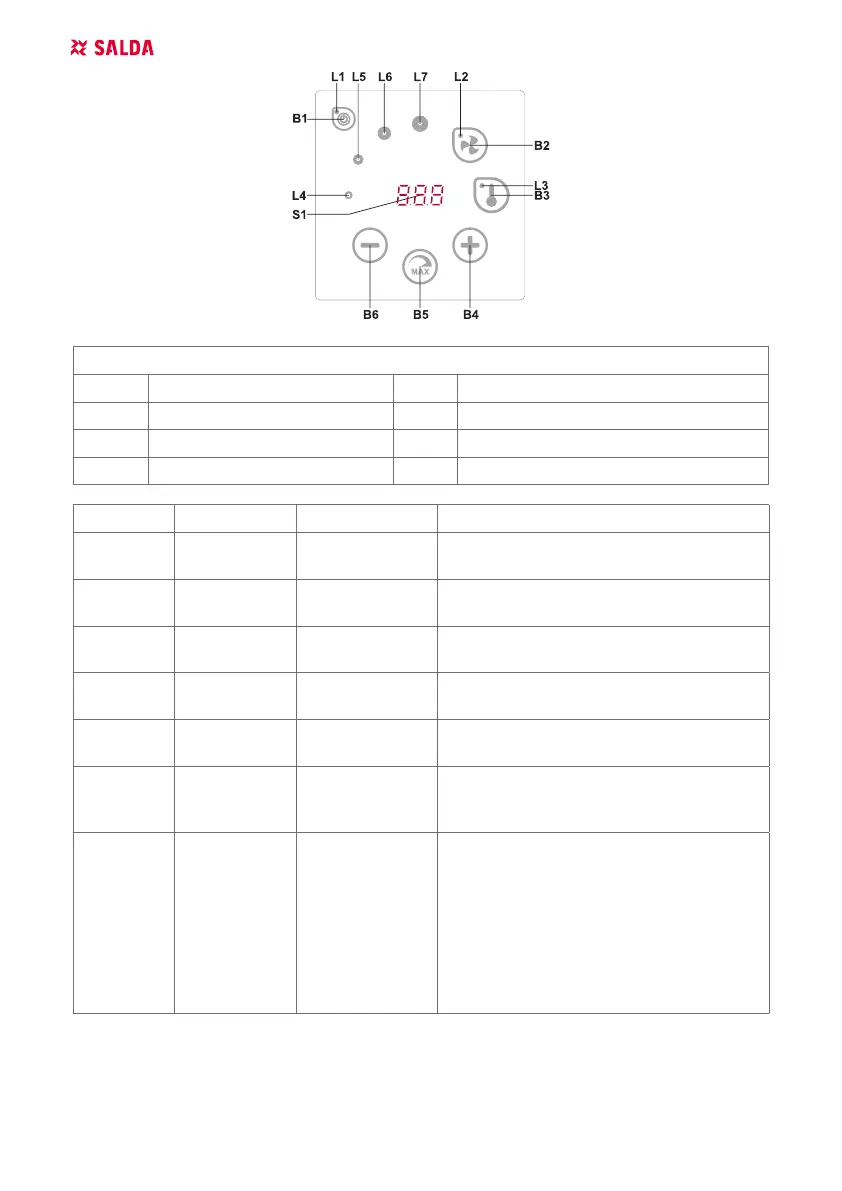
DESCRIPTION OF ELEMENTS
B1 On/O B5 Maximum fan speed for limited time (boost)
B2 Fan speed selection B6 Decrease
B3 Temperature selection S1 Segment display
B4 Increase L4-L7 Fan speed indications
ELEMENTS COOMAND ACTION INDICATION
B1 L1 Switch on
Press down for 2
seconds B1
L1 lights on.
B1 L1 Switch o
Press down for 2
seconds B1
L1 lights o.
L1
Activation from
sleep mode
Press any button. L1 ashes slowly in sleep mode.
B2 B4 B6
L2
Set fan speed Touch B2.
L2 lights on. Speed is adjusted by touching
elements B4 and B6
B3 B4 B6
L3
Set tempera-
ture
Touch B3.
L3 lights on. Temperature is adjusted by
touching elements B4 and B6
B4 B6
L4-L7
Change value
of selected
setting
Increase by touch-
ing B4, decrease
by touching B6
Numbers change in the segment display. L4,
L5, L6, L7 shows selected fan speed.
B4 B5 B6
L2
Switch on/o
the intensive
ventilation
(boost)
Press 2 secons
B5.
L2 is blinking. Split screen shows remaining
time in seconds (if there’re more than 600
sec. then - in minutes). Time can be adjusted
by pressing B4 and B5 (in time of processing
the function).
Maximal BOOST time: 300 minutes (5 hours).
Note: Time can’t be adjusted on PRV con-
troller. If unlimited BOOST time is set on PRV
controller, then split screen shows “---“.



 To Next Page