EN | 13STOUCH v2019.1
12.5. CO
2
CONTROL
MODBUS
RC
AHU
0...10 VDC
RC
FAN
MODBUS
0...10 VDC
RC
FAN
MODBUS
0...10 VDC
PS
0...10 VDC
RC
FAN
0...10 VDC
PS
MODBUS
AHU
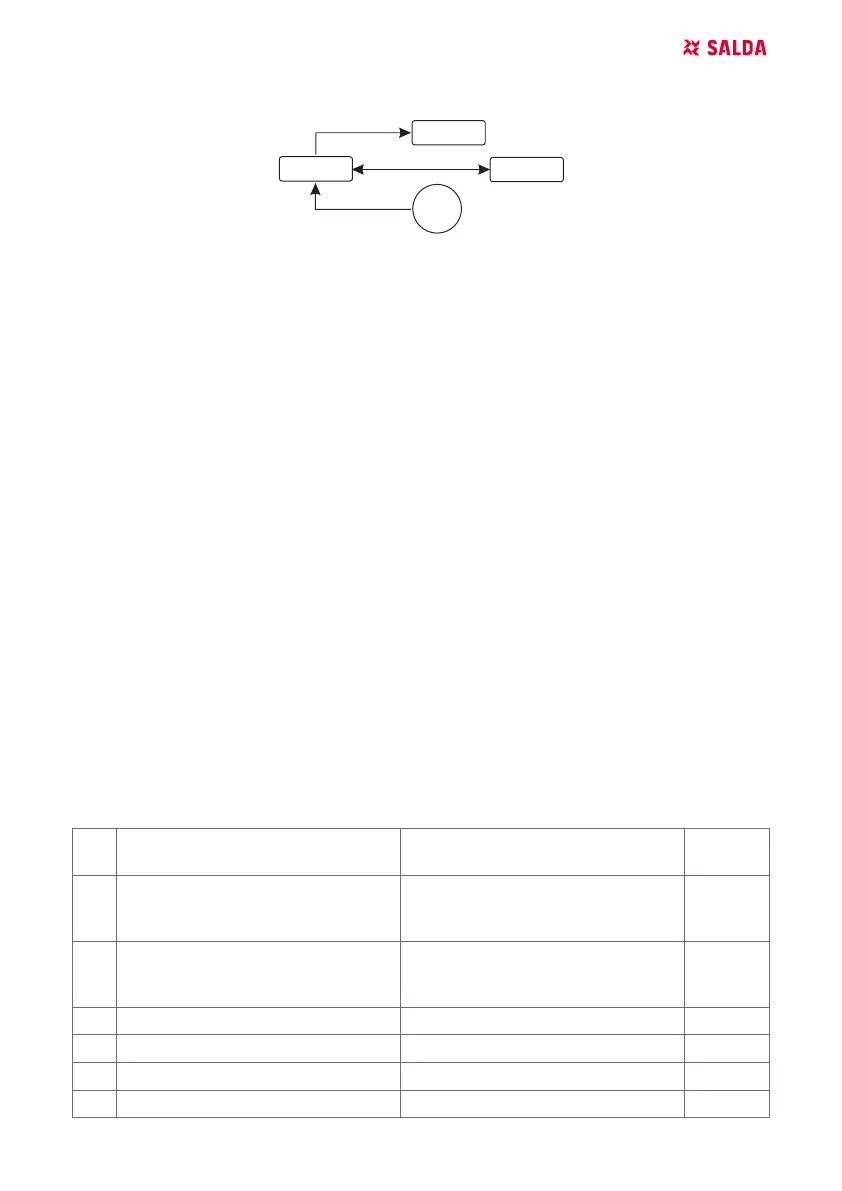
RC - controller (master); AHU - AHU (slave) ; PS - pressure sensors; FAN - fan
This controller allows controlling level of carbon dioxide (CO
2
) in a room. Connect 0..10 VDC CO
2
sensor directly to the controller and congure the controller. In service mode, in item F.14 set 2, and
F.15 and F.16 should be set based on the sensor specication.
After CO
2
sensor is connected and required parameters are set in the service menu, select desired
CO
2
level (P.05) and allowed dierence from the set (P.05) limit in the user menu. If allowed dier-
ence is exceeded, controller will automatically start fans at maximum (4) speed and “CO
2
” will be
shown in digital display. After set CO
2
level (P.05) is reached, controller will return to previous mode.
NOTE: The air quality converters and remote controller (when fan is controlled) must be powered
from a separate power source. It is not supplied with the remote controller.
13. SERVICE MENU
To enter service menu:
1. Go to “Off” state (if controller is on, press down element B1 for 3 seconds).
2. Press down B1 and B2 for 3 seconds.
3. Using elements B4 and B6, enter security code “022” and conrm with element B5.
In the service menu, settings of menu items (F.01, F.02 etc.) are shown sequentially. Menu item is
selected using elements B4 and B6. After pressing B5, value of selected parameter is shown and
can be changed using elements B4 and B6. Pressing B5 saves the parameters and returns to the
setting menu.
To exit the service menu, press down element B1 for 3 seconds (controller goes to switch o state).
NO. NAME POSSIBLE VALUES DEFAULT
VALUE
F.01 Fan control
0: 0..100 %
1: Fixed speeds
2: Based on xed pressures
1
F.02 Switch of locking
0: Not locked
1: Fan always operates at minimum
speed 1
0
F.03 Speed 1 (%) 0 – 100 20
F.04 Speed 2 (%) 0 – 100 40
F.05 Speed 3 (%) 0 – 100 70
F.06 Speed 4 (boost) (%) 0 – 100 100



 To Next Page