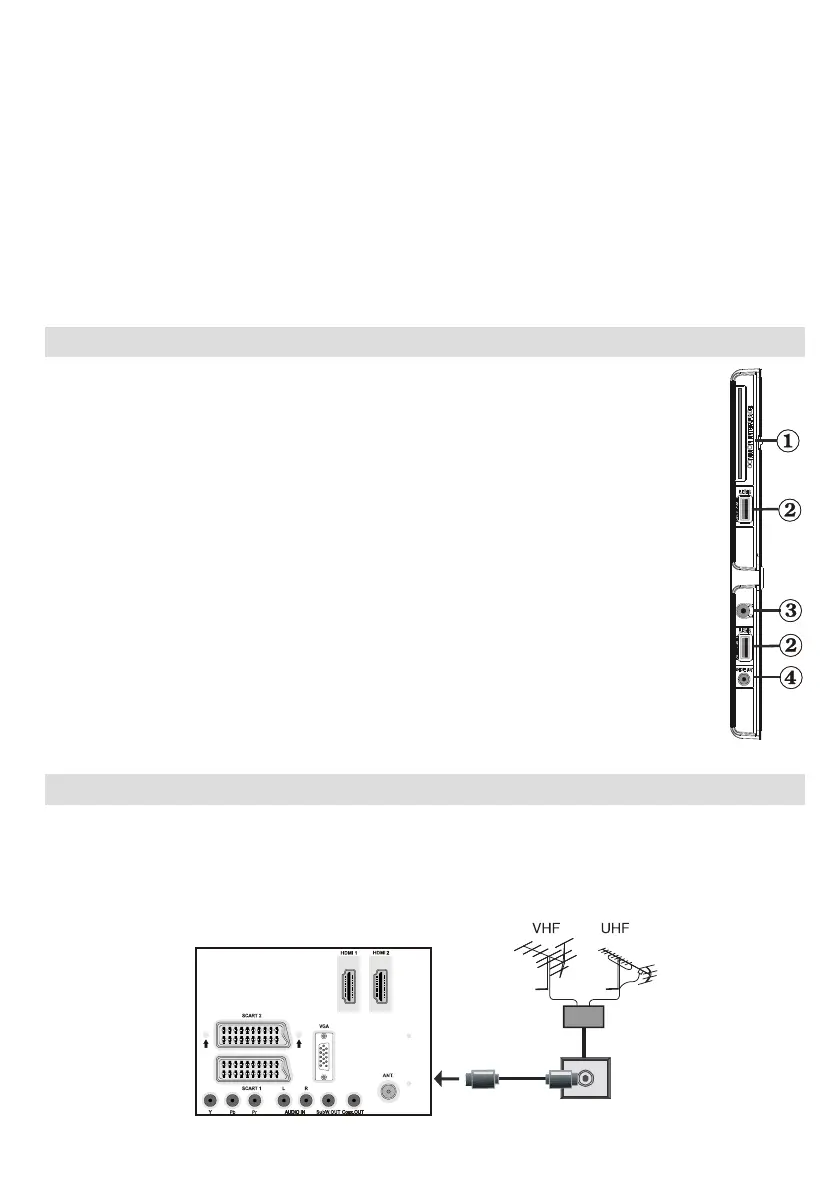
Subwoofer Out5. is for connecting an external, active subwoofer to the set to give a much deeper bass
effect. Use an appropriate RCA cable to connect the TV set to a subwoofer unit.
SPDIF Coaxial Out6. outputs digital audio signals of the currently watched source.
Use an SPDIF coaxial cable to trasfer audio signals to a device that has SPDIF input.
RF Input7. connects to an aerial antenna system.
Note that if you use a decoder or a media recorder, you should connect the aerial cable through the device
to the television with an appropriate antenna cable, as shown in the illustration in the following pages.
PC Input8. is for connecting a personal computer to the TV set.
Connect the PC cable between the PC INPUT on the TV and the PC output on your PC.
HDMI Inputs9. are for connecting a device that has an HDMI socket. Your LED TV is capable of
displaying High Denition pictures from devices such as a High Denition Satellite Receiver or DVD
Player. These devices must be connected via the HDMI sockets or Component Socket. These sockets
can accept either 720p or 1080p signals. No sound connection is needed for an HDMI to HDMI
connection.
Viewing the Connections - Side Connectors
CI Slot is used for inserting a CI card. A CI card allows you to view all the channels that 1.
you subscribe to. For more information, see “Conditional Access” section.
Side USBs2.
Headphone jack is used for connecting an external headphone to the system. Connect to 3.
the HEADPHONE jack to listen to the TV from headphones (optional).
Side audio-video connection4. input is used for connecting video and audio signals of
external devices. To make a video connection, you must use the supplied AV connection
cable for enabling connection. First, plug singular jack of the cable to the TV’s Side AV
socket. Afterwards, insert your video cable’s (not supplied) connector into the YELLOW
input (located on the plural side) of the supplied AV connection cable. Colours of the
connected jacks should match.
To enable audio connection, you must use RED and WHITE inputs of the side AV
connection cable. Afterwards, insert your device’s audio cable’s connectors into the RED
and WHITE jack of the supplied side AV connection cable. Colours of the connected jacks
should match.
Note: You should use audio inputs of side AV connection cable (RED & WHITE) to enable
sound connection when connecting a device to your TV by using PC or COMPONENT
VIDEO input.
Power Connection
IMPORTANT: The TV set is designed to operate on 220-240V AC, 50 Hz.
After unpacking, allow the TV set to reach the ambient room temperature before you connect the set to the •
mains. Plug the power cable to the mains socket outlet.
Aerial Connection
Connect the aerial or cable TV plug to the AERIAL INPUT socket located at the rear of the TV.•


 To Next Page