Desktop Reader Manual V2.1
26/02/2007
4/11
3.1 Wall Reader Connection
The Wall Reader is connected to the Adaptor through a 5 pins block connector identical to the CU5000.
The functions of the 5 pins are:
1 5 volts power supply (from Adaptor to Wall Reader)
2 PPD connection (not used)
3 Ground
4 Data input-output
5 Card Present
3.2 External Device Connection
The interface with the external device can be RS232, OMRON and WIEGAND. The connection is made
through a 4 pins block terminal.
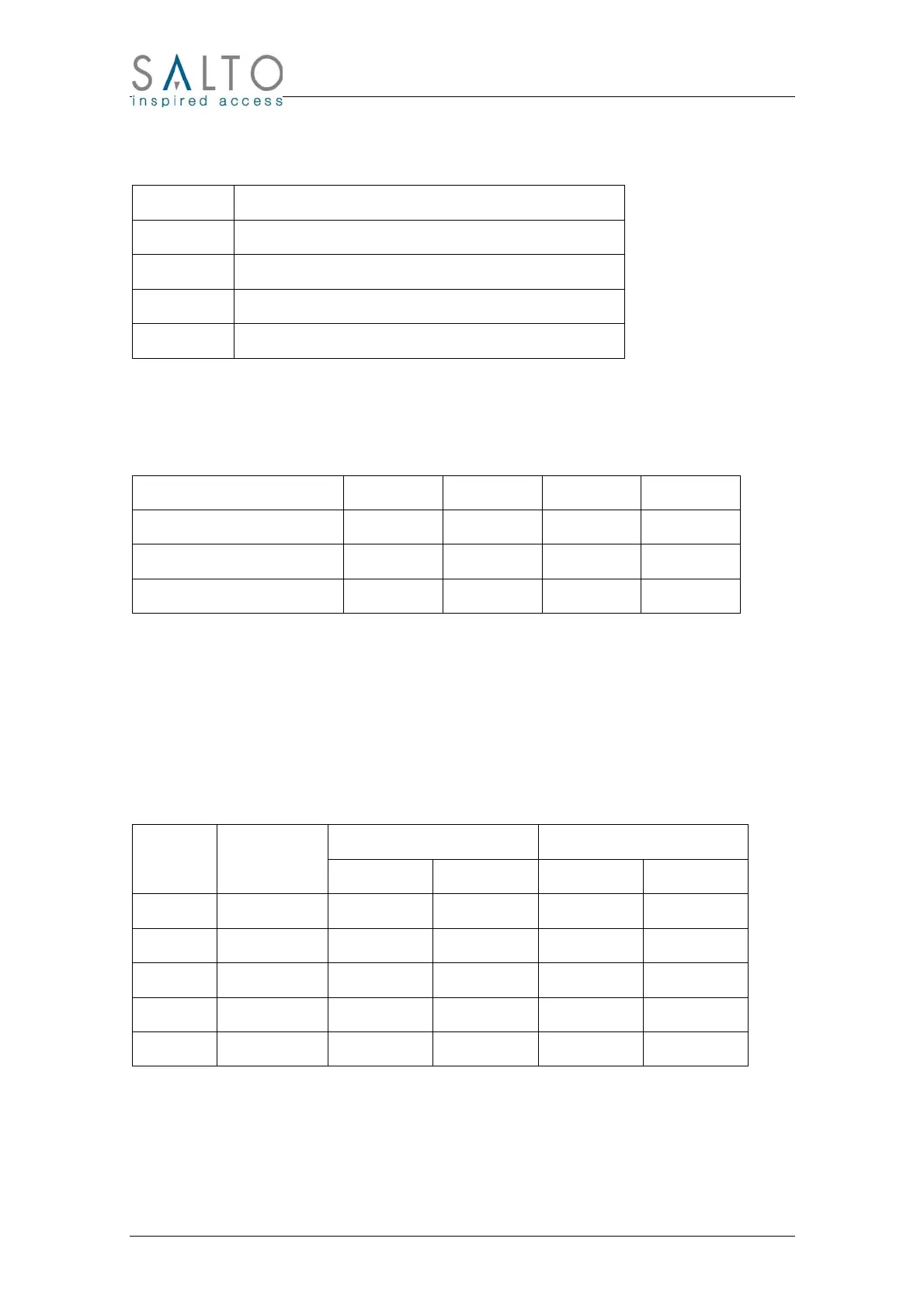
The functions of the 4 pins connector are different depending on the selected type of interface:
Interface Connector Rx/D0 Tx/D1 GND +V
RS232 RX TX GND +V
OMRON CLOCK DATA GND +V
WIEGAND D0 D1 GND +V
The Wall Reader Adaptor is powered from the external device through pins +V and GND. Optionally can
be powered through the jack connector.
The Wall Reader Adaptor is continuously looking for a card and when one is presented it sends the data
to the external device giving simultaneously a valid signal (green led and beep).
3.3 Power Supply
Desktop Reader and Wall Reader Adaptor needs a DC power supply with a voltage between 7 and 15
volt.
The typical current consumption is 15 mA (maximum 30 mA) plus the current consumption of the reader
that depends on the technology:
Reader Consumption (mA) Total Consumption (mA)
Reader Technology
Typical Maximum Typical Maximum
WR2000 iButton 15 30 30 60
WR5000 Smart Card 20 80 35 110
WR8000 Legic 30 50 45 80
WR9000 Mifare 40 120 55 150
WR7000 Picopass 20 60 35 90
4 CLR Button
The CLR Button permits to make a quick diagnosis of the reader. When pressing the CLR button the Led
beside the button lights and the Reader gives an orange light as long as the CLR button remains
pressed.



 To Next Page