22 23
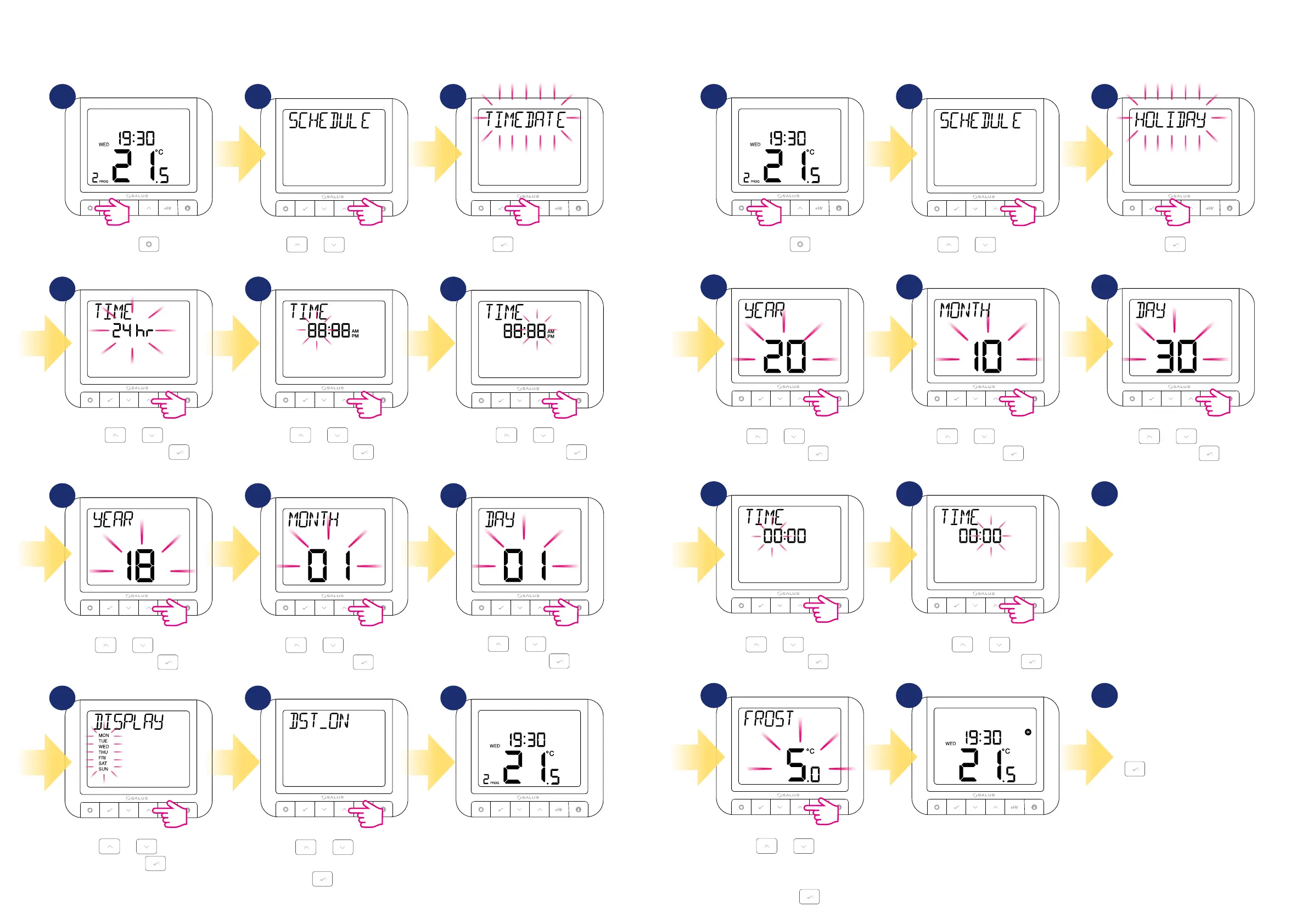
Using or , enable or
disable DST (Daylight Saving Time).
Press to conrm.
Thermostat will go to the main screen
with saving all the settings.
4.7 Time/Date
To set time/date follow steps below:
1 2 3
Press .
Using
or move between
parameters.
Press
to enter Time/Date
settings.
Using or , choose
the time format. Press
to
conrm.
Using
or , set the
minutes and then press
.
Using
or , set the day
and then press
.
Using
or , select the
week format. Press
to conrm.
Using
or , set the year
and then press
.
Using
or , set the month
and then press
.
Using
or , set the hour
and then press
.
4 5 6
7 8 9
10 11 12
4.8 Holiday mode
Holiday mode is a special program temperature setpoint which thermostat will maintain for specied days. How to set HOLIDAY MODE:
1 2 3
Press .
Using
or , set the year
and then press
.
Using
or , set the month
and then press
.
Using
or , set the day
and then press
.
Using
or , set the hour
and then press
.
Using
or , set the
temperature which should be
maintaned during holiday mode and
then press
.
According to set period of time the
plane icon will appear on the main
screen and thermostat is working in
holiday mode.
Using
or , set the
minutes and then press
.
Using
or move between
parameters.
Press
to enter
holiday mode settings.
Now do the same steps
to set holiday mode’s final day.
To abort holiday mode just
press any button and then
confirm HOLIDAY STOP by
button. Plane icon will
disappear and thermostat will
go back to previous work mode.
4 5 6
987
10 11 12
3 3



 To Next Page