7. System Menu Configuration
m
Player mode
In the player mode, you
can
select the number of players who
can
play simultaneously with
one
board. The number
of simultaneous
players
is selectable between two
and four.
With
two simultaneous players, the 1P is allocated to Coin Chute A, and the 2P is allocated to
Coin Chute B.
With four simultaneous players, the 1P and 2P
are
allocated to Coin Chute A, and the 3P
and 4P
are
allocated to Coin Chute B.
Credit operations broadly fall into two modes:
common
and individual.
In the
common
mode, only
one
credit count is displayed
on
the
screen
even
though multiple
players
are
in play.
Common mode
is useful
for playing
one-man
games
or
for those cabi-
nets having multiple coin chutes connected to handle different kinds of coins. The credit
calculation
routine
works out
one
credit
count by totaling
the number
of coins entered from
all coin chutes according to
a
credit
rate. Note that two kinds of credit rates exist
for the coin
chutes.
In the individual mode,
one
coin chute is associated with each player. Credits entered
through each coin chute
are
displayed for each player in play. Individual mode is useful for
those cabinets
that permit
multiple
players to play simultaneously and to which
one
coin
chute
can
be connected for each player. The credit calculation routine works out credit
counts for up to four
players according to
a
credit rate. Only chute
rate
A is used
as
a
credit
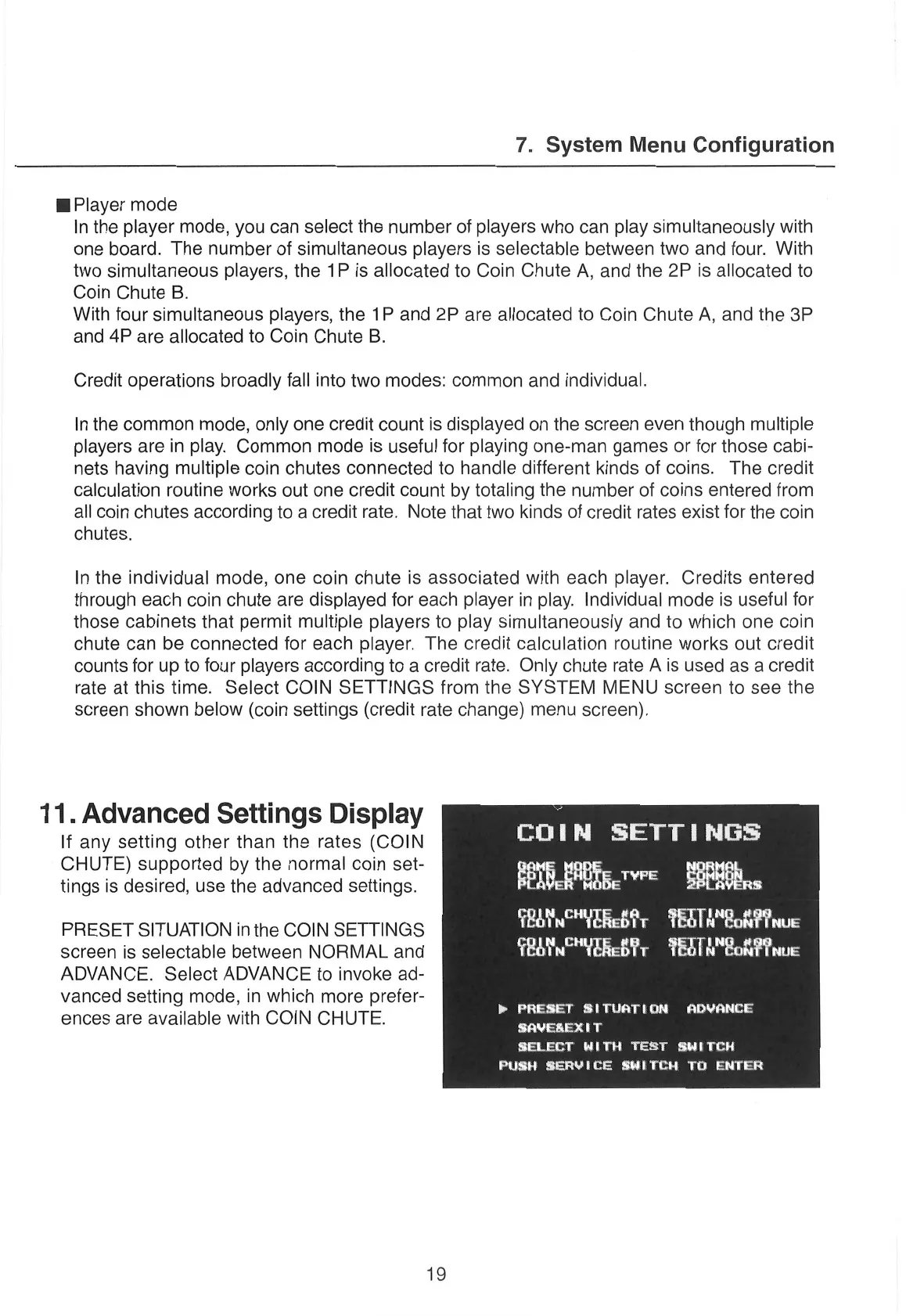
rate at this time. Select COIN SETTINGS from the SYSTEM MENU
screen
to
see
the
screen
shown below (coin settings
(credit rate
change)
menu
screen).
11. Advanced
Settings Display
y
If any setting other than the rates (COIN
Oe)
ee
CHUTE)
supported
by the normal
coin set-
i
tings is desired,
use
the advanced settings.
aS
a
pu
Le
a
PRESET SITUATION
in the COIN
SETTINGS
Loti
aly
Lill antl
screen
is selectable
between
NORMAL
and
ciel
Mie(hs
eae
iertia
tts
ADVANCE. Select ADVANCE to invoke ad-
vanced setting mode, in which
more
prefer-
ences
are
available with COIN
CHUTE.
>» PRESET
SITUATION
ADVANCE
SAVEREXIT
SELECT
WITH
TEST
SWITCH
PUSH
SERVICE
SWITCH TO
ENTER
12


 To Next Page
 Loading...