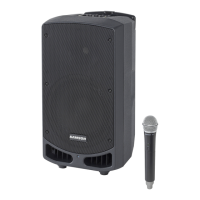
Expedition EX10
Guided Tour
1: 1/4" input - Use this standard 1/4" connector to connect signal from a power
amplifier (rated at up to 250 watts into 8 ohms) to the EX10.
2: Speakon™ input - Alternatively, you can use this Speakon™ connector to
connect signal from a power amplifier (rated at up to 250 watts into 8 ohms) to
the EX10.
3: 1/4" extension - Use this standard 1/4" connector to daisy-chain one EX10
to another. See below for interconnection diagrams.
4: Speakon™ extension - Alternatively, you can use this Speakon™ connector
to daisy-chain one EX10 to another. See below for interconnection diagrams.
Speakon™ Wiring
Interconnecting the EX10
6
Using one EX10: A single mono signal (bus or aux
send) is routed from a mixer to a power amplifier.
One speaker output of the power amplifier is connected
to
either the EX10 1/4" input connector (solid line) or
Speakon™ input connector (dotted line).








 To Next Page