7
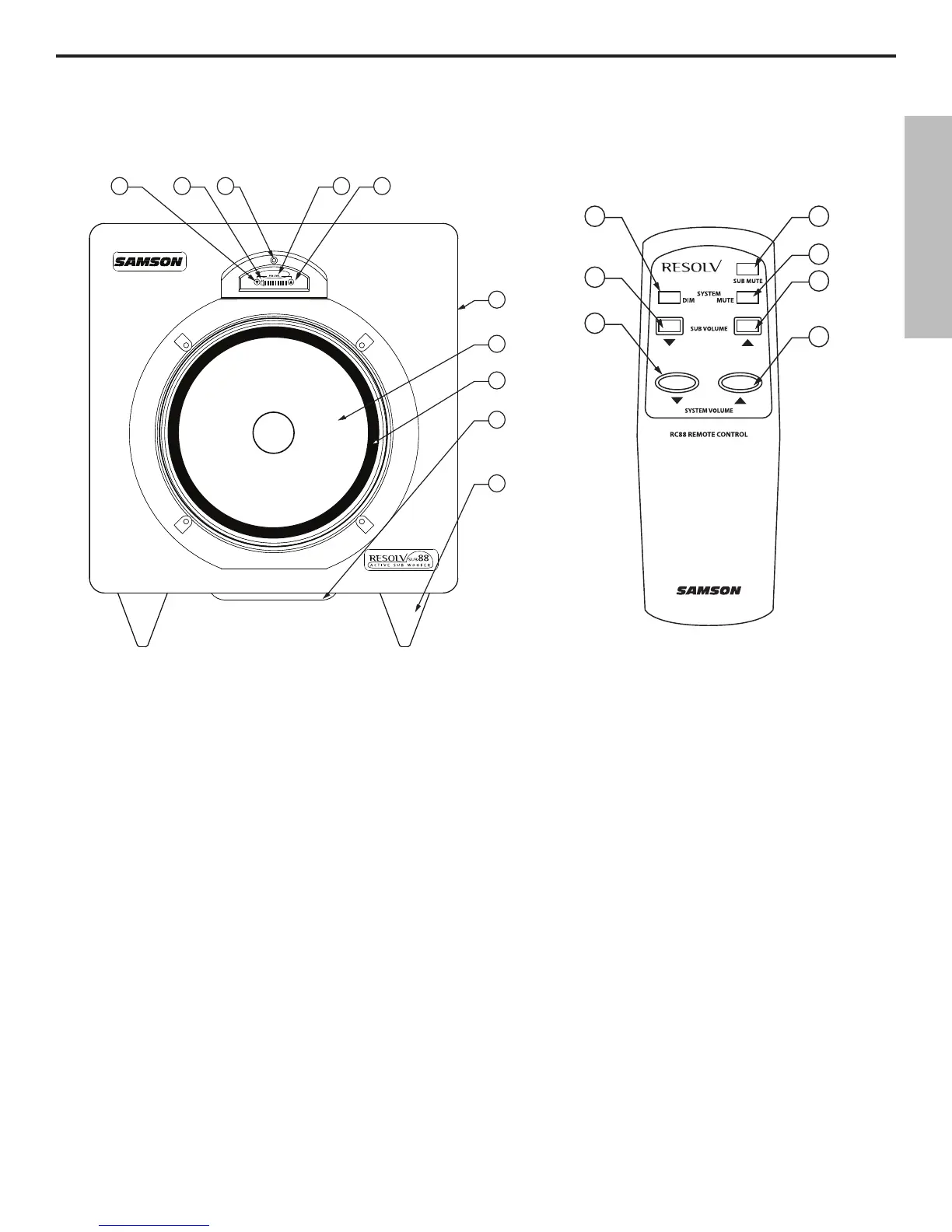
Resolv sub88 Layout
1 SUB DOWN - Push switch used to lower the Sub volume.
2 MUTE – LED lights indicating that the sub is off.
3 POWER LED – Blue LED lights indicating that the sub88 is
powered up and ready for operation. The Power LED will also
flash while receiving information from the IR remote control.
4 VU METER – Eight segment LED VU meter showing input
level.
5 SUB UP – Push switch used to raise the Sub volume.
6 ENCLOSURE - Rigid MDF (Medium Density Fiberboard) con-
struction finished in a sleek black textured paint.
7 TRANSDUCER - Heavy Duty 8,” long excursion (25mm)
extended range low frequency transducer.
8 BUTYL SURROUND - Provides maximum excursion while
maintaining tight bass response.
9 TUNED PORT - Quiet port design offering linear extended low
frequency response. (Bottom of unit.)
10 NON-SKID FEET - Large, hard, plastic feet keep enclosure in
place even at high sound pressure levels.
A SYSTEM DIM switch – When pressed
the system level is lowered by 20dB.
B SUB VOLUME DOWN switch
– Push
switch used to lower the level of the
sub-woofer.
C SYSTEM VOLUME DOWN switch
– Push switch used to lower the overall
system level.
D SUB MUTE switch – When pressed the
sub-woofer is turned off.
E SYSTEM MUTE switch – When pressed
the system is turned off.
F SUB VOLUME UP switch – Push switch
used to raise the level of the sub-woofer.
G SYSTEM VOLUME UP switch
– Push
switch used to raise the overall system
level.
Front View Layout
Remote Control Layout
ENGLISH
7


 To Next Page