10
English
Connections
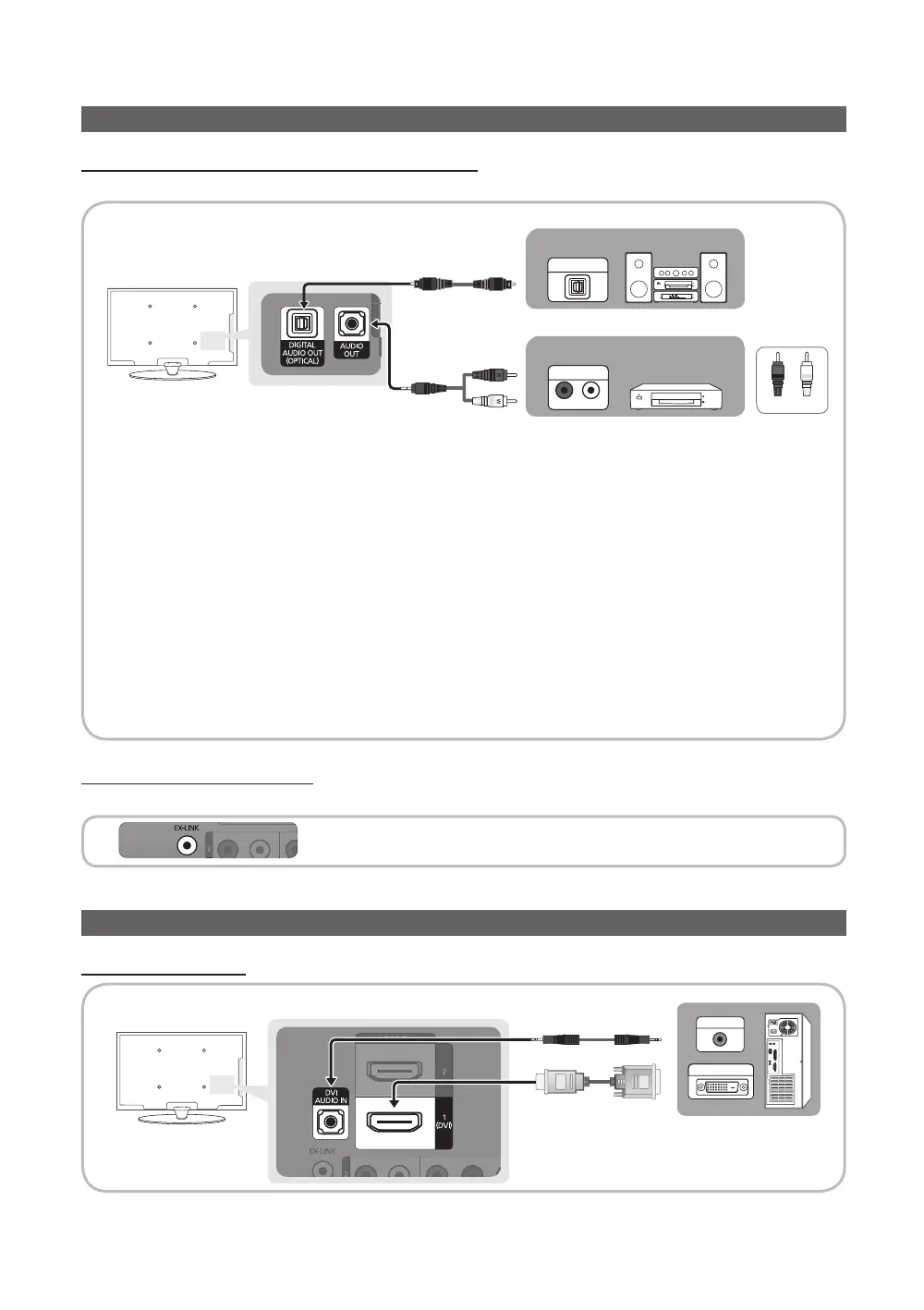
Connecting to an Audio Device
Using an Optical (Digital) or Audio (Analog) Cable Connection
Available devices: Digital Audio System, Amplifier, DVD home theater
✎
DIGITAL AUDIO OUT (OPTICAL)
x
When a Digital Audio System is connected to the DIGITAL AUDIO OUT (OPTICAL) jack, decrease the volume
of both the TV and the system.
x
5.1 CH (channel) audio is available when the TV is connected to an external device supporting 5.1 CH.
x
When the receiver (home theater) is set to on, you can hear sound output from the TV’s optical jack. When the
TV is receiving a DTV signal, the TV will send 5.1 CH sound to the amplifier or DVD home theater. When the
source is a digital component such as a DVD / Blu-ray player / cable box / STB (Set-Top-Box) satellite receiver
and is connected to the TV via HDMI, only 2 CH audio will be heard from the amplifier or DVD home theater. If
you want to hear 5.1 CH audio, connect the digital audio out jack from your DVD / Blu-ray player / cable box /
STB satellite receiver directly to an amplifier or home theater.
✎
AUDIO OUT: Connects to the audio input jacks on your amplifier/DVD home theater.
x
When connecting, use the appropriate connector.
x
When an audio amplifier is connected to the AUDIO OUT jacks: Decrease the volume of the TV and adjust the
volume level with the amplifier’s volume control.
Using an EX-Link Cable Connection
Available Devices: External devices that support EX-Link
EX-LINK: Connector for service only.
Connecting to a PC
Using an HDMI/DVI cable
AUDIO OUT
DVI OUT
AUDIO IN
OPTICAL
R
W
Digital Audio System
Amplifier /
DVD home theater
Red White
[PC430_Mexico]BN68-02642A-05L02.indb 10 2010-07-23 오후 1:57:25


 To Next Page