5
01 Getting Started
English
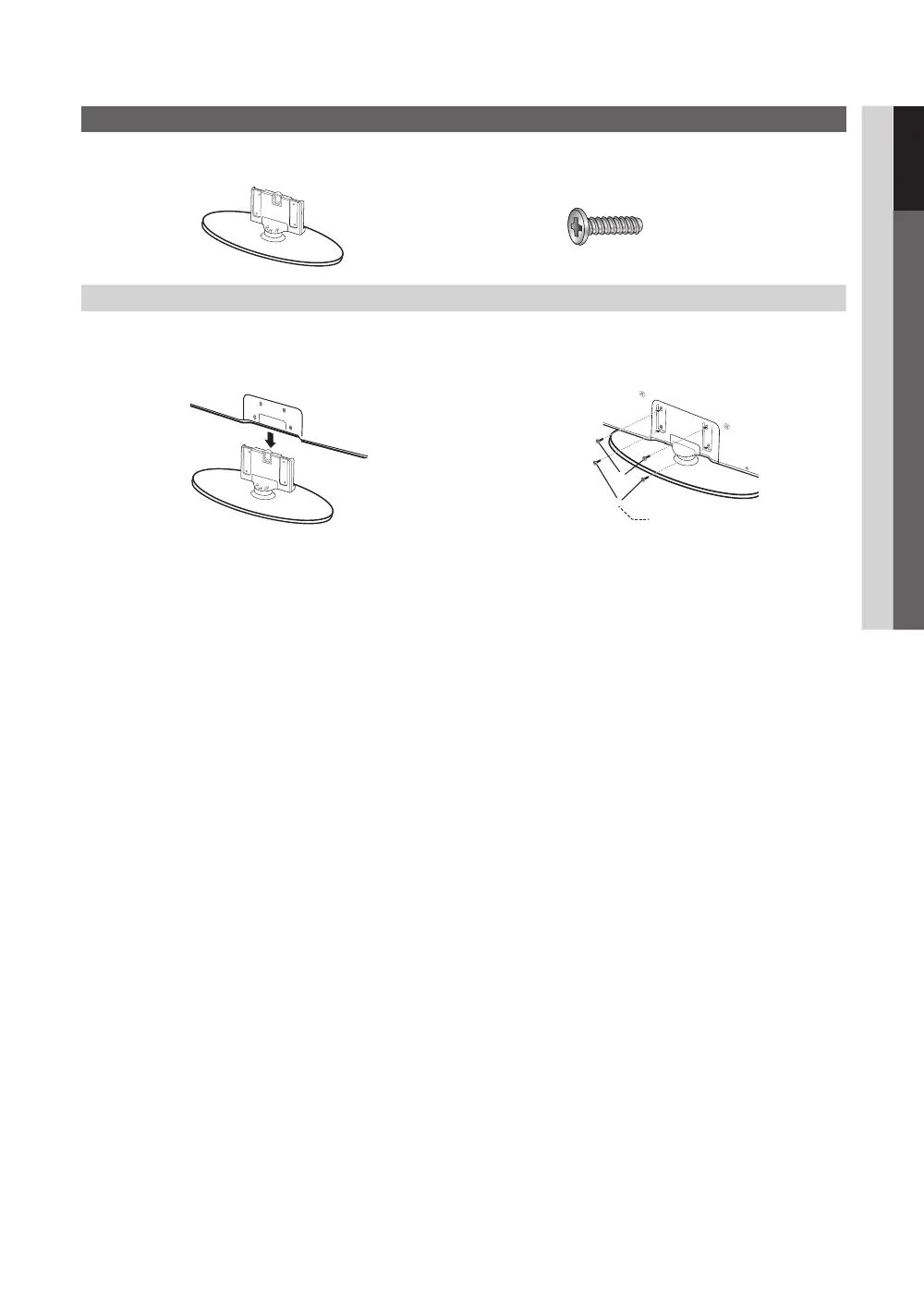
Install the Stand
See separate guide for installing the stand.
(M4 X L16)
Stand (1EA) Screws (4EA)
Follow the steps below to connect the TV to the stand.
1. With your TV upright, connect the TV to the Stand.
2. Fasten two screws (M4 X L16) at position 1, and then
fasten two screws (M4 X L16) at position 2.
✎
NOTE
x
Make sure to distinguish between the front and back of the Stand and Guide Stand when assembling them.
x
Make sure that at least two persons lift and move the PDP TV.
x
Stand the product up and fasten the screws. If you fasten the screws with the PDP TV placed down, it may lean to
one side.
[
Do not insert your fingers into the stand base slot of the TV when installing the stand base.
Screws (M4 X L16)
[PC430_Mexico]BN68-02642A-05L02.indb 5 2010-07-23 오후 1:57:22



 To Next Page