English - 35
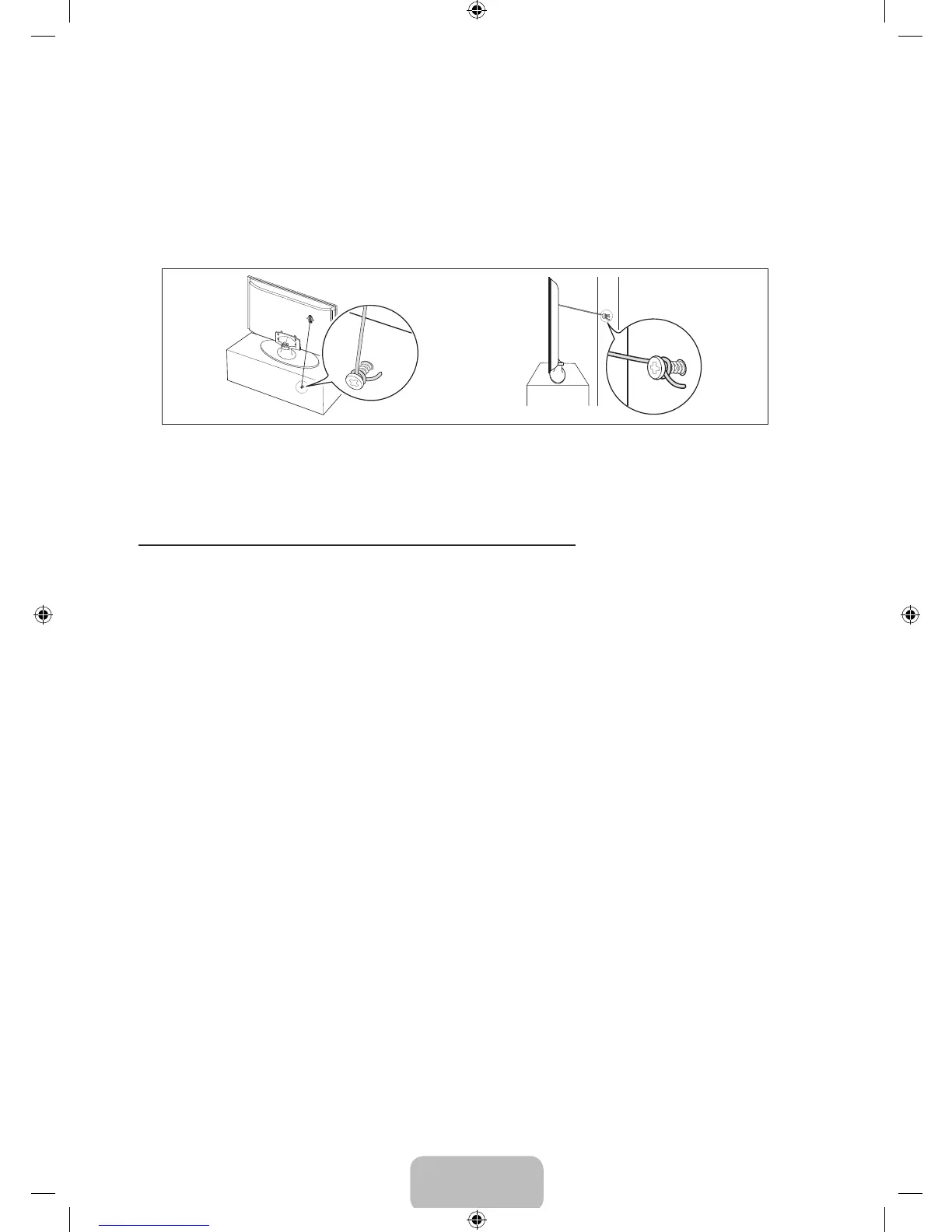
3. Tie the TV-Holder cord to the screw fastened to the wall or cabinet so that the TV is fixed. See the
illustrations below.
✎
Install the TV close to the wall so that it does not fall.
✎
When attaching the TV-Holder cord to the wall, tie the cord level with the ground or slanted
downwards for safety purposes.
✎
Check the cord occasionally to make sure it is secure.
✎
Before moving the TV, separate the connected cord first.
4. Verify all connections are properly secured. Periodically check the connections for any sign of fatigue or
failure. If you have any doubt about the security of your connections, contact a professional installer.
To purchase the TV-Holder Kit, contact Samsung Customer Care
• In the United States: 1-800-SAMSUNG (1-800-726-7864)
• In Canada: 1-800-SAMSUNG (1-800-726-7864)
[UE5300-ZA]BN68-04075A-00Eng.indb 35 2012-04-13 �� 3:16:31





 To Next Page