English - 6
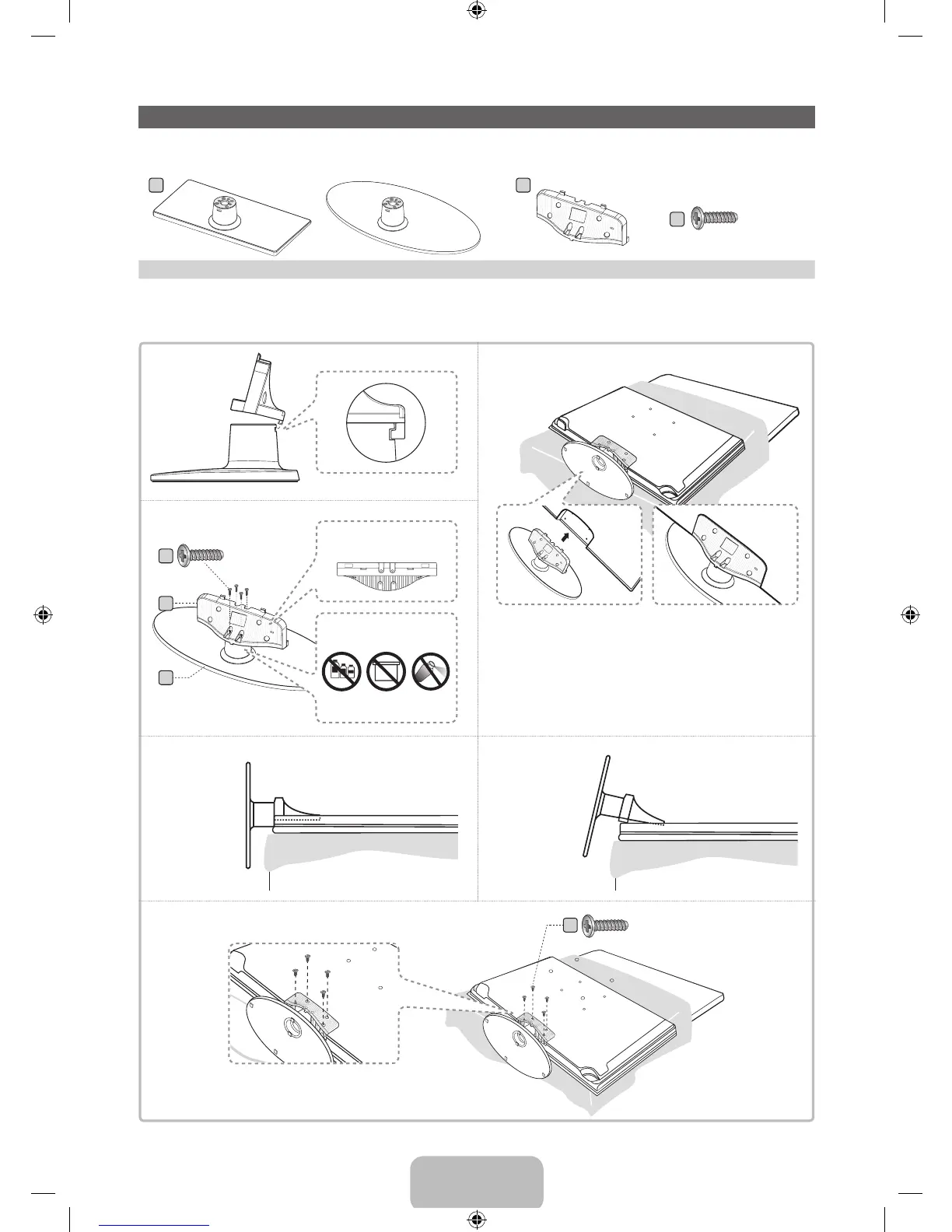
Installing the Stand
Stand Parts:
A
or
B
(M4 X L12)
C
Stand x 1 Guide Stand x 1
Screws x 8
Follow the steps below to connect the TV to the stand. For more detailed instructions, see the separate
stand installation guide.
1
2
3
4
C
3
A
B
C
(Incorrect assembly)(Correct assembly)
Side View
✎
Place a soft cloth over the table to protect the TV, and then
place the TV on the cloth screen side down.
✎
Insert the Stand Guide into the slot of TV bottom side.
x4 (M4 X L12)
Rear
Front
Top View
DO NOT USE
CHEMICALS
DO NOT USE
GREASE
DO NOT
USE OIL
ATTENTION
x4 (M4 X L12)
[UE5300-ZA]BN68-04075A-00Eng.indb 6 2012-04-13 �� 3:16:16







 To Next Page