4
English
Operating the Air Conditioner
01
Functions and Buttons
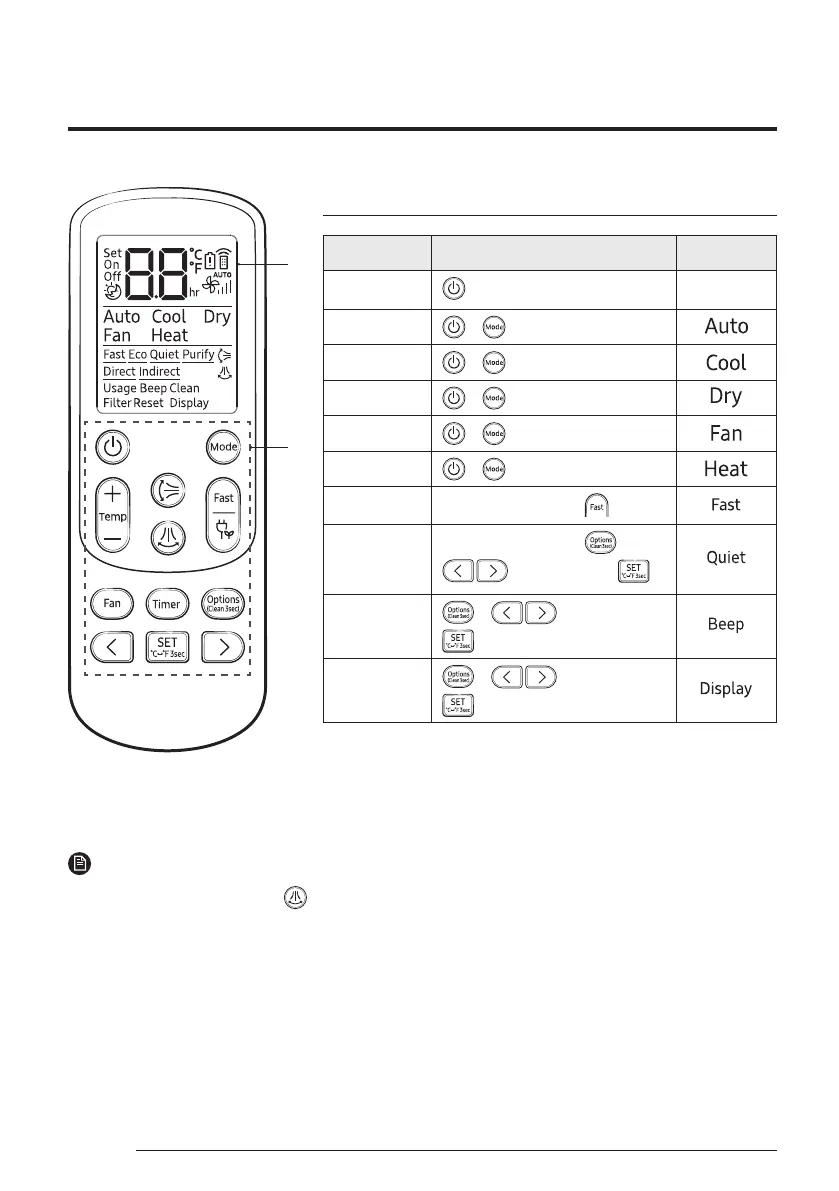
Function Button and Selection Display
Power On/Off
Auto
▶ ▶ Select Auto.
Cool
▶ ▶ Select Cool.
Dry
▶ ▶ Select Dry.
Fan
▶ ▶ Select Fan.
Heat
▶ ▶ Select Heat.
Fast
In Cool or Heat mode ▶
Quiet
In Cool or Heat mode ▶ ▶
▶ Select Quiet. ▶
Beep
▶ ▶ Select Beep. ▶
Display lighting
▶ ▶ Select Display. ▶
01 Display
02 Button
NOTE
• Although Horizontal air flow( ),
Purify, Usage, Direct and Indirect
is displayed on the remote control
display, it is not available on this
model.
• Features may differ depending on
models.



 To Next Page