6
English
Cleaning
Auto clean function
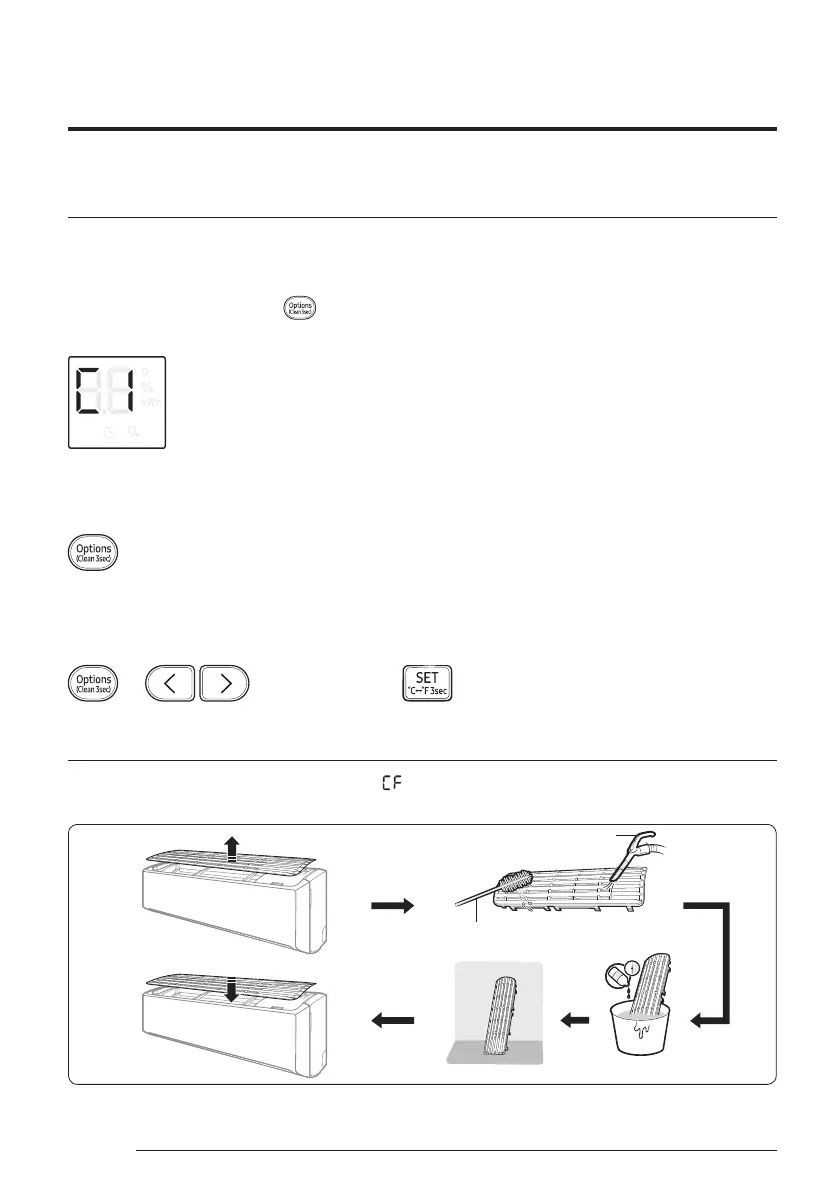
Use the Auto clean function if the indoor unit produces odors.
Activating Auto clean
To activate Auto clean, press the (Options) button for at least 3 seconds.
The indoor unit display shows:
Canceling Auto clean
To cancel Auto clean while it is running, follow the procedure below:
▶ Press and hold for 3 or more seconds.
Deactivating Auto clean
To deactivate Auto clean, follow the procedure below while the air conditioner is in operation or turned off:
▶ ▶ Select Clean. ▶
Cleaning the filter
Clean the air filter every two weeks or when the (filter‑cleaning reminder) appears on the indoor unit
display. The time between cleanings may vary, depending on the usage and environmental conditions.
Vacuum cleaner
Soft brush
30 minutes
Mild detergent



 To Next Page