Samsung Electronics10-3
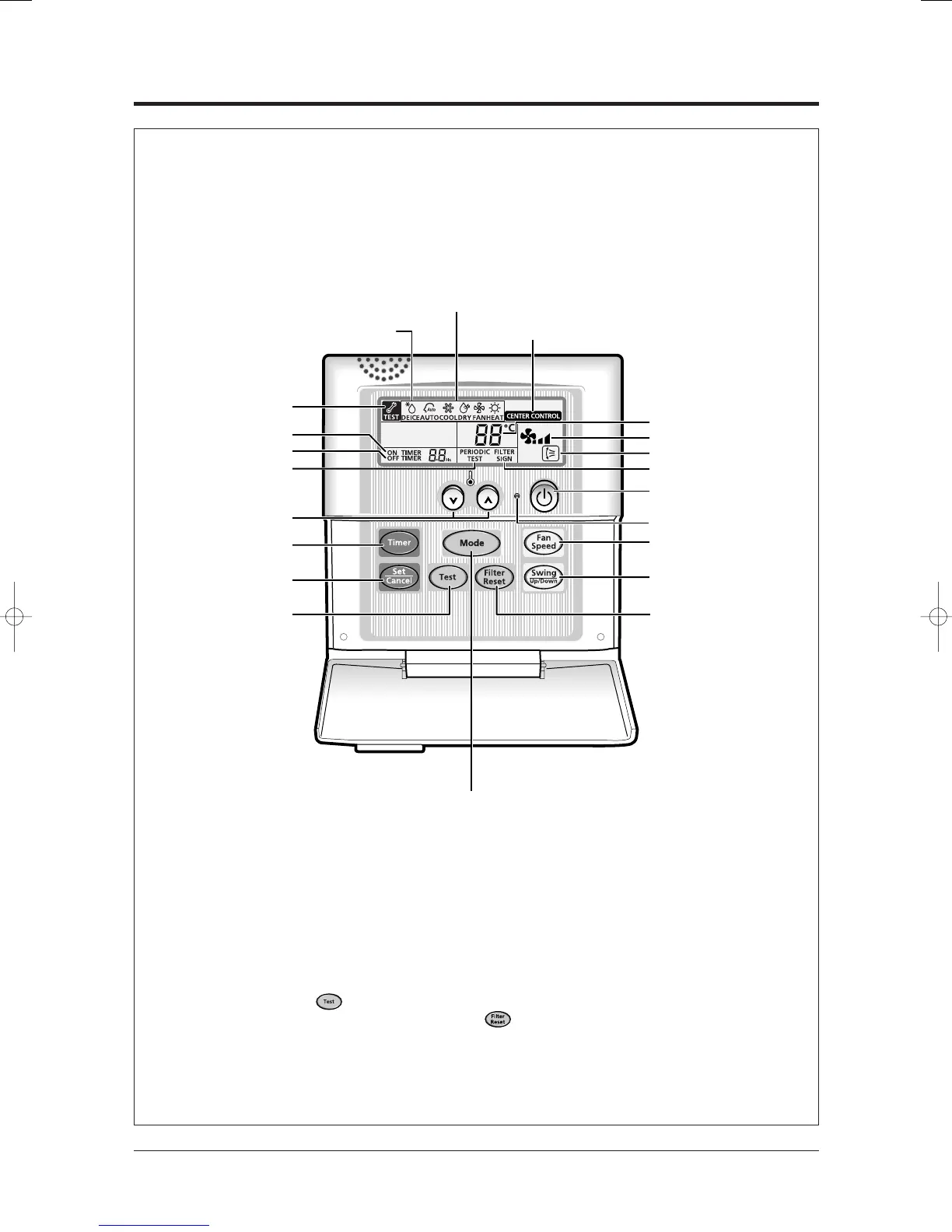
10-3 Wired Remote Controller-Buttons and Display
Note : • The button is for your installation specialist. You must not press it.
Note : • After cleaning the air filter, press the button. Then the wired remote
controller will display the Filter Sign indicator when the time to clean the air filter.
The wired remote controller is an optional accessory and it is installed on the wall.
To use the wired remote controller, refer to an appropriate manual.
Mode selection button
Communication
error indicator
On Timer setting
Off Timer setting
Test indicator
Timer Set/Cancel button
Test button
Temperature adjustment
buttons
Removing frost indicator
Operating mode
Centralized controller indicator
(In case of installing the Centralized controller)
Filter Reset button
Swing button
Temperature setting
Fan speed
Air flow direction
Filter Sign indicator
On/Off button
Fan speed
adjustment button
On/Off indicator
On Timer button
24103A(1)_2 12/23/05 12:57 PM Page 6-54



 To Next Page