Samsung Electronics3-4
3-2 Setting Option Setup Method
3-2-1 PCB option code input method(example : 021E31142285)
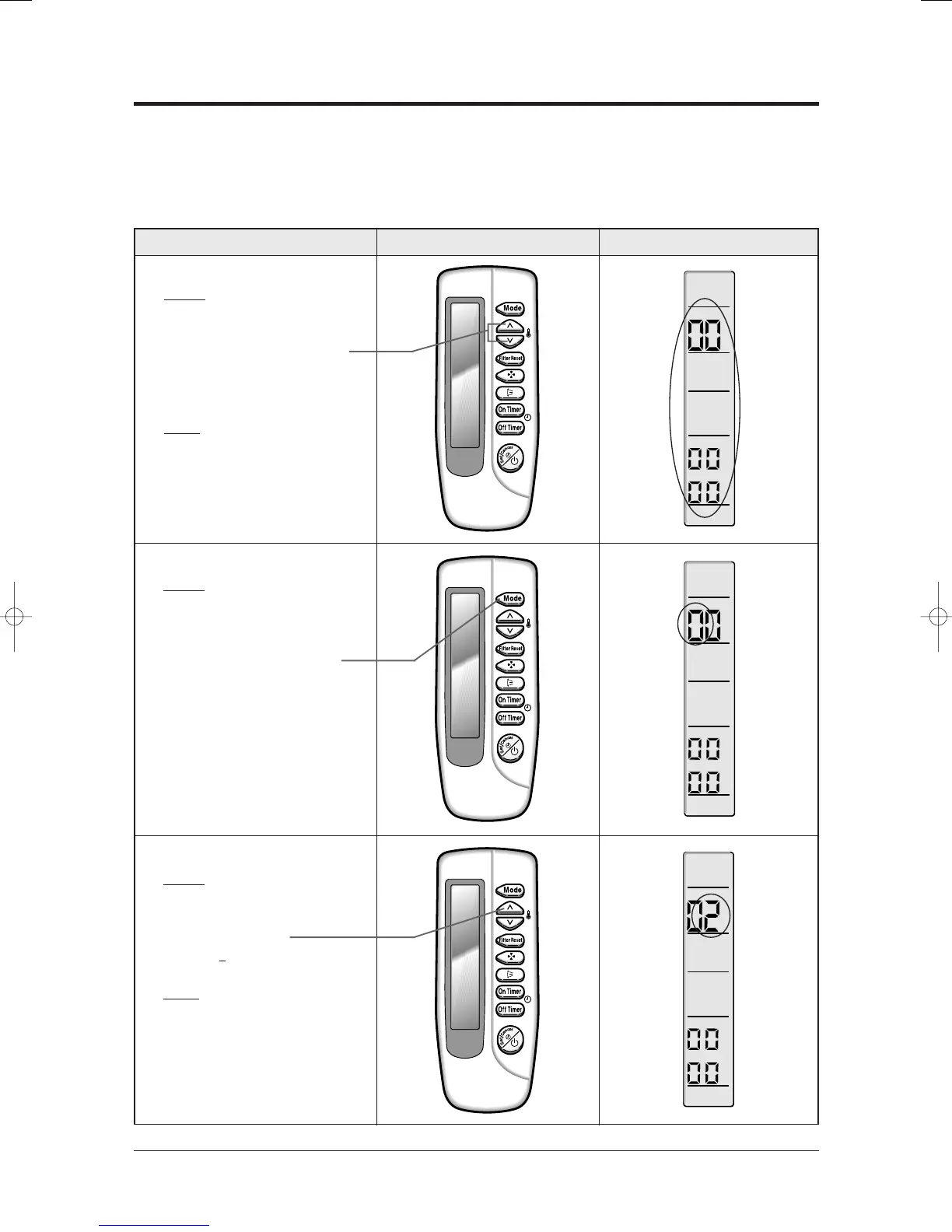
Operation method Applicable button Indicating state
✳ Step 1
✳ Method)
✳ !Remove the battery of remote
controller.
✳ @Push the temperature adjustment
button simultaneously.
✳ #Insert the battery.
✳ Result)
✳ When the display of remote
✳ controller is indicated as shown
✳ in the right, then go to the step 2.
✳ Step 2
✳ Method)
✳ If the first digit of remote
controller shows "0", go to the
step 3.
• If it shows 1, press the operation
selection button one time to change
it into 0 and then go to step 3.
✳ Step 3
✳ Method)
✳ Input the second digit of option code
by pressing the temperature
adjustment button (up).
example) 02
1E31142285
✳ Result)
✳ If 2 is displayed, go to the step 4
(whenever pressing the button, 1~9,
A,B,C,D,E,F are lit in order.)
Be sure to input the option code suitable for the indoor unit by use of wireless remote controller after replacing the PCB
of indoor unit.
Follow to do the following 15 steps sequentially.
24103A(1)_1 12/23/05 12:01 PM Page 3-4



 To Next Page