Alignment and Adjustments
3-5Samsung Electronics
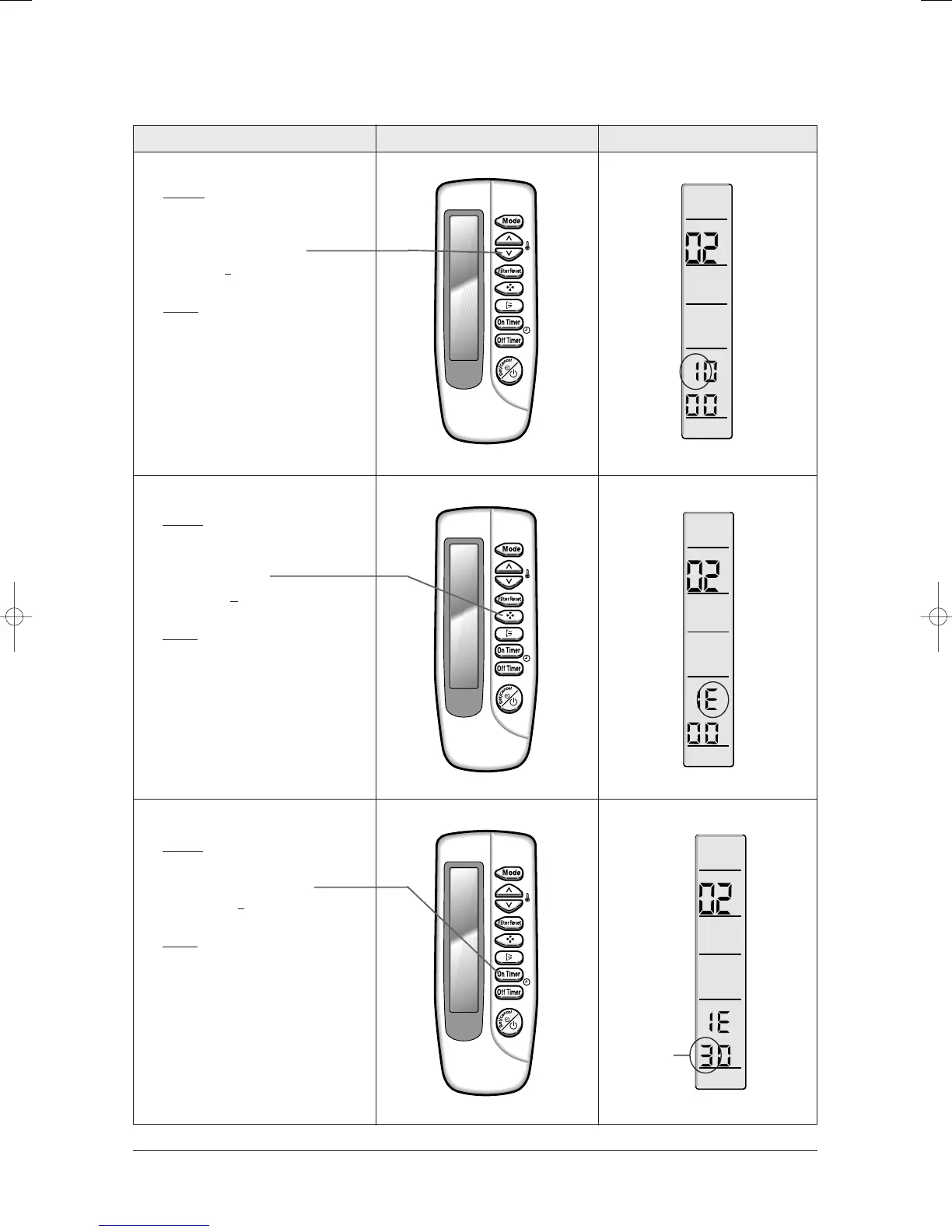
Operation method Applicable button Indicating state
✳ Step 4
✳ Method)
✳ Input the third digit of option code
by pressing the temperature
adjustment button (down).
example) 021
E31142285
✳ Result)
✳ If 1 is displayed, go to the step 5.
✳ Step 5
✳ Method)
✳ Input the fourth digit of option code
by pressing the fan speed
adjustment button.
example) 021E
31142285
✳ Result)
✳ If E displays, go to step 6.
✳ Step 6
✳ Method)
✳ Input the fifth digit of option code by
pressing the On timer button.
example) 021E3
1142285
✳ Result)
✳ If 3 displays, go to step 7.
24103A(1)_1 12/23/05 12:01 PM Page 3-5



 To Next Page