
 Need help?
Do you have a question about the Samsung AX90T7080WD and is the answer not in the manual?
General warnings and cautions for safe operation and prevention of property damage.
Guidelines for safe installation, socket usage, and power cord handling to prevent hazards.
Precautions for using the air purifier, handling the power cord, and child safety.
Instructions for safely cleaning the air purifier, including disconnecting power and detergent usage.
Details the accessories included with the air purifier.
Outlines the technical specifications, dimensions, and area coverage of the air purifier.
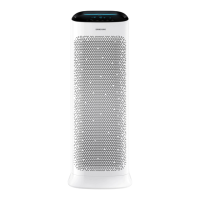
Provides a general overview of the air purifier's components and features.
Details the air purifier's display indicators and control buttons for operation.
Step-by-step instructions on how to remove the air purifier filters from the unit.
Step-by-step instructions for correctly assembling the air purifier filters.
How to reset the filter replacement reminder after installing new filters.
Guidance and tips for using and maintaining the air purifier filters.
Explains how to turn the air purifier on/off and control fan speed.
Details Sleep mode, timed on/off, and display lighting features.
Instructions for Wi-Fi setup, filter reminder reset, and lock function.
How to check air quality and understand readings and influencing factors.
Guidance on cleaning the air purifier's exterior and its sensitive sensors.
Detailed instructions for cleaning and properly drying the air purifier filters.
Steps for connecting the air purifier to the SmartThings app and Wi-Fi.
How to register your Samsung account and connect the app to your air purifier.
Overview of how to control various air purifier functions via the SmartThings app.
Solutions for issues like no operation, strange noises, and smells.
Addresses issues with cleanliness indicators, PM readings, and display errors.
Explains air circulation patterns and when to contact service.
 General
| Brand | Samsung |
|---|---|
| Model | AX90T7080WD |
| Category | Air Cleaner |
| Language | English |




 To Next Page