Connecting to an Audio System
Please turn the volume down when you turn on the Amplifier. A sudden loud sound may cause
damage to the speakers and your ears.
Set the audio output format according to the capabilities of your amplifier. (See pages 34~36)
The position of HDMI terminals may vary depending on the Amplifier. Please refer to the user manual
of your Amplifier.
•
•
•
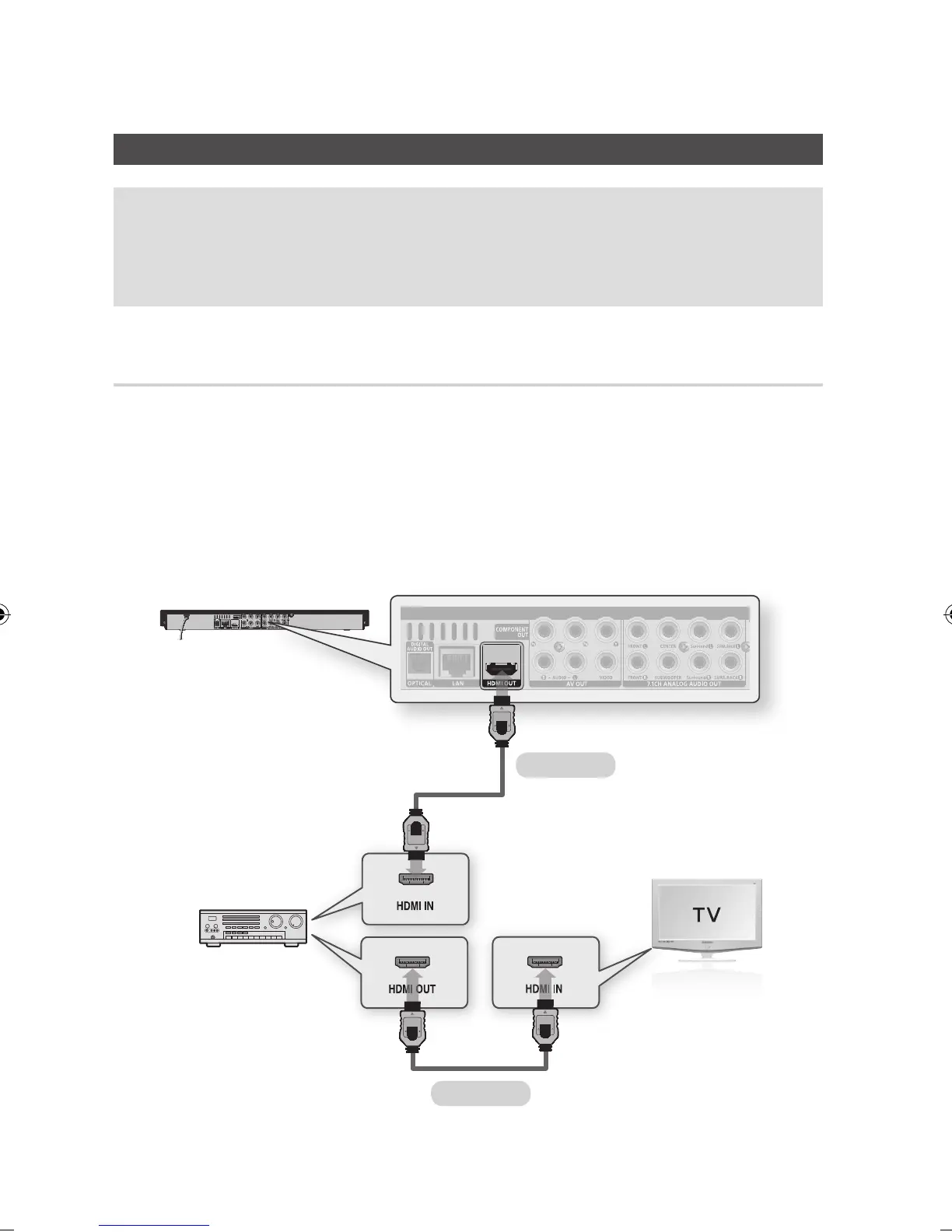
Case 1 : Connecting to an Audio System (HDMI Supported Amplifier)
- Best Quality (Recommended)
Using an HDMI cable, connect the HDMI OUT terminal on the rear of the product to the HDMI IN
terminal of your amplifier.
Using an HDMI cable, connect the HDMI OUT terminal of the amplifier to the HDMI IN terminal of
your TV.
Turn on the product, TV and amplifier.
Press the input select button of the amplifier to select the external input and hear sound from the
product. Refer to your Amplifier's user manual to set the Amplifier's audio input.
1.
2.
3.
4.
HDMI cable
HDMI cable



 To Next Page