Dynamic : Choose this setting to increase
Sharpness.
Normal : Choose this setting for most
viewing applications.
Movie : This is the best setting for watching
movies.
User : You user can adjust the sharpness
and noise reduction functions respectively.
Setting BONUSVIEW
h
The BONUSVIEW feature allows you to view
additional content (such as commentaries) in a
small screen window while the movie is playing.
This function is only available if the disc has the
Bonusview feature.
You can also operate this function
by pressing the
画中画
button on the
remote control.
During playback, press the
工具
button.
Press the ▲▼ buttons to select BONUSVIEW
Video or BONUSVIEW Audio.
Press the ◄► buttons to select the desired
bonusview.
NOTE
If you switch from BONUSVIEW Video, BONUSVIEW
Audio will change automatically in accordance with
BONUSVIEW Video.
•
•
•
•
1.
2.
3.
✎
▪
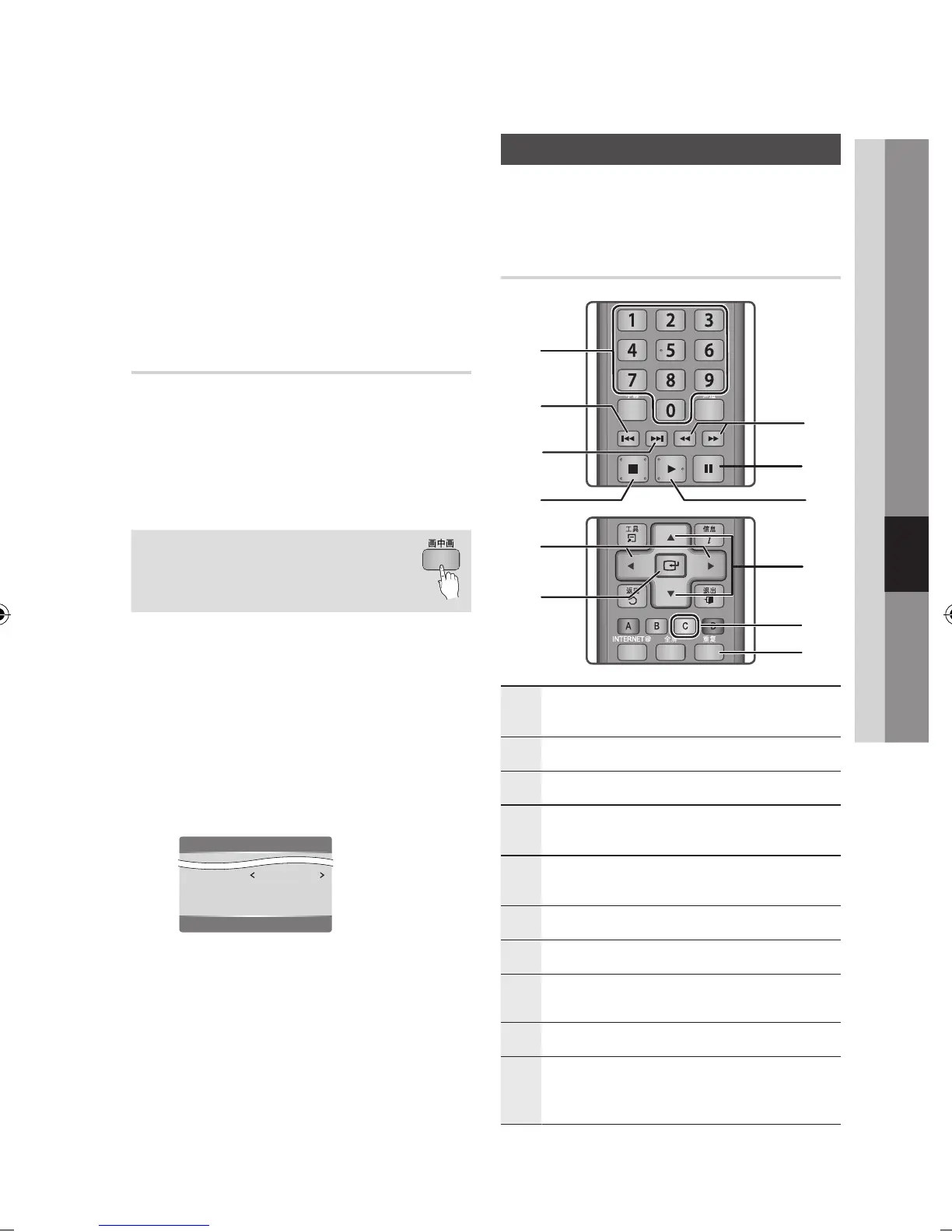
Listening to Music
ow
Buttons on the Remote Control
used for Music Playback
1
搜索
buttons : Fast Play.
(Audio CD (CD-DA) only)
2
暂停
button : Pauses playback.
3
播放
button : Plays the currently selected track.
4
▲▼ buttons : Selects a track in the Music List or
Playlist.
5
黄色
(C) button : Select or deselect a track in the
music list.
6
重复
button : Selects the play mode in the Playlist.
7
确认
button : Plays and pauses the selected track.
8
◄► buttons : Jump Play.
(except for the Audio CD (CD-DA))
9
停止
button :
Stops a
track
.
0
跳过
button : During playback, moves to the next
page in the Music List or moves to the next track in
the Playlist.
Tools
BONUSVIEW Video Off
BONUSVIEW Audio : 0/1 Off
Picture Setting
<
Change
"
Enter












 To Next Page