41
ENGLISH
SPECIAL HINTS
MELTING BUTTER
Put 50 g butter into a small deep glass dish. Cover with plastic lid.
Heat for 30-40 seconds using 800 W, until butter is melted.
MELTING CHOCOLATE
Put 100 g chocolate into a small deep glass dish.
Heat for 3-5 minutes, using 450 W until chocolate is melted.
Stir once or twice during melting. Use oven gloves while taking out!
MELTING CRYSTALLIZED HONEY
Put 20 g crystallized honey into a small deep glass dish.
Heat for 20-30 seconds using 300 W, until honey is melted.
MELTING GELATINE
Lay dry gelatine sheets (10 g) for 5 minutes into cold water.
Put drained gelatine into a small glass pyrex bowl.
Heat for 1 minute using 300 W. Stir after melting.
COOKING GLAZE/ICING (FOR CAKE AND GATEAUX)
Mix instant glaze (approximately 14 g) with 40 g sugar and 250 ml cold
water. Cook uncovered in a glass pyrex bowl for 3½ to 4½ minutes using
800 W, until glaze/icing is transparent. Stir twice during cooking.
COOKING JAM
Put 600 g fruits (for example mixed berries) in a suitable sized glass
pyrex bowl with lid. Add 300 g preserving sugar and stir well.
Cook covered for 10-12 minutes using 800 W.
Stir several times during cooking. Empty directly into small jam
glasses with twist-o lids. Stand on lid for 5 minutes.
COOKING PUDDING/ CUSTARD
Mix pudding powder with sugar and milk (500 ml) by following the
manufacturers instructions and stir well. Use a suitable sized glass pyrex
bowl with lid. Cook covered for 6½ to 7½ minutes using 800 W.
Stir several times well during cooking.
BROWNING ALMOND SLICES
Spread 30 g sliced almonds evenly on a medium sized ceramic plate.
Stir several times during browning for 3½ to 4½ minutes using 600 W.
Let it stand for 2-3 minutes in the oven. Use oven gloves while taking out!
Troubleshooting and error code
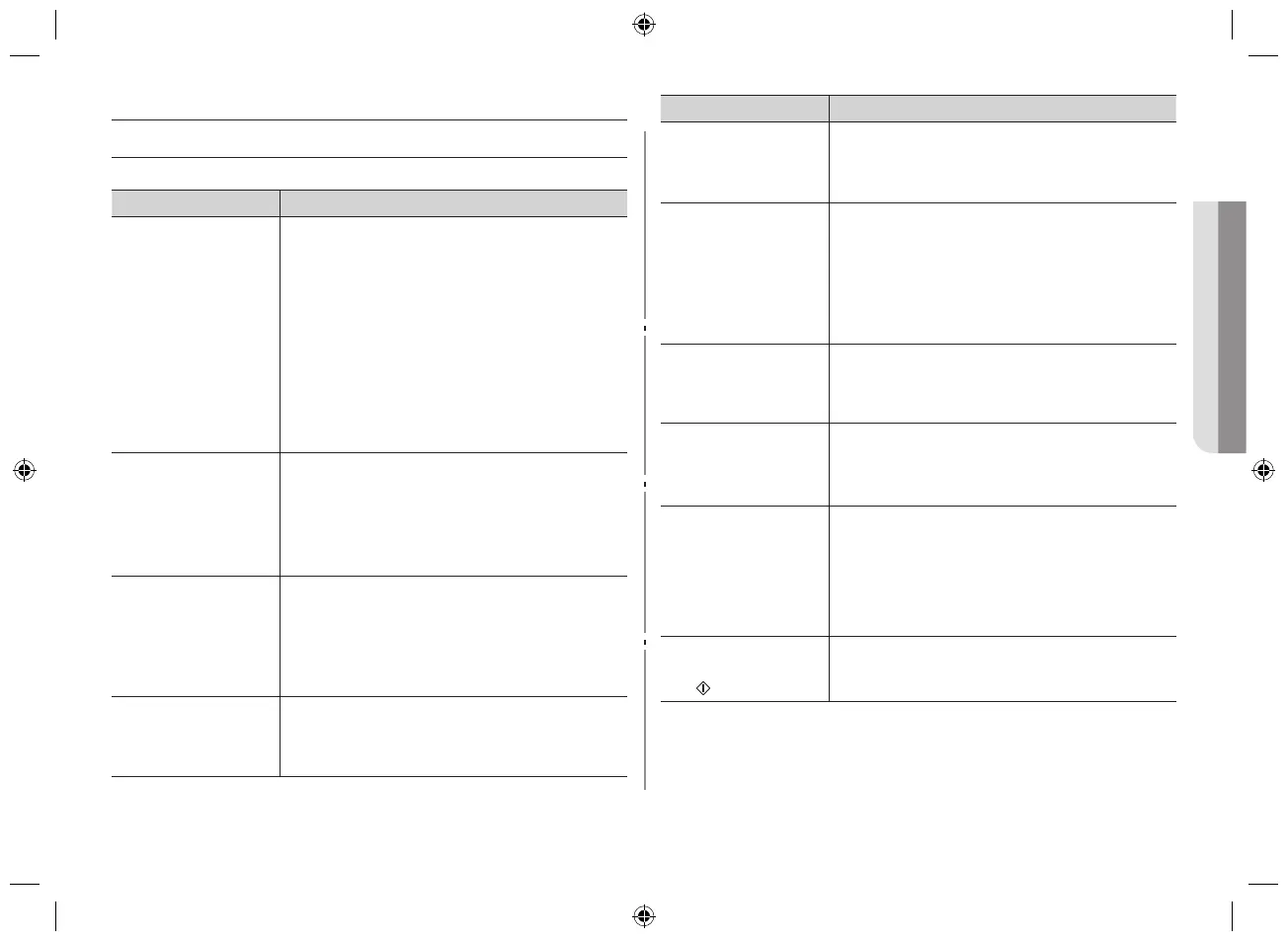
TROUBLESHOOTING
If you have any of the problems listed below try the solutions given.
Problem Solution
The display and/
or the oven is not
working.
• Makesuretheplugisproperlyconnectedtoa
grounded outlet.
• Ifthewalloutletiscontrolledbyawallswitch,
make sure the wall switch is turned on.
• Removetheplugfromtheoutlet,waitten
seconds, then plug it in again.
• Resetthecircuitbreakerorreplaceanyblown
fuse.
• Plugadierentapplianceintotheoutlet.Ifthe
other appliance doesn’t work, call a qualified
electrician to repair the wall outlet.
• Plugtheovenintoadierentoutlet.
The oven’s display
works, but the power
won’t come on.
• Makesurethedoorisclosedsecurely.
• Checkifanypackagingmaterialoranythingelse
is stuck in the door seal.
• Checkifthedoorisdamaged.
• PressCanceltwiceandenterallcooking
instructions.
The power goes o
before the set time
has elapsed.
• Itmayoccurapoweroutage.Iftherewasa
power outage, the time indicator will display:
88:88.
• Resettheclockandanycookinginstructions
• Resetthecircuitbreakerorreplaceanyblown
fuse.
The food is cooking
too slowly.
• Makesuretheovenisonitsown12Aamp
circuit line. Operating another appliance on
the same circuit can cause a voltage drop. If
necessary, move the oven to its own circuit.
Problem Solution
Has sparks or arcing.
• Remove any metallic utensils, cookware, or
metal ties. If using foil, use only narrow strips
and allow at least one inch between the foil and
interior oven walls.
The turntable makes
noise or becomes
stuck.
• Cleantheturntable,rollerringandovenoor.
• Makesuretheturntableandrollerringare
positioned correctly.
• Makesureyouhavenotputtoomuchfoodon
the turntable.
• Ifthefoodistoolargeortooheavy,theturntable
may operate improperly.
Causes TV or radio
interference.
• Thisissimilartointerferencecausedbyother
small appliances, such as hair dryers. Move your
microwave (or appliance) away from appliances,
such as your TV or radio.
Operating noise is
too loud.
• TheMWOmakesnoiseduringoperation.Thisis
normal.
• Ifyouhearanabnormalsoundcontinuously,
please contact the Samsung Call Center.
This is normal. • Condensation inside the oven
• Airowaroundthedoorandoutercasing.
• Lightreectionaroundthedoorandouter
casing.
• Steamescapingfromaroundthedooror
vents.
The oven does not
start when you press
the
button.
• Is the door completely closed?
CE74JD-CR_XTL_DE68-04168A-01_EN.indd 41 2014-05-16 �� 9:09:34


 To Next Page