Operating advanced function _27
ENGLISH
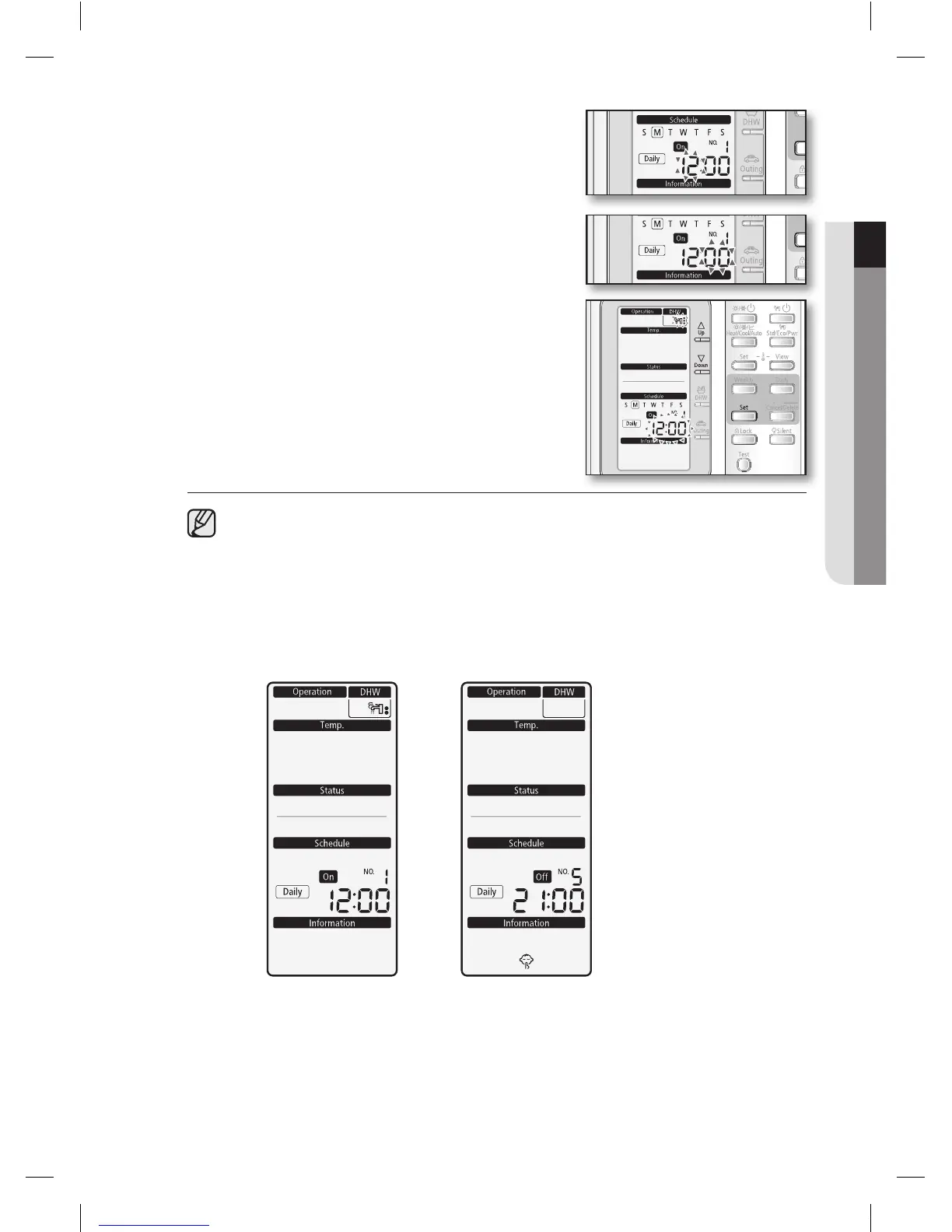
4. Set the hour by pressing the Up or Down button.
The ‘hour’ indicator will blink. Set the hour and press
Set button to save the setting.
5. Set the minute by pressing the Up or Down button.
The ‘minute’ indicator will blink. Set the minute and
press Set button to save the setting.
6. Confirm the Schedule.
After step 5, all indicators are blinking except
“Reservation No”, “Daily”. Then press Set button.
• Onthisstep,youcanonlyuseSet or Cancel/Delete button.
• Ifthereisareservationonthesamedayandtime,itwillnotbeconfirmedand
“Not Available” indicator will blink for 3 seconds. In this case, go back to the step 4.
Viewing the Daily Schedule (On / Off) Display
OnReservation OffReservation
RC120MHXGA_IB_E_34412A(1).indd 27 2012-02-08 오후 2:35:48










 To Next Page