44_ Operating the oven
USING THE KEEP WARM FUNCTION
The keep warm feature will maintain an oven temperature of 170°F. You should not use this feature
to reheat cold foods. The keep warm feature will keep cooked food warm for serving up to 3
hours after cooking has finished.
After 3 hours, the feature will shut the oven off automatically. The feature may be used without any
other cooking operations or may be set to activate after a timed or delay timed cooking operation.
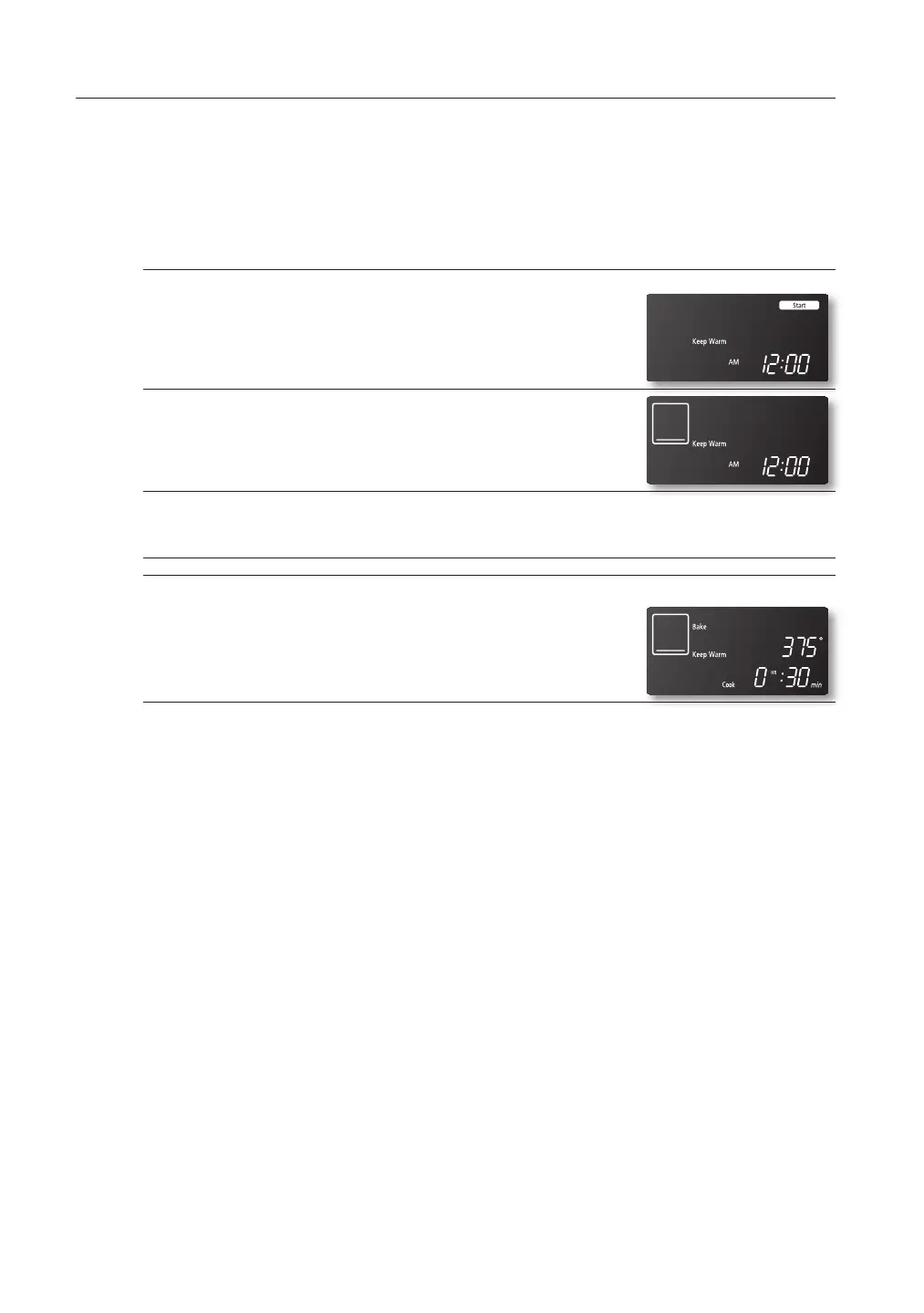
How to use the keep warm feature
1. Press the KEEP WARM pad.
2. Press the SET/START pad.
3. Press the CLEAR/OFF pad at any time to turn the feature off.
How to set the oven to activate the keep warm mode after a timed
cooking
1. Press the KEEP WARM pad during a cooking operation, eg.
baking.
The oven is now programmed to activate the keep warm mode
automatically after completing the cooking operation.
2. Press the CLEAR/OFF pad at any time to turn the feature off.
FTQ307NWGX_XAA DG68-00228A.indd 44 2009-06-30 1:54:55



 To Next Page