EasyManua.ls Logo

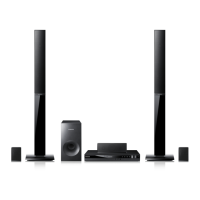
Samsung HT-E455K - User Manual

Samsung HT-E455K
46 pages
Print Icon
To Next Page IconTo Next Page
Loading...
Digital Home
Entertainment System
user manual
Imagine the possibilities
Thank you for purchasing this Samsung product.
To receive more complete service,
please register your product at
www.samsung.com/register
HT-E450K
HT-E453K
HT-E453HK
HT-E445K
HT-E455K

Table of Contents

Questions and Answers

  • L
    lindsay53Aug 18, 2025
    How to reset my Samsung HT-E455K Home Theater System?
    • G
      geoffrey39Aug 18, 2025
      If your Samsung Home Theater System isn't working at all, you can try resetting it. To do this, press and hold the STOP button on the remote control for longer than 5 seconds while there is no disc inside. Be aware that using the RESET function will erase all stored settings, so only use this if necessary.
  • B
    Brittany StokesAug 20, 2025
    Why is my Samsung HT-E455K Home Theater System remote control not working?
    • J
      jeremy59Aug 20, 2025
      If your Samsung Home Theater System remote control isn't working, make sure you're within the operational range for both angle and distance. Check if the batteries are dead and replace them if needed. Also, verify that you've selected the correct mode, such as RECEIVER, DVD, or TV.
  • S
    sheltonjustinAug 23, 2025
    Why is there no sound coming from my Samsung HT-E455K?
    • A
      Anthony FernandezAug 23, 2025
      If your Samsung Home Theater System isn't producing any sound, here are a few things to check: * Ensure the speakers are correctly connected and the speaker setup is customized properly. * Be aware that no sound is produced during fast playback, slow playback, and step motion playback. * Check the disc for severe damage.
  • E
    Elizabeth LopezAug 26, 2025
    How to enable Dolby Digital 5.1 CH Surround Sound on Samsung HT-E455K?
    • R
      Robert ColeAug 26, 2025
      If your Samsung Home Theater System is not producing Dolby Digital 5.1 CH Surround Sound, first check if the disc has the "Dolby Digital 5.1 CH" mark, as the sound is only produced if the disc is recorded with 5.1 channel sound. Next, verify that the audio language is correctly set to Dolby Digital 5.1-CH in the information display.
  • A
    Amy PrattAug 28, 2025
    Why is sound only coming from a few speakers on my Samsung Home Theater System?
    • R
      rebekahmurphyAug 28, 2025
      If you're only hearing sound from a few speakers instead of all six on your Samsung Home Theater System: * Note that some DVD discs only output sound from the front speakers. * Ensure all speakers are connected correctly. * Adjust the volume levels. * When listening to a CD, radio, or TV, sound is typically output to the front speakers only; select "PROLOG" by pressing PL II (Dolby Pro Logic II) on the remote to utilize all six speakers.
  • M
    Meghan CameronAug 30, 2025
    What to do if my Samsung Home Theater System disc is rotating but there is no picture?
    • D
      Dawn RogersAug 30, 2025
      If your Samsung Home Theater System disc is rotating, but no picture is showing, first, ensure that your TV is powered on. Then, check whether the video cables are properly connected. Also, inspect the disc for any dirt or damage. Keep in mind that a poorly manufactured disc might not be playable.
  • A
    Andrew McdonaldSep 2, 2025
    Why does playback not start immediately on my Samsung Home Theater System?
    • E
      Erika WilsonSep 2, 2025
      If playback doesn't start immediately on your Samsung Home Theater System when you press the Play/Pause button, it could be due to a deformed or scratched disc. Try wiping the disc clean.
  • L
    Linda NelsonSep 4, 2025
    Why won't playback start on my Samsung Home Theater System?
    • E
      Elizabeth BondSep 5, 2025
      If playback won't start on your Samsung Home Theater System, check the DVD's region number, as discs from abroad may not be playable. Note that CD-ROMs and DVD-ROMs cannot be played on this product. Also, ensure the rating level is correct.
  • M
    Michael GarciaSep 7, 2025
    What to do if I forgot the rating level password on my Samsung HT-E455K?
    • C
      Cassandra KimSep 7, 2025
      If you've forgotten the rating level password on your Samsung Home Theater System, make sure the “NO DISC” message is displayed. Then, press and hold the STOP button on the remote control for longer than 5 seconds. “INIT” will appear, resetting all settings to default. Finally, press the POWER button. Remember, this will erase all stored settings, so use it only when necessary.
  • J
    Joel PerkinsSep 9, 2025
    Why can't my Samsung HT-E455K receive radio broadcast?
    • V
      Valerie DunnSep 9, 2025
      If your Samsung Home Theater System can't receive radio broadcasts, check that the antenna is properly connected. If the antenna signal is weak, consider installing an external FM antenna in an area with better reception.

Summary

Safety Information

Safety Warnings

Key safety warnings for using the product to prevent hazards.

Precautions

Important guidelines for safe and proper product usage and installation.

Cautions on Handling and Storing Discs

Instructions for handling discs to maintain quality and prevent damage.

Licence, Copyright, and Copy Protection

Legal notices, software licenses, and guidelines for copy protection.

Getting Started

Icons and Manual Conventions

Explanation of icons and notes used throughout the user manual for clarity.

Disc Types and Characteristics

Details on compatible disc formats, region codes, and playback capabilities.

USB Connection Notes

Important considerations and limitations for connecting USB storage devices.

Description

Front Panel Overview

Identifies and explains the controls and ports located on the front of the device.

Rear Panel Connectors

Identifies and explains the various input and output connectors on the rear of the device.

Remote Control

Tour of the Remote Control

Detailed explanation of each button and its function on the remote control.

Remote Control Setup and Operation

Instructions for installing batteries and setting the remote to control the TV.

Connections

Connecting the Speakers

Guide on how to connect and position the speaker system for optimal sound.

Speaker Components and Installation

Visual guide to speaker parts and assembly instructions for tallboy stands.

Video, Audio, and Antenna Connections

Methods for connecting video, audio inputs, microphone, and FM antenna.

Setup

Initial Settings and Language Selection

Guide for initial setup, on-screen language, and TV aspect ratio.

Display Settings

Configuration options for screen aspect ratio, resolution, and video output formats.

Audio Configuration

Settings for speaker size, sound editing, delay time, and audio modes.

System Settings

Access to system configurations like DivX registration and initial settings.

Security and Parental Controls

Manages parental lock and password settings to control DVD content access.

Basic Functions

Disc Playback Operations

Instructions for inserting, playing, stopping, and resuming discs.

Media File Playback

How to play various media files like JPEG, MP3, and use playback features.

Advanced Disc Navigation

Features for step motion, title menus, repeat playback, and disc menus.

Disc Repeat and Information

Setting repeat modes, A-B playback, and displaying disc information.

Playback Tools and Options

Accessing playback tools, caption functions, and viewing different angles.

Device Control Features

Setting sleep timers and adjusting display brightness.

Sound Modes and Settings

Configuring DSP/EQ, Dolby Pro Logic II, and other audio enhancements.

Radio Operation

Tuning FM stations, setting mono/stereo, and presetting favorite stations.

Advanced Functions

USB Functionality

Playing media files from USB devices and performing safe removal.

USB Recording

Recording audio from CDs or FM radio to a USB device.

Other Information

Troubleshooting Guide

Solutions for common problems and issues encountered with the product.

Technical Specifications

Detailed technical data including dimensions, power, and speaker performance.

Software Licenses and Credits

Terms and conditions for OpenSSL and other included software.

Customer Support

Contact Information by Region

Samsung customer care contact details for various global regions.

Samsung HT-E455K Specifications

General IconGeneral
Disc loading typeTray
Disc types supportedCD, CD-R, CD-RW, DVD, DVD+R, DVD+RW, DVD-R, DVD-RW
Playback disc formatsCD audio, CD video, VCD
Number of optical discs1 discs
Optical disc player typeDVD player
Built-in HDDNo
Apple docking compatibilityNot supported
Video formats supportedDIVX
EqualizerYes
Audio decodersDolby Digital, Dolby Pro Logic II, DTS
RMS rated power1000 W
Audio output channels5.1 channels
Audio formats supportedAAC, MP3, WMA
Supported radio bandsFM
Subwoofer typePassive subwoofer
Product colorBlack
Consumer Electronics Control (CEC)Anynet+
HDMI in0
USB version2.0
Number of HDMI outputs1
Power consumption (standby)0.47 W
Power consumption (typical)67 W
Cables includedAC, Composite, HDMI
Package weight22800 g
Weight and Dimensions IconWeight and Dimensions
Main unit weight2300 g
Subwoofer weight6060 g
Center speaker weight465 g
Main unit dimensions (WxDxH)430 x 250 x 58 mm
Subwoofer dimensions (WxDxH)200 x 350 x 390 mm
Front speaker dimensions (WxDxH)89 x 71 x 1053 mm
Center speaker dimensions (WxDxH)228 x 70 x 77 mm

Related product manuals