EasyManua.ls Logo

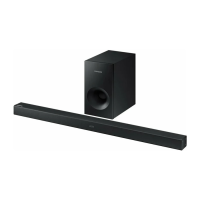
Samsung HW-H600 - User Manual

Samsung HW-H600
23 pages
Print Icon
To Next Page IconTo Next Page
Loading...
Wireless Audio - SoundStand
Imagine the possibilities
Thank you for purchasing this Samsung product.
To receive a more complete service, please register your product at
www.samsung.com/register
User manual
HW-H600

Questions and Answers

  • D
    Douglas MartinezAug 15, 2025
    What to do if my Samsung Stereo System is not producing sound?
    • D
      Daniel MaciasAug 16, 2025
      If your Samsung Stereo System isn't producing any sound, make sure the Mute function is not activated by pressing the Mute button to cancel it. Also, check and adjust the volume to an audible level.
  • A
    Adam WallsAug 19, 2025
    What to do if my Samsung Soundbar remote control does not work?
    • R
      Ronald ChoiAug 19, 2025
      If your Samsung Soundbar remote isn't working, first, try replacing the batteries with new ones. If that doesn't solve the issue, make sure you're not too far from the main unit and move closer.
  • M
    michealpalmerAug 22, 2025
    What to do if my Samsung Speaker System is not producing sound?
    • S
      spriceAug 22, 2025
      If your Samsung Speaker System isn't producing sound, check if the Mute function is on or if the volume is set to the minimum. To resolve this, press the Mute button to cancel the function, and adjust the volume accordingly.
  • G
    gabrieltaylorAug 25, 2025
    How to fix Samsung Stereo System TV SoundConnect pairing failed?
    • C
      cassandra92Aug 25, 2025
      If the TV SoundConnect pairing is failing on your Samsung Stereo System, first ensure that your TV supports TV SoundConnect, which is available on some Samsung TVs released after 2012. Update your TV with the latest firmware. Additionally, press and hold the ?? button for 5 seconds to reset the TV SoundConnect connection. If an error still occurs, contact the Samsung call centre.
  • M
    Mr. Christopher HerreraAug 27, 2025
    Why is there no sound coming from my Samsung Soundbar?
    • L
      Lee BrownAug 27, 2025
      If your Samsung Soundbar isn't producing sound, first check if the Mute function is activated and deactivate it by pressing the Mute button. Also, ensure that the volume isn't set to the minimum; adjust it to a suitable level.
  • M
    Michelle RaymondAug 30, 2025
    What to do if TV SoundConnect (TV pairing) failed on Samsung Soundbar?
    • M
      Michelle LewisAug 30, 2025
      If the TV SoundConnect (TV pairing) failed on your Samsung Soundbar, ensure your Samsung TV supports TV SoundConnect (available on models released after 2012). Update your TV's firmware to the latest version. If an error occurs during connection, contact the Samsung call center or reset the TV SoundConnect connection by pressing and holding the ?? button for 5 seconds.
  • A
    Alexander CampbellSep 3, 2025
    Why is my Samsung Speaker System remote control not working?
    • S
      Sarah MartinSep 3, 2025
      If your Samsung Speaker System remote control isn't working, the batteries may be drained, or you might be too far from the main unit. Try replacing the batteries with new ones and move closer to the unit.
  • C
    Casey TorresSep 6, 2025
    Why is my Samsung Stereo System remote control not working?
    • C
      Colleen JenkinsSep 6, 2025
      If the remote control for your Samsung Stereo System isn't working, first, replace the batteries with new ones, as the current ones may be drained. If that doesn't solve the issue, try moving closer to the main unit, as the distance might be too far.
  • C
    cthomasSep 9, 2025
    What to do if a function does not work on Samsung Stereo System?
    • P
      paynemollySep 9, 2025
      If a function on your Samsung Stereo System isn't working when you press the button, disconnect the power plug and then reconnect it.
  • D
    Dakota WoodSep 12, 2025
    Why did the TV SoundConnect (TV pairing) fail on my Samsung Speaker System?
    • R
      Rose ClarkSep 12, 2025
      The TV SoundConnect (TV pairing) might have failed on your Samsung Speaker System because your TV may not support TV SoundConnect, your TV firmware might not be the latest version, or an error occurred during connection. TV SoundConnect is supported by some Samsung TVs released after 2012, so check your TV's compatibility. Update your TV with the latest firmware. Press and hold the ?? button for 5 seconds to reset the TV SoundConnect connection.

Summary

FEATURES

TV SoundConnect

Listen to TV audio via Bluetooth and control sound.

HDMI and ARC

Transmit video/audio via HDMI; ARC for TV audio output.

Sound Modes & Expansion

Special Sound Modes and Surround Sound Expansion for enhanced audio.

Wireless & USB Connectivity

Bluetooth, NFC, and USB Host for wireless music playback.

SAFETY INFORMATION

Safety Warnings

Reduce risk of electric shock, fire, and personal injury.

Precautions for Use

Protect from moisture, heat, interference; handle batteries safely.

GETTING STARTED

Before Reading

Review manual terms, safety instructions, and copyright information.

Whats Included

List of supplied accessories with the SoundStand.

DESCRIPTIONS

Top;Front Panel Overview

Details buttons and display on the front panel for operation.

Rear Panel Connections

Describes all input/output ports on the rear panel for connectivity.

REMOTE CONTROL

Remote Button Functions

Explains operation of key buttons like Source, Sound Effect, Volume, and playback.

Installing Remote Batteries

Step-by-step guide to insert batteries using a coin.

INSTALLATION

SoundStand TV Placement

Conditions for placing TV on SoundStand and installation tips.

Protection Pad Usage

Apply protection pads to prevent scratches on the product surface.

CONNECTIONS

HDMI Cable Connections

Connect external devices using HDMI IN and OUT ports for quality transmission.

Optical & Analogue Connections

Connect to TV using OPTICAL IN or AUX IN ports for audio.

FUNCTIONS

Input Mode Selection

Select desired audio input source mode using SOURCE or F. button.

ARC (HDMI OUT) Function

Enables digital audio output via the HDMI OUT(ARC) port.

Bluetooth Music Playback

Connect and play music from Bluetooth devices wirelessly.

Bluetooth Power Management

Control automatic power on/off behavior via Bluetooth.

NFC Device Pairing

Connect NFC-enabled devices via Bluetooth for simple setup.

TV SoundConnect Setup

Connect to a Samsung TV for wireless audio streaming.

USB Media Playback

Play music files from USB storage devices.

Software Upgrade Procedure

Update the SoundStand's system firmware using a USB device.

TROUBLESHOOTING

Common Operational Issues

Solutions for power, sound, remote control, and TV SoundConnect problems.

APPENDIX

Technical Specifications

Details on weight, dimensions, power, and audio performance.

Licensing Information

Details on Dolby, DTS, HDMI, and ENERGY STAR licensing.

Contact SAMSUNG WORLD WIDE

Samsung HW-H600 Specifications

General IconGeneral
Audio decodersDolby Digital, DTS
RMS rated power80 W
Audio output channels4.2 channels
Soundbar speaker RMS power40 W
Subwoofer typeActive subwoofer
Subwoofer includedYes
Subwoofer locationBuilt-in
Receiver included-
FM radioNo
Product colorBlack
Audio formats supportedAAC, FLAC, MP3, OGG, WAV, WMA
Consumer Electronics Control (CEC)Anynet+
Apple docking compatibilityNot supported
Soundbar dimensions (WxDxH)735 x 36.5 x 360 mm
HDMI in1
Package weight6500 g
Weight and Dimensions IconWeight and Dimensions
Soundbar weight5000 g

Related product manuals