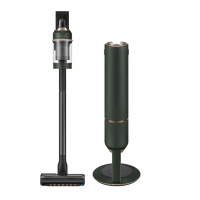
This document serves as a user manual for the Samsung VS15A60**** series vacuum cleaner, providing detailed instructions for its operation and maintenance. The vacuum cleaner is designed for indoor use and emphasizes user safety and optimal performance through proper handling and care.
Function Description
The Samsung VS15A60**** is a versatile vacuum cleaner designed for various cleaning tasks within the home. Its primary function is to suction dust and debris from different surfaces, including floors and carpets, using a powerful motor and a range of specialized attachments. The device features a dustbin and a multi-stage filtration system, including a washable micro filter, metal mesh grille filter, and fine dust filter, to capture particles effectively and maintain air quality. The vacuum cleaner operates on a rechargeable lithium-ion battery, offering cordless convenience.
Usage Features
The vacuum cleaner is designed for ease of use with several intuitive features:
- Power and Suction Control: A power button initiates operation in 'MID' mode, and a suction power control button allows users to adjust the suction strength (increase with '+' and decrease with '-').
- Battery Level Indicator: An indicator displays the current battery level, blinking when low to prompt charging.
- Charging Options: The vacuum can be charged using a wall mount or a desk charger. The wall mount is designed for easy storage and charging, requiring installation at a specific height (113 cm from the floor) on a hard concrete wall. The battery can also be removed and charged separately using the desk charger.
- Accessory System: The vacuum cleaner comes with a variety of accessories that can be easily attached and detached:
- Pipe: Extends the reach of the vacuum for floor cleaning.
- Jet Fit Brush: Suitable for various floor conditions, including carpets.
- Mini Motorized Tool: Designed for cleaning bedding.
- Combination Tool: Ideal for removing dust from curtains, furniture, and sofas.
- Extension Crevice Tool: Perfect for reaching dust in window frames, chinks, and corners.
- Accessory Storage: The wall mount includes accessory holders for convenient storage of attachments. The Extension Crevice Tool can be inserted first to facilitate folding of the accessory holders.
- Battery Ejection and Re-insertion: The battery can be ejected by pressing a release button at the rear of the handle and re-inserted by pushing it until a click is heard, ensuring a secure connection.
- Safety Mechanisms: The vacuum cleaner incorporates safety features such as an overheating prevention device that stops operation if the dustbin is full or the suction part/brush is clogged. The spinning brush (drum) will also stop if excessive force is applied or foreign matter gets tangled, protecting the motor.
Maintenance Features
Regular maintenance is crucial for the vacuum cleaner's performance and longevity:
- Dustbin Emptying and Cleaning: The dustbin should be emptied frequently, especially before it becomes completely full (indicated by the 'MAX' sign). After emptying, the dustbin should be cleaned and dried in the shade to prevent malformation from heat. The metal mesh grille filter inside the dustbin can be cleaned with the combination tool.
- Filter Cleaning:
- Washable Micro Filter: To maintain optimal performance, dust should be removed frequently, and the filter should be cleaned with water once a month. After cleaning, it must be dried completely in the shade for more than 24 hours before re-use.
- Fine Dust Filter: Similar to the micro filter, this filter should be cleaned frequently and washed with water once a month, followed by complete drying in the shade for over 24 hours.
- Assembly Note: When reassembling filters, turn them until the line below the lock image is no longer visible to ensure correct placement.
- Brush Cleaning:
- Jet Fit Brush: If foreign matter is tangled in the spinning brush, it should be removed using scissors. If the brush stops working due to foreign matter, turn the power off, remove the obstruction, and then turn it on again.
- General Brush Care: Avoid cleaning the brush with water to prevent deformation or discoloration.
- Wall Mount Cleaning: The wall mount should be cleaned after unplugging the product.
- General Cleaning: The exterior of the vacuum cleaner should be wiped with a dry towel after turning off the power. Avoid spraying water directly onto the product or using volatile materials like benzene, thinner, or alcohol, as this can cause damage or malfunction.
- Detergent Use: When cleaning washable parts, use neutral dishwashing detergent. Avoid alkaline detergents, acids, industrial cleaners, jet spray air fresheners, oils, or edible acetic acid, as these can cause product damage, deformation, or discoloration.
- Battery Care:
- If the battery level is consistently low, recharge it promptly to prevent performance degradation.
- If the vacuum cleaner will not be used for an extended period, detach the battery from the vacuum and unplug the wall mount to prevent slow discharge.
- Replace exhausted batteries with genuine Samsung batteries when charging time and usage time shorten significantly.
- Discard dead batteries in a collection box for recycling.
- Troubleshooting: The manual provides solutions for common issues such as the vacuum not working, decreased suction force, inability to charge, or the spinning brush not working. These solutions often involve checking battery levels, clearing blockages, cleaning filters, or removing foreign matter.


 To Next Page
 General
 Weight and Dimensions