EasyManua.ls Logo

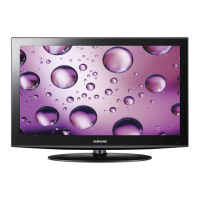
Samsung LN32D403E2D - User Manual

Samsung LN32D403E2D
64 pages
Print Icon
To Next Page IconTo Next Page
Loading...
imagine the possibilities
Thank you for purchasing this Samsung product.
To receive more complete service, please register
your product at
www.samsung.com/register
Model _____________ Serial No. _____________
User Manual
Contact SAMSUNG WORLD-WIDE
If you have any questions or comments relating to Samsung products, please contact the SAMSUNG customer care center.
Contacte con SAMSUNG WORLD WIDE
Si desea formular alguna pregunta o comentario en relación con los productos de Samsung, comuníquese con el centro de atención
al cliente de SAMSUNG.
Country
Customer Care Center
Web Site
MEXICO 01-800-SAMSUNG(726-7864) www.samsung.com
IMPORTADO POR: SAMSUNG ELECTRONICS MÉXICO S.A. de C.V.
AV. PRESIDENTE MASARIK #111 INT701
COL. CHAPULTEPEC MORALES C.P.11570
DELEGACION MIGUEL HIDALGO MEXICO. DISTRITO FEDERAL
Tel: 01-55-5747-5100 / 01-800-726-7864
BN68-03703C
BN68-03703C-02
[UD5003-ZX]BN68-03703C.indb 1 2011-06-08 �� 10:34:51

Table of Contents

Other manuals for Samsung LN32D403E2D

Questions and Answers

  • B
    Benjamin GonzalezAug 29, 2025
    Why is the color wrong or missing on my Samsung LN32D403E2D?
    • Z
      zachary23Aug 29, 2025
      Incorrect or loose connections may cause color problems or a blank screen on your Samsung Monitor. If you’re using a Component connection, ensure the component cables are connected to the correct jacks.
  • L
    Leroy BauerAug 28, 2025
    What to do if my Samsung Monitor TV turns off automatically?
    • C
      Christopher MolinaAug 28, 2025
      If your Samsung Monitor TV turns off automatically, check if the Sleep Timer is set to Off in the Setup menu. If a PC is connected, review its power settings. Ensure the AC power cord is securely plugged into the wall outlet and the TV. Note that the TV will turn off after 10-15 minutes if there is no signal from an antenna or cable connection.
  • D
    Dominic EverettAug 27, 2025
    Why is there no picture/video on my Samsung Monitor?
    • M
      Michael NixonAug 27, 2025
      If there's no picture or video on your Samsung Monitor, check the cable connections by removing and reconnecting all cables connected to the TV and external devices. Ensure your external device's video outputs match the connections to the TV input. Also, make sure your connected devices are powered on and that you've selected the correct source on the TV using the SOURCE button on the remote. You can also try rebooting the connected device by reconnecting its power cable.
  • L
    Lisa ThomasAug 26, 2025
    Why is there no sound on my Samsung LN32D403E2D Monitor even though the picture is good?
    • W
      williamsmargaretAug 27, 2025
      If the picture is good but there is no sound on your Samsung Monitor, and you are using an external device, check the device’s audio output option. For example, you may need to change your cable box’s audio option to HDMI when you have a HDMI cable connected to your TV. If you are using a DVI to HDMI cable, a separate audio cable is required. You can also try rebooting the connected device by reconnecting the device’s power cable.
  • S
    Shawn ThomasAug 25, 2025
    Why is the picture black and white on my Samsung LN32D403E2D?
    • C
      Caleb BradleyAug 26, 2025
      If the picture on your Samsung Monitor is black and white, and you are using an AV composite input, connect the video cable (yellow) to the Green jack of component input 1 on the TV.
  • B
    Brandon CalderonAug 25, 2025
    Why is there no sound on my Samsung Monitor, or the sound is too low at maximum volume?
    • V
      vleeAug 25, 2025
      If there's no sound or the sound is too low even at maximum volume on your Samsung Monitor, check the volume level of the device connected to your TV, such as a Cable/Sat Box, DVD player, or Blu-ray player.

Samsung LN32D403E2D Specifications

General IconGeneral
Audio systemSRS TS
RMS rated power10 W
Number of speakers2
3DNo
Power LEDYes
Storage temperature (T-T)-20 - 45 °C
Operating relative humidity (H-H)10 - 80 %
Operating temperature (T-T)10 - 40 °C
Package depth155 mm
Package width930 mm
Package height565 mm
Package weight10800 g
Image formats supportedJPG
Display diagonal32 \
Display resolution1360 x 768 pixels
Display technologyLCD
Native aspect ratio16:9
Supported video modes720p
Contrast ratio (dynamic)20000:1
Supported graphics resolutions1360 x 768 (WXGA)
Tuner typeDigital
Digital signal format systemATSC
SCART ports quantity0
USB 2.0 ports quantity1
Product colorBlack
LED indicatorsStand-by
Panel mounting interface200 x 200 mm
Sustainability certificatesENERGY STAR
Weight and Dimensions IconWeight and Dimensions
Depth (with stand)182.4 mm
Width (with stand)784 mm
Height (with stand)545.3 mm
Weight (with stand)8600 g
Depth (without stand)98 mm
Height (without stand)503 mm
Weight (without stand)7600 g

Related product manuals