EasyManua.ls Logo

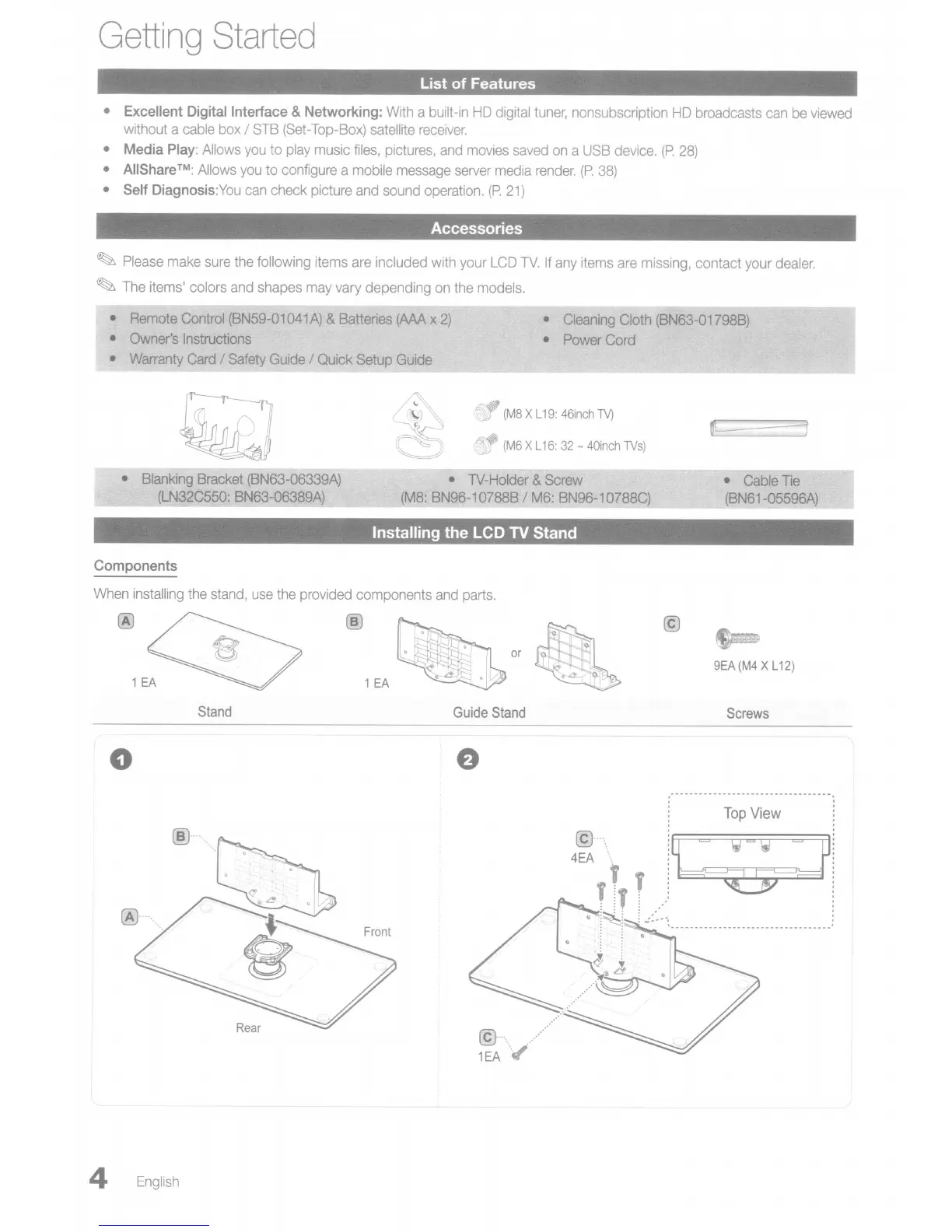
Samsung LN40C550 - Getting Started; Ust of Features; Accessories; Installing the LCD TV Stand

Samsung LN40C550
70 pages
Print Icon
To Next Page IconTo Next Page
To Previous Page IconTo Previous Page
Loading...
Getting
Started
List
of
Features
• Excellent Digital Interface & Networking:
With
a built-in
HD
digital
tuner,
nonsubscription
HD
broadcasts
can
be
viewed
without a
cable
box
/
STB
(Set
-Top-Box)
satellite
receiver.
• Media
Play:
Allows
you
to
play
music
files,
pictures,
and
movies
saved
on
a
USB
device.
(P.
28)
•
AIIShare™:
Allows
you
to
configure
a
mobile
message
server
media
render.
(P.
38)
• Self Diagnosis:You
can
check picture
and
sound
operation.
(P.
21)
Accessories
~
Please
make
sure
the
following items
are
included
with
your
LCD
TV.
If
any
items
are
missing,
contact
your
dealer.
~
The
items' colors
and
shapes
may
vary
depending
on
the
models.
•
Remote
Control
(BN59-01041A)
&
Batteries
(AAA
x
2)
•
Owner's
Instructions
•
Warranty
Card
/
Safety
Guide
/ Quick Setup
Guide
•
Cleaning
Cloth
(BN63-01798B)
• PowerCord
F.d)
(M8
XL
19:
46inch
TV)
(M6
XL
16:
32
-
40inch
TVs)
•
Blanking
Bracket
(BN63-06339A)
(LN32C550:
BN63-06389A)
•
Cable
Tie
(BN61-05596A)
Installing the LCD
TV
Stand
Components
When
installing
the
stand,
use
the
provided
components
and
parts.
~or
1EA~
@
9EA
(M4
XL
12)
Stand
Guide
Stand
Screws
o
Top
View
i~
,:
~
..
@--_
....
4EA
@-_.\
1EA
.
4
English