EasyManua.ls Logo

Samsung LN40C550 - Viewing the Control Panel

Samsung LN40C550
70 pages
Print Icon
To Next Page IconTo Next Page
To Previous Page IconTo Previous Page
Loading...
o
.....
©
..
'\,
4EA
o
~
~7
.
1.!'~
~
:\
1 j
'--~---','!_------------
,---~\\_---------_._-------.
•
s~.
I B
V·
·
;
~s
1 1 ottom
lew
(-
--~
:
~
. :
,0:
I
s~.
,---'
0 •
· ,
...------.....---,0
---,
..
~.
: I ·
::
(
0'
:
:.
.
::
.:
:
::~
C>:
'i~1
'
..
..
__
..
_.~
..
~
.......
__
..
_f
~
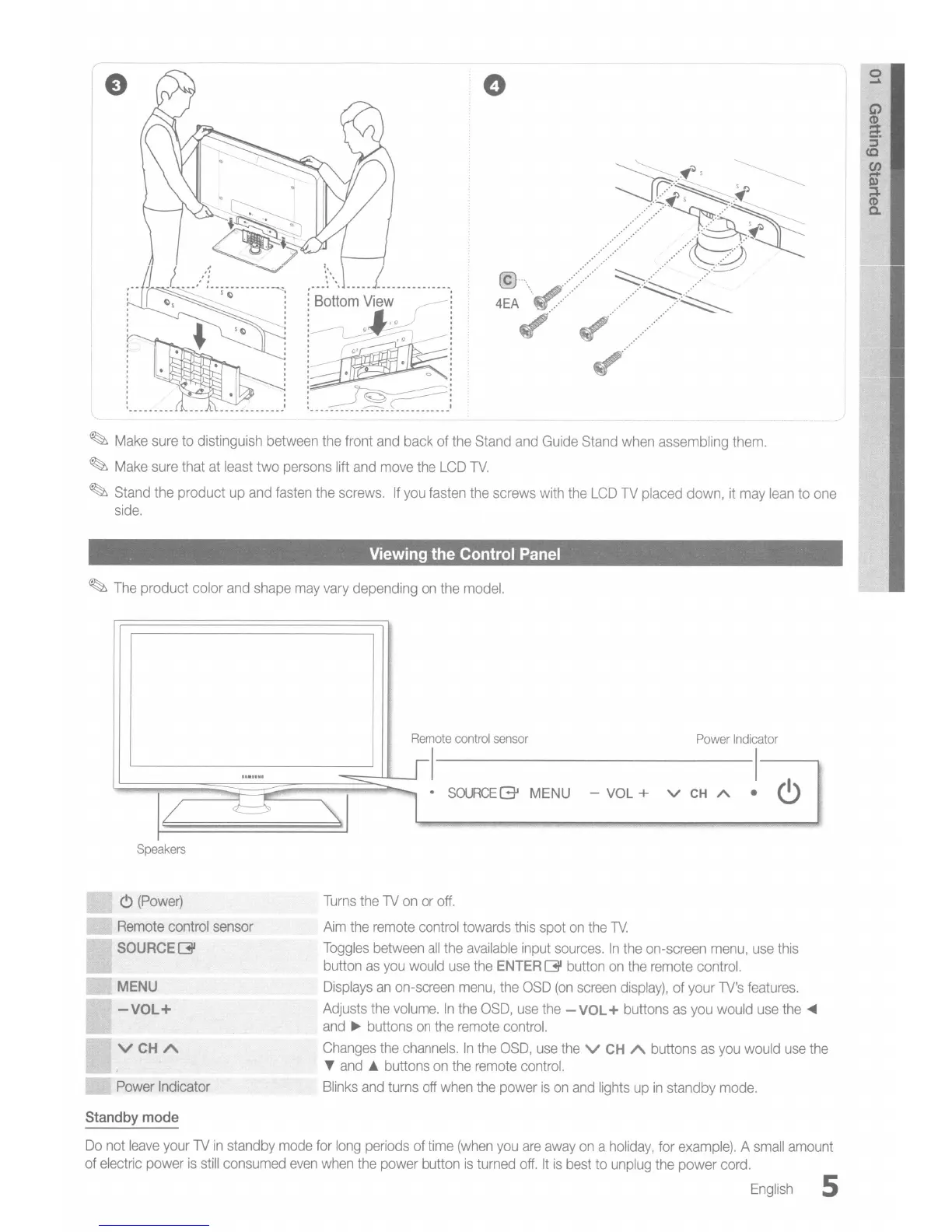
Make
sure
to
distinguish between
the
front
and
back of the Stand
and
Guide
Stand
when
assembling them.
~
Make
sure that
at
least two persons lift
and
move
the
LCD
TV.
~
Stand the product
up
and
fasten
the screws.
If
you
fasten the screws
with
the
LCD
TV
placed down,
it
may
lean
to
one
side.
Viewing
the
Control
Panel
~
The
product color
and
shape
may
vary
depending
on
the
model.
Power
Indicator
I
- VOL + v
CH
A •
<9
•
SOURCE(3J
MENU
Remote
control
sensor
I
--
Speakers
"
(Power)
Remote
control sensor
SOURCE(3JI
MENU
-VOL+
VCHA
Power
Indicator
Turns
the
TV
on
or
off.
Aim
the
remote
control towards
this
spot
on
the
TV.
Toggles
between
all
the
available
input
sources.
In
the
on-screen
menu,
use
this
button
as
you
would
use
the
ENTER
[31 button
on
the
remote
control.
Displays
an
on-screen
menu,
the
OSD
(on
screen
display),
of your
TV's
features.
Adjusts
the
volume.
In
the
OSD,
use
the
-
VOL
+ buttons
as
you
would
use
the
...
and
~
buttons
on
the
remote
control.
Changes
the
channels.
In
the
OSD,
use
the
V
CH
A buttons
as
you
would
use
the
T
and
A buttons
on
the
remote
control.
Blinks
and
turns off
when
the
power
is
on
and
lights
up
in
standby
mode.
Standby
mode
Do
not
leave
your
TV
in
standby
mode
for
long
periods of
time
(when
you
are
away
on
a
holiday,
for
example).
A
small
amount
of
electric power
is
still
consumed
even
when
the
power button
is
turned
off.
It
is
best
to
unplug
the
power cord.
English
5