EasyManua.ls Logo

Samsung LN40C550 - Connecting to an Audio Device; Connecting to a PC

Samsung LN40C550
70 pages
Print Icon
To Next Page IconTo Next Page
To Previous Page IconTo Previous Page
Loading...
Connecting
to
an
Audio
Device
"
o
::s
::s
CD
o
r+
S·
::s
en
--_':~
.-==II.-~r:
~
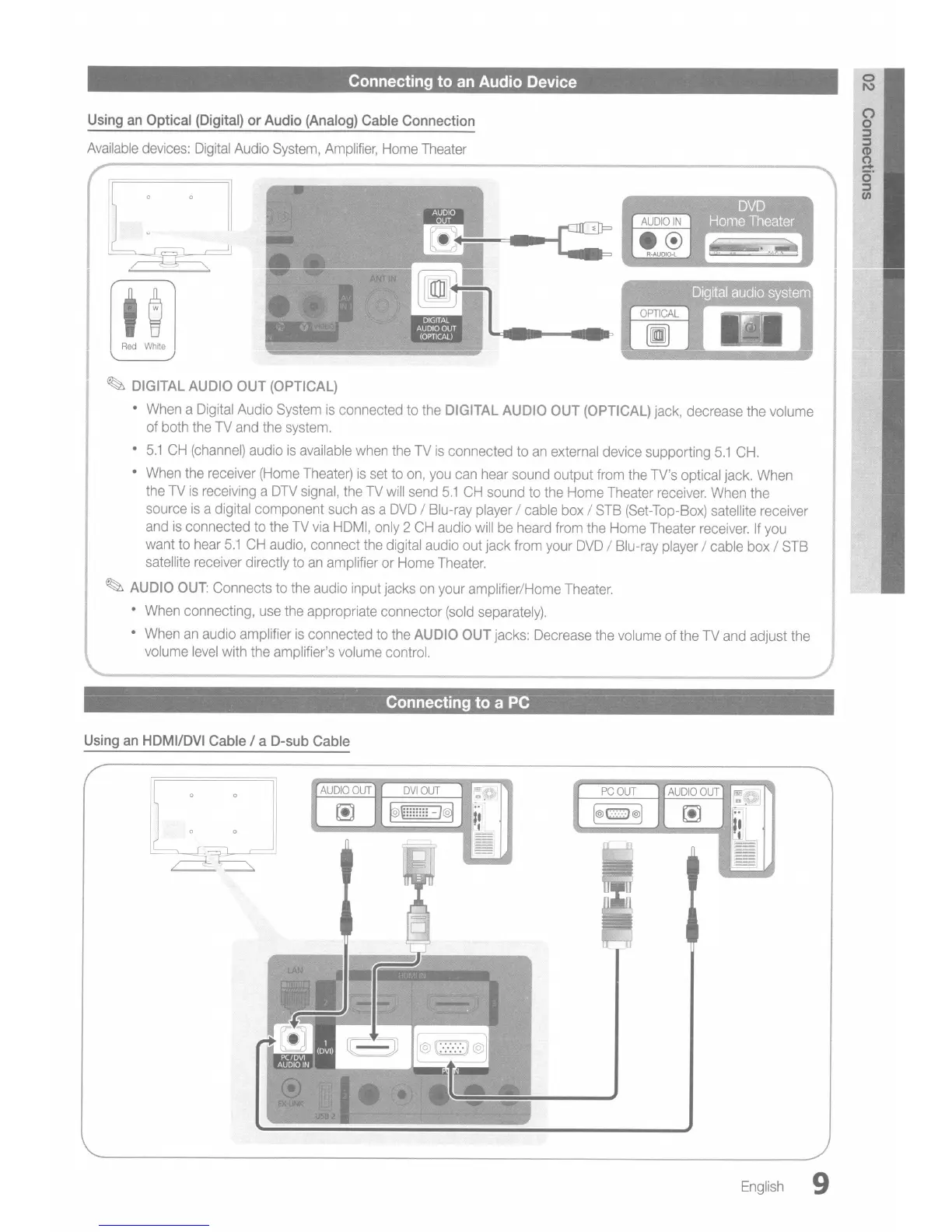
DIGITAL
AUDIO
OUT
(OPTICAL)
•
When
a
Digital
Audio
System
is
connected
to
the
DIGITAL
AUDIO
OUT
(OPTICAL)
jack,
decrease
the
volume
of
both
the
TV
and
the
system.
•
5.1
CH
(channel)
audio
is
available
when
the
TV
is
connected
to
an
external
device supporting
5.1
CH.
•
When
the
receiver
(Home
Theater)
is
set
to
on,
you
can
hear
sound output
from
the
TV's
optical jack.
When
the
TV
is
receiving
a
DTV
signal,
the
TV
will
send
5.1
CH
sound
to
the
Home
Theater
receiver.
When
the
source
is
a digital component
such
as
a
DVD
/ Blu-ray
player
/ cable
box
/
STB
(Set-Top-Box)
satellite receiver
and
is
connected
to
the
TV
via
HDMI,
only
2
CH
audio
will
be
heard
from
the
Home
Theater
receiver.
If
you
want
to
hear
5.1
CH
audio,
connect
the
digital
audio
out jack
from
your
DVD
/
Blu-ray
player
/ cable
box
/
STB
satellite
receiver directly
to
an
amplifier
or
Home
Theater.
~
AUDIO
OUT:
Connects
to
the
audio input jacks
on
your
amplifier/Home
Theater.
•
When
connecting,
use
the
appropriate connector
(sold
separately).
•
When
an
audio
amplifier
is
connected
to
the
AUDIO
OUT
jacks:
Decrease
the
volume
of
the
TV
and
adjust
the
volume
level
with
the
amplifier's
volume
control.
Red
White
Using
an
Optical
(Digital)
or
Audio
(Analog)
Cable
Connection
Available
devices:
Digital
Audio
System,
Amplifier,
Home
Theater
Connecting
to
a
PC
Using
an
HDMI/DVI
Cable
I a
D-sub
Cable
English
9