EasyManua.ls Logo

Samsung LN40C550 - Onnec Ions; Connecting to an AV Device

Samsung LN40C550
70 pages
Print Icon
To Next Page IconTo Next Page
To Previous Page IconTo Previous Page
Loading...
Connections
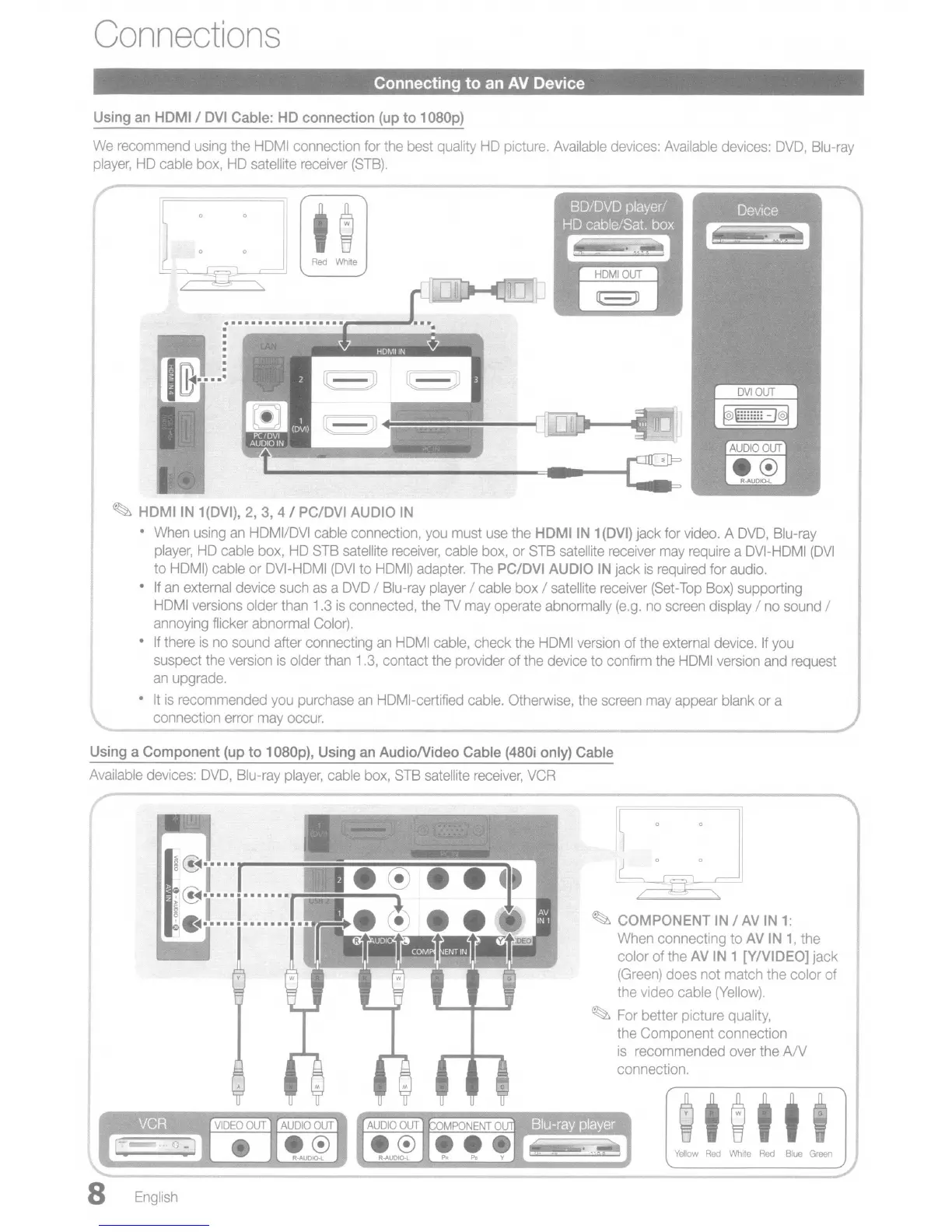
Connecting to an
AV
Device
Using
an
HDMI I
DVI
Cable:
HD
connection
(up
to
1
D8Dp)
We
recommend
using
the
HOMI
connection
for
the
best
quality
HO
picture.
Available
devices:
Available
devices:
OVO,
Blu-ray
player,
HO
cable
box,
HO
satellite
receiver
(STB).
~
HDMIIN
1(DVI),
2,
3,
4 I PC/DVI
AUDIO
IN
When
using
an
HOMI/OVI
cable
connection,
you
must
use
the HDMIIN 1
(DVI)
jack
for
video.
A
OVO,
Blu-ray
player,
HO
cable
box,
HO
STB
satellite
receiver,
cable
box,
or
STB
satellite
receiver
may
require
a
OVI-HOMI
(OVI
to
HOM!)
cable
or
OVI-HOMI
(OVI
to
HOMI)
adapter.
The
PC/DVI
AUDIO
IN
jack
is
required
for
audio.
If
an
external
device
such
as
a
OVO
I
Blu-ray
player
/
cable
box I
satellite
receiver
(Set-Top
Box)
supporting
HOMI
versions
older
than
1.3
is
connected,
the
TV
may
operate
abnormally
(e.g.
no
screen
display I
no
sound
I
annoying
flicker abnormal
Color).
If
there
is
no
sound after connecting
an
HOMI
cable,
check
the
HOMI
version
of
the
external
device.
If
you
suspect
the
version
is
older
than
1.3,
contact
the
provider of
the
device
to confirm
the
HOMI
version
and
request
an
upgrade.
It
is
recommended
you
purchase
an
HOMI-certified
cable.
Otherwise,
the
screen
may
appear
blank
or
a
connection error
may
occur.
=====o::lIl_=-===~--===------'_-=
""""
"""-
Using
a
Component
(up
to
1
D8Dp),
Using
an
AudioNideo Cable
(48Di
only)
Cable
Available
devices:
OVO,
Blu-ray
player,
cable
box,
STB
satellite
receiver,
VCR
~
COMPONENT
IN
I
AV
IN
1:
When
connecting to
AV
IN
1,
the
color of
the
AV
IN
1 [Y/VIDEO] jack
(Green)
does not match the color of
the
video cable
(Yellow).
~
For
better picture
quality,
the
Component connection
is
recommended
over
the
A/V
connection.
Yellow
Red
White
Red
Blue
Green
8
English