GB
22
The timer enables you to switch the system on or off at spe-
cific times.
Example: You wish to wake up to music every morning.
If you no longer want the system to be switched on or off auto-
matically, you must cancel the timer.
Before setting the timer, check that the current time is correct.
For each step, you have a few seconds to set the required
options. If you exceed this time, you must start again.
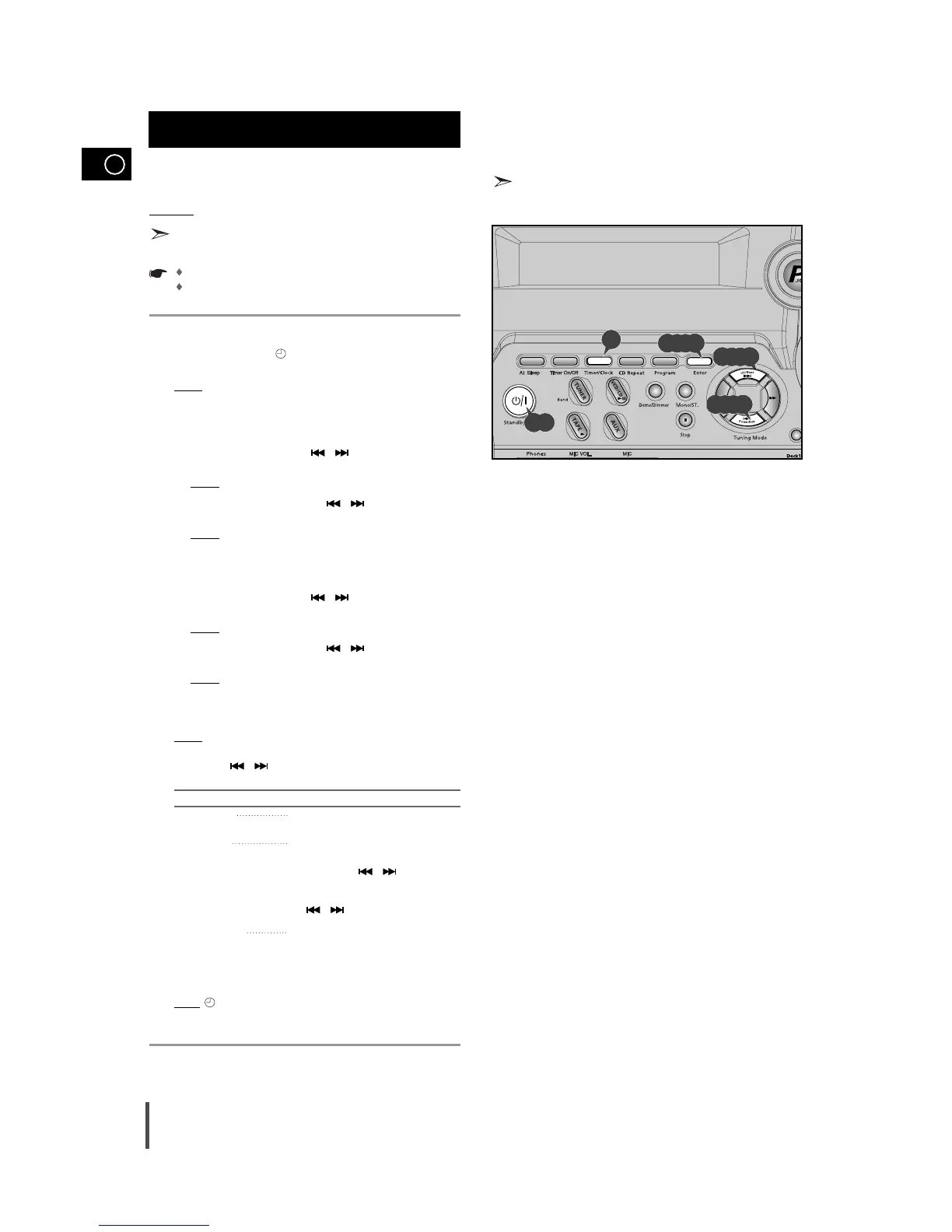
Switch the system on by pressing Standby/On.
Press Timer/Clock until TIMER is displayed.
Press Enter.
Result:
ON TIME is displayed (instead of the equalizer symbols) for
a few seconds, followed by any switch-on time already set;
you can set the timer switch-on time.
Set the timer switch-on time.
a Set the hour by pressing the
/ buttons
.
b Press Enter.
Result:
The minutes flash.
c Set the minutes by pressing the
/ buttons
.
d Press Enter.
Result:
OFF TIME is displayed (instead of the equalizer symbols)
for a few seconds, followed by any switch-off time already
set; you can now set the timer switch-off time.
Set the timer switch-off time.
a Set the hour by pressing the
/ buttons
.
b Press Enter.
Result:
The minutes flash.
c Set the minutes by pressing the
/ buttons
.
d Press Enter.
Result:
VOL XX is displayed, where XX corresponds to the vol-
ume already set.
Press Tuning Down and Up to adjust the volume level and press
Enter.
Result:
The source to be selected is displayed.
pressing the
/ buttons to select
the source to be played
when the system switches on .
If you select... You must also...
TAPE (cassette) Insert a recorded cassette in one of the
decks before setting the system to standby.
TUNER (radio) a Press
Enter.
b Select the FM or AM frequency band by
pressing the
/ buttons
.
c Press
Enter.
d Select a preset station by
pressing the
/ buttons
.
VCD/CD (compact disc) a Load one or more compact discs.
b Select the required disc.
Press Enter to confirm the timer.
Press Standby/On to set the system to standby mode.
Result
: is displayed to the bottom left of the time, indicating that
the timer has been set. The system will switch on and off automati-
cally at the required times.
If the timer switch on and off times are identical, the word ERROR is
displayed.
Timer Function
7
8
9
5
6
1
2
3
4
4,5,6,7
1,9
2
3,4,5,6,7,8
4,5,6,7



 To Next Page