GB
9
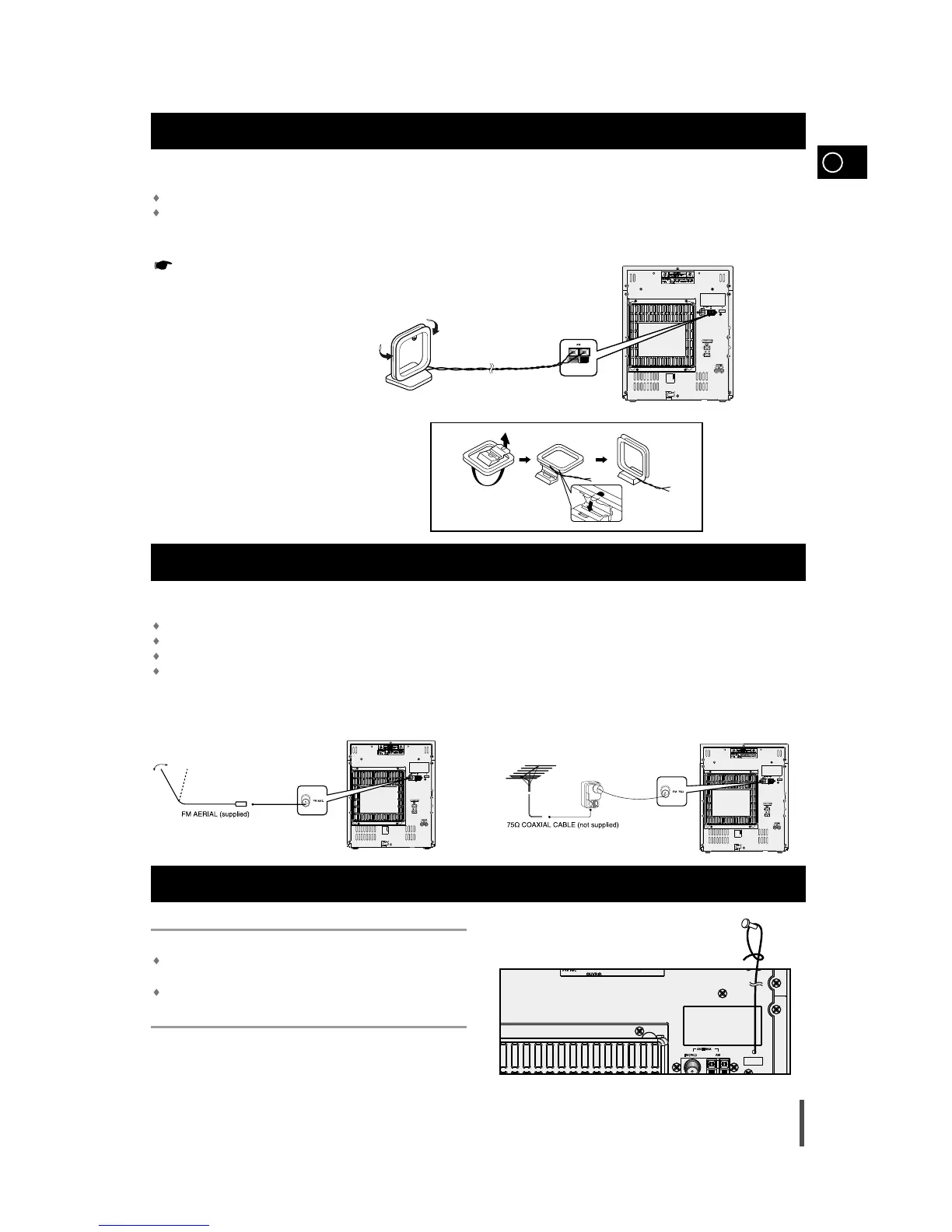
The AM aerial (for long and medium waves) can be:
Placed on a stable surface
Fixed to the wall (you must first remove the base)
The AM aerial connector terminals are located on the rear of the system and are
marked AM .
To avoid noise interference, check that the loudspeaker wires do not run
close to the aerial wires.
Always keep them at least 2 inches (5 cm) away.
Connecting the AM (MW)/LW Aerial
How to connect a COAXIAL TYPE aerial.
Connect a 75Ω antenna to the FM antenna terminal.
Plug the connector on the FM aerial supplied into the coaxial socket (75Ω) marked FM on the rear of the system.
Follow the instructions given on Page 18 to tune into a radio station, and determine the best position for the aerial.
If reception is poor, you may need to install an outdoor aerial.
To do so, connect an outdoor FM aerial to the FM socket on the rear of the system using a 75Ω coaxial cable (not supplied).
Connecting the FM Aerial
Connecting the SW Aerial (option)
How to connect a WIRE TYPE aerial.
Spread the SW aerial out and attach the ends to a wall, in the position
providing the best reception.
If reception is poor (e.g. distance from transmitter too great, walls blocking
the radio waves, etc.), install an outdoor aerial.


 To Next Page